












Forex brokerages usually offer a proprietary platform alongside the third-party options they offer. This platform is, in most cases, available in and targeted for mobile devices for Android and iOS.
The list below includes the best choices for trading Forex on a proprietary platform.
 | FXTM | |||
 | IC Markets | |||
 | eToro | |||
| 4 |  | Tickmill | ||
| 5 |  | BlackBull Markets | ||
| 6 |  | XM | ||
| 7 |  | FBS | ||
| 8 |  | AvaTrade |
Trustpilot Ratings in Forex Brokers with Apps
The table below ranks and demonstrates the Forex brokers with respective Trustpilot ratings.
Broker Name | Trustpilot Rating | Number of Reviews |
50,050 | ||
BlackBull Markets | 2,949 | |
AvaTrade | 11,537 | |
FBS | 8,129 | |
eToro | 29,974 | |
1,066 | ||
XM | 2,839 | |
FXTM | 1,073 |
Lowest Spreads in Forex Brokers with Trading Apps
This section ranks the mentioned brokers based on the minimum spread across all account types.
Broker Name | Min. Spread |
0 Pips | |
AvaTrade | 0 Pips |
eToro | 0 Pips |
FXTM | 0 Pips |
CMC Markets | 0 Pips |
IG | 0.3 Pips |
0.6 Pips | |
FBS | 0.7 Pips |
Non-Trading Fees of Forex Brokers with Trading Apps
Deposit/withdrawal costs and inactivity fees are provided for each broker in the table below.
Broker Name | Deposit Fees | Withdrawal Fees | Inactivity Fees |
FBS | None | None | None |
None | None | $10 | |
CMC Markets | None | None | £10 |
XM | None | None | $10 |
eToro | None | $5 | $10 |
IG | Varies | None | $18 |
None | Varies | 10 EUR | |
XTB | Varies | Varies | None |
Number of Tradable Instruments in Brokers Offering Trading Apps
This section is dedicated to rank the brokers with proprietary trading platforms based on the list of tradable instruments.
Broker Name | Number of Instruments |
IG | 17,000+ |
6,000+ | |
XTB | 2,000+ |
XM | 1,400+ |
AvaTrade | 1,250+ |
FOREX.com | 1,000+ |
FXTM | 1,000+ |
550+ |
Top 6 Forex Brokers Trading Apps
In the following sections, some of the Forex brokers with best trading applications will be introduced in more details.
IC Markets
IC Markets is a globally active multi-asset brokerage offering Forex and CFD trading across currencies, stocks, indices, commodities, bonds, and cryptocurrencies. The broker supports 10 base currencies, requires a $200 minimum deposit, and serves both retail and professional traders.

Founded in 2007 in Australia, IC Markets operates through regulated entities in Australia, Cyprus, and Seychelles. Oversight by ASIC, CySEC, and FSA enables the broker to offer region-specific leverage models, including 1:30 in the EU and up to 1:500 for global clients.
Pricing is a core strength. IC Markets provides institutional-grade liquidity, spreads from 0.0 pips on Raw accounts, and low commissions averaging $3-$3.50 per lot. For lower fees, you can opt in the IC Markets rebate program.
Traders gain access to 2,100+ stock CFDs and fast market execution, making the broker suitable for scalping and algorithmic strategies.
Platform coverage includes MetaTrader 4, MetaTrader 5, and cTrader, alongside web and mobile apps. Advanced order execution, EA compatibility, and copy-trading via cTrader allow flexible strategy deployment across manual, automated, and social trading environments.
Overall, IC Markets balances competitive pricing, deep market access, and strong regulatory coverage. Here’s a summary of specifics.
Account Types | Standard, Raw Spread, Islamic |
Regulating Authorities | FSA, CySEC, ASIC |
Minimum Deposit | $200 |
Deposit Methods | Bank Cards, Wire Transfers, Electronic payments, etc. |
Withdrawal Methods | Bank Cards, Wire Transfers, Electronic payments, etc. |
Maximum Leverage | 1:500 |
Trading Platforms & Apps | Metatrader 4, Metatrader 5, cTrader, cTrader Web, IC Markets Mobile |
IC Markets Pros and Cons
The following pros and cons highlight where the broker excels and where certain limitations may apply.
Pros | Cons |
Tight spreads from 0.0 pips with low commissions | Leverage capped at 1:30 under EU regulation |
Multiple top-tier regulators (ASIC, CySEC, FSA) | No PAMM or in-house copy-trading solution |
Wide asset range with 2,100+ stock CFDs | Some bonuses restricted by region |
Strong platform support for scalping and EAs | Not available to traders in the US and several other countries |
BlackBull Markets
BlackBull Markets is a multi-award-winning ECN broker founded in 2014, offering access to more than 26,000 tradable instruments across six asset classes. The broker has earned seven industry awards, reflecting its focus on execution quality, platform diversity, and institutional-grade infrastructure.

Headquartered in New Zealand, BlackBull Markets operates under Black Bull Group Limited, established by Michael Walker and Selwyn Loekman. The company combines local Tier-1 oversight with offshore flexibility, allowing it to serve both retail and professional traders through a globally distributed trading environment.
From a regulatory standpoint, BlackBull Markets is supervised by the New Zealand FMA (Tier-1) and the Seychelles FSA (Tier-3). Client funds are held in segregated accounts, negative balance protection is applied, and leverage is available up to 1:500, depending on jurisdiction and account type.
The broker supports ECN Standard, ECN Prime, and ECN Institutional accounts, featuring spreads from 0.0 pips, multiple commission models, and direct market access via MT4, MT5, TradingView, cTrader, and proprietary investment solutions such as BlackBull CopyTrader and BlackBull Invest.
Summary of Specifics
Account Types | ECN Standard, ECN Prime, ECN Institutional |
Regulating Authorities | FSA, FMA |
Minimum Deposit | $0 |
Deposit Methods | Visa, MasterCard, Apple Pay, Google Pay, Bank Wire, Crypto, Neteller, Skrill, SEPA, FasaPay |
Withdrawal Methods | Visa, MasterCard, Apple Pay, Google Pay, Bank Wire, Crypto, Neteller, Skrill, SEPA, FasaPay |
Maximum Leverage | 1:500 |
Trading Platforms & Apps | MT4, MT5, TradingView, cTrader, BlackBull CopyTrader, BlackBull Invest |
BlackBull Markets Pros and Cons
If you are considering going through the BlackBull Markets registration, the following table outlines the key pros and cons of the broker, helping traders evaluate how well the broker aligns with their trading style, experience level, and regional eligibility.
Pros | Cons |
True ECN execution with spreads from 0.0 pips | Platform and product range may overwhelm beginners |
Access to 26,000+ instruments including stocks and CFDs | Not available to clients in the US, UK, and some regions |
Wide platform support: MT4, MT5, TradingView, cTrader | Offshore regulation (Seychelles entity) for some accounts |
No minimum deposit on Standard and Prime accounts | $5 flat fee applied to all withdrawals |
AvaTrade
AvaTrade is a globally recognized online broker operating under 9 regulatory licenses, including the Central Bank of Ireland, ASIC, CySEC, FSCA, FSA Japan, ADGM, and BVI FSC. This wide regulatory footprint highlights AvaTrade’s strong compliance standards across Europe, Asia, Australia, and the Middle East.

Founded with a global-first approach, AvaTrade serves traders in 150+ countries, offering access to Forex, CFDs, indices, commodities, stocks, and cryptocurrencies. The broker supports MetaTrader 4, MetaTrader 5, WebTrader, mobile apps, and its proprietary AvaOptions platform for options trading.
AvaTrade requires a minimum deposit of $100, making it accessible to retail traders while still supporting professional and Islamic accounts. Risk controls are clearly defined, with a 25% margin call and 10% stop-out level, alongside mandatory negative balance protection across all regulated entities.
Client fund safety is reinforced through segregated accounts and MiFID II compliance in Europe, with investor compensation up to €20,000 under the ICF for eligible EU clients. Multiple AvaTrade payment methods, including cards, bank wires, PayPal, Skrill, and Neteller, ensure flexible funding and withdrawals.
Features and Parameters
Account Types | Retail, Professional, Islamic, Demo |
Regulating Authorities | ASIC, CySEC, CBI, FSA, FSCA, MiFID, ADGM, PFSA, ISA |
Minimum Deposit | $100 |
Deposit Methods | Credit/Debit Cards, E-Wallets, Bank Wire Transfer, PayPal |
Withdrawal Methods | Credit/Debit Cards, E-Wallets, Bank Wire Transfer, PayPal |
Maximum Leverage | 1:400 |
Trading Platforms & Apps | MetaTrader 4, MetaTrader 5, Mobile App, WebTrader |
AvaTrade Pros and Cons
Before opening an account through AvaTrade registration, it’s important to balance its strengths against its limitations. Below is a clear overview of the broker’s main advantages and drawbacks.
Pros | Cons |
Regulated by multiple top-tier authorities worldwide | Inactivity fees apply after prolonged non-use |
Low minimum deposit of $100 | No PAMM or MAM account solutions |
Supports MT4, MT5, WebTrader, and AvaOptions | Bonuses not available in most regions |
Negative balance protection and segregated funds | Not available to U.S. traders |
FBS
Founded in 2009, FBS is a global forex and CFD broker serving more than 27 million registered users worldwide. The broker has built its reputation around accessible trading conditions, fast onboarding, and multi-platform availability for both beginner and advanced traders.
FBS operates under a multi-entity regulatory structure, including Cyprus Securities and Exchange Commission (license 331/17), the Financial Services Commission of Belize, and Australian Securities and Investments Commission, offering segregated funds and negative balance protection across all entities.
The broker provides access to 550+ CFD instruments across forex, indices, commodities, shares, and cryptocurrencies. Trading is available on MetaTrader 4, MetaTrader 5, and a proprietary mobile app featuring 90+ technical indicators and streamlined account management.
The broker applies floating spreads from 0.7 pips with zero trading commissions on its Standard account. Also, an FBS rebate program is available for discounts on fees.
With a minimum deposit starting from $5, leverage up to 1:3000 (entity-dependent), and 24/7 multilingual support, the broker positions itself as a low-entry, high-flexibility trading venue. Here’s a table demonstrating FBS’s specifics.
Account Types | Standard |
Regulating Authorities | FSC, CySEC |
Minimum Deposit | $5 |
Deposit Methods | Bank Transfers, Payment Systems, Credit/Debit Cards |
Withdrawal Methods | Bank Transfers, Payment Systems, Credit/Debit Cards |
Maximum Leverage | 1:3000 |
Trading Platforms & Apps | MT4, MT5, Mobile App |
FBS Pros and Cons
Before opening an account via FBS registration, reviewing the broker’s advantages and limitations helps clarify whether FBS aligns with specific trading goals, risk tolerance, and regional eligibility. Below is a balanced summary of its key pros and cons.
Pros | Cons |
Very low minimum deposit starting from $5 | Only one live account type available |
Regulated by CySEC, ASIC, and FSC entities | Service restrictions in several major countries |
Zero commission trading with competitive spreads | No PAMM or copy trading options |
Robust proprietary mobile app with 90+ indicators | Wider spreads on some indices compared to peers |
eToro
Founded in 2007, eToro is a globally recognized Israeli broker headquartered in Tel Aviv. Operating under eToro Ltd., the company was established by David Ring, Ronen Assia, and Yoni Assia, and has grown into a multi-asset platform serving millions of users worldwide.

eToro is best known for its social and investment-centric approach, offering CopyTrader, Smart Portfolios, and Crypto Staking as core investment solutions. These features position the broker beyond traditional trading by combining portfolio management, community-driven strategies, and long-term crypto yield opportunities.
From a regulatory perspective, eToro operates through multiple licensed entities, including oversight by the FCA (UK), CySEC (EU), ASIC (Australia), FSRA (Abu Dhabi), and SEC/FINRA (US). This multi-jurisdictional structure enhances transparency, investor protection, and regional compliance.
The broker supports four account types, Personal, Professional, Corporate, and Islamic, with a low minimum deposit of $10. Trading is conducted exclusively via eToro’s proprietary web and mobile platform, supporting stocks, ETFs, forex, indices, commodities, and cryptocurrencies.
If you are interested in opening an account, you may go through our eToro registration guide. The table below summarizes the broker’s details.
Account Types | Personal, Professional, Corporate, Islamic |
Regulating Authorities | FCA, CySEC, MFSA, FSRA, ASIC, FSA, Gibraltar FSC |
Minimum Deposit | $10 |
Deposit Methods | eToro Money, Credit/Debit Card, Bank Transfer, PayPal, Neteller, Skrill, Online Banking (Trustly), iDEAL, Sofort, Przelewy24 |
Withdrawal Methods | eToro Money, Credit/Debit Card, Bank Transfer, PayPal, Neteller, Skrill, Online Banking (Trustly), iDEAL, Sofort, Przelewy24 |
Maximum Leverage | 1:400 |
Trading Platforms & Apps | Proprietary App |
eToro Pros and Cons
eToro combines strong regulatory coverage, innovative investment tools, and broad market access. However, its platform-only ecosystem and limited support channels introduce trade-offs that are important to weigh against its strengths.
Pros | Cons |
Advanced social trading via CopyTrader and Smart Portfolios | No MT4 or MT5 platform support |
Regulated across multiple Tier-1 jurisdictions | No phone-based customer support |
Wide range of assets across global markets | Inactivity fee after 12 months |
Low minimum deposit and beginner-friendly interface | Fixed $5 withdrawal fee on USD accounts |
Tickmill
Tickmill is a multi-asset brokerage serving over 785,000 registered users worldwide. The broker offers trading across Forex, indices, commodities, stocks, bonds, and crypto CFDs, with spreads from 0.0 pips and leverage reaching up to 1:300 depending on regulation.
Founded in 2014, Tickmill operates a no-dealing-desk (NDD) execution model, routing orders directly to liquidity providers. This structure supports fast execution, reduced conflicts of interest, and deep liquidity, making the broker suitable for scalping, hedging, and algorithmic trading strategies.
Also, there is a Tickmill rebate program available for discount on trading fees and commissions.
Tickmill reports an average monthly trading volume exceeding $129 billion and provides access to global markets in more than 180 countries. Accounts are available with six base currencies, USD, EUR, GBP, ZAR, PLN, and CHF, allowing traders to reduce conversion costs.
From a regulatory standpoint, Tickmill follows a multi-jurisdictional framework, overseen by authorities such as the FCA (UK), CySEC (Cyprus), FSA (Seychelles), FSCA (South Africa), and LFSA (Labuan). Client funds are segregated, negative balance protection applies, and eligible clients benefit from compensation schemes like FSCS and ICF coverage.
Overall, Tickmill combines strong regulatory coverage, competitive pricing, and institutional-style execution. Here’s a table of specifics.
Account Types | Classic, Raw |
Regulating Authorities | FSA, FCA, CySEC, LFSA, FSCA |
Minimum Deposit | $100 |
Deposit Methods | Crypto, Payment Systems, Credit/Debit Cards, Bank Transfers |
Withdrawal Methods | Crypto, Payment Systems, Credit/Debit Cards, Bank Transfers |
Maximum Leverage | 1:1000 |
Trading Platforms & Apps | Metatrader 4, Metatrader 5, Metatrader Web, Mobile App |
Tickmill Pros and Cons
Before going through with Tickmill registration, below is a balanced overview of the broker’s main strengths and limitations, helping traders quickly assess whether this broker aligns with their trading objectives.
Pros | Cons |
Regulated by multiple top-tier authorities (FCA, CySEC) | Limited number of account types |
Raw spreads from 0.0 pips with low commissions | Forex pair selection is not industry-leading |
No-dealing-desk execution with deep liquidity | PAMM accounts not supported |
Supports MT4, MT5, WebTrader, and mobile apps | Educational content is moderate compared to top brokers |
How We Chose the Forex Brokers with Trading Applications
Selecting the best Forex brokers with trading applications requires a structured, transparent, and data-driven approach. At TradingFinder, broker selection is based on a proprietary 19-metric evaluation framework designed to reflect the real priorities of active forex traders using desktop and mobile trading apps.
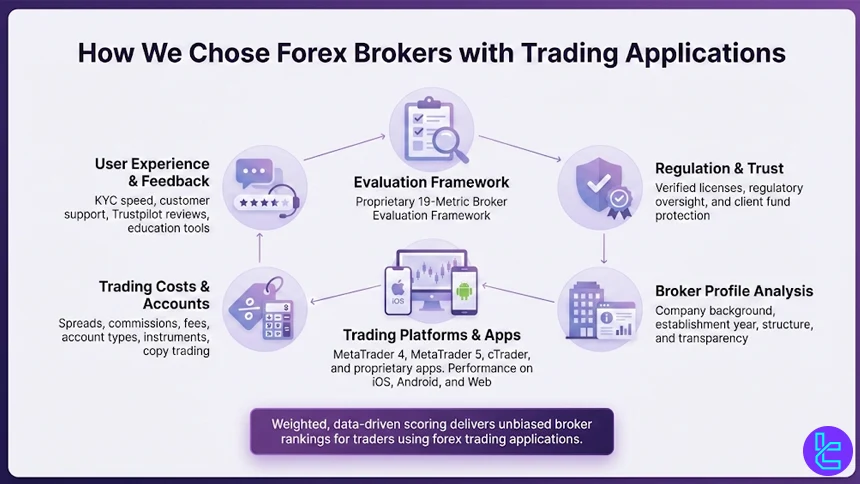
The review process starts with regulations and licenses, where each broker is verified against recognized international financial authorities to ensure legal operation and client fund protection. This is followed by an in-depth broker profile analysis, covering establishment year, corporate structure, global offices, and operational transparency.
A core focus of this article is trading platforms and mobile applications. Brokers are assessed on the quality, stability, and accessibility of platforms such as MetaTrader 4, MetaTrader 5, cTrader, and proprietary trading apps. Performance across iOS, Android, and web environments plays a decisive role in broker rankings.
Trading costs are evaluated through spreads, commissions, inactivity fees, and deposit or withdrawal charges, as these directly affect long-term profitability. In parallel, account type diversity, tradable instruments, and copy trading or investment features are reviewed to ensure flexibility for different trading strategies.
User experience is further examined through account opening procedures, KYC efficiency, and customer support responsiveness, including live chat, help centers, and social media activity. Independent feedback from Trustpilot, scam alerts, broker responses to complaints, and educational tools complete the assessment.
By weighting each metric according to its real-world impact, TradingFinder delivers unbiased, expert-level broker reviews tailored to traders seeking reliable forex trading applications.
What is a Proprietary Trading Platform?
A proprietary trading platform is a trading application developed and owned directly by a broker or financial services provider, rather than being licensed from third-party software companies.
Unlike widely used platforms such as MetaTrader 4 or MetaTrader 5, proprietary platforms are built in-house to reflect a broker’s specific execution model, pricing structure, and client workflow.
These platforms are typically designed to integrate order execution, risk management, account administration, and analytics into a single ecosystem. Because the broker controls the technology stack, proprietary platforms often offer tighter integration with internal liquidity, faster feature deployment, and customized tools such as advanced order types, built-in sentiment data, or account-level risk controls.
From a usability perspective, proprietary trading platforms are commonly optimized for mobile trading applications, offering streamlined interfaces, simplified charting, and account management features tailored to active retail traders. Some also support web-based trading without requiring software installation, which improves accessibility across devices.
However, proprietary platforms may lack the extensive third-party ecosystem found in established platforms, such as custom indicators, automated strategies, or marketplace add-ons. For this reason, professional traders often evaluate proprietary platforms based on execution quality, stability, transparency of pricing, and long-term platform support, rather than just visual design.
In broker comparisons, proprietary trading platforms are assessed as a core differentiator, especially when mobile performance and platform reliability are key decision factors.
What Benefits Do Broker Proprietary Applications Offer?
Broker proprietary trading applications provide several advantages that are often not available on third-party platforms. These benefits are usually tied to tighter system integration, platform optimization, and broker-specific feature development.
- Direct broker integration: Proprietary apps connect natively to the broker’s pricing engine, liquidity providers, and risk systems, reducing dependency on external bridges and improving execution consistency;
- Optimized mobile performance: Many proprietary applications are built with a mobile-first approach, delivering smoother performance on iOS and Android compared to adapted desktop platforms like MetaTrader 4 or MetaTrader 5;
- Customized trading tools: Brokers can embed exclusive features such as advanced order types, built-in analytics, sentiment indicators, and account-level risk controls tailored to their trading environment;
- Simplified user experience: Proprietary apps often reduce interface complexity, making trade execution, position management, and funding operations more intuitive for active traders;
- Faster feature updates: Because development is controlled in-house, brokers can roll out platform updates, security enhancements, and new tools without relying on third-party release cycles;
- Integrated account management: Functions such as deposits, withdrawals, copy trading, and performance tracking are usually available directly inside the application without external dashboards.
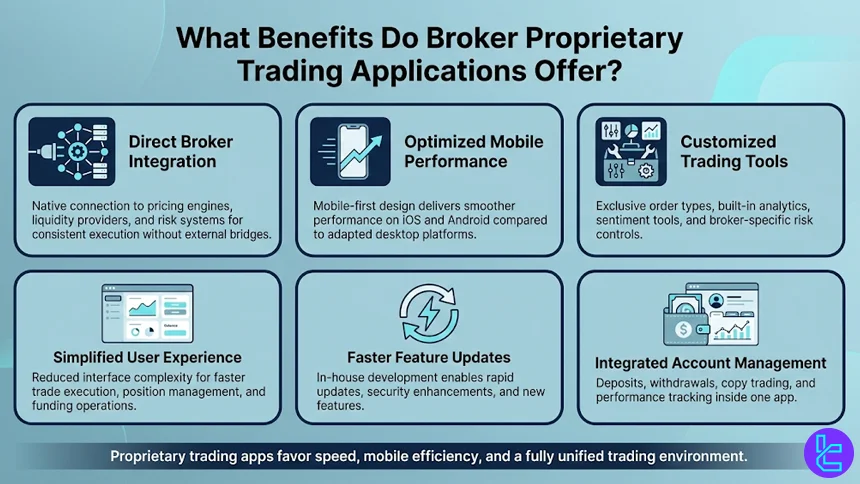
These advantages make proprietary broker applications particularly attractive for traders who prioritize speed, mobile accessibility, and a unified trading environment over extensive third-party customization.
Can I Use Custom Indicators in Brokers’ Trading Applications?
The ability to use custom indicators in brokers’ proprietary trading applications largely depends on how the platform is designed and who it is built for. In most cases, proprietary trading apps do not offer the same level of customization found in third-party platforms such as MetaTrader 4 and MetaTrader 5, which support custom indicators, scripts, and automated strategies through MQL programming.
Broker-developed applications are typically closed ecosystems. This means traders cannot upload external indicator files or modify the platform’s internal calculation logic. Instead, brokers predefine the available technical indicators, drawing tools, and analytics based on their target audience, often prioritizing usability, execution speed, and mobile performance over deep technical customization.
That said, some advanced proprietary platforms partially bridge this gap by offering built-in indicator libraries, configurable parameters, or proprietary analytics tools that replicate the behavior of popular indicators.
In certain cases, brokers also integrate copy trading, signal services, or AI-based market insights as alternatives to traditional custom indicators.
For traders who rely heavily on personalized indicators, algorithmic strategies, or custom backtesting environments, third-party platforms remain the preferred option. Proprietary trading applications are generally better suited for discretionary traders who focus on execution efficiency, account management, and seamless mobile access rather than extensive indicator development.
Do Proprietary Trading Applications Offer Services for Free?
In most cases, proprietary trading applications are offered free of charge by forex brokers, but the scope of free access depends on the broker’s business model and target audience.
Unlike third-party platforms that may require licensing or subscription fees, broker-owned applications are typically provided as part of the overall trading service to attract and retain clients.
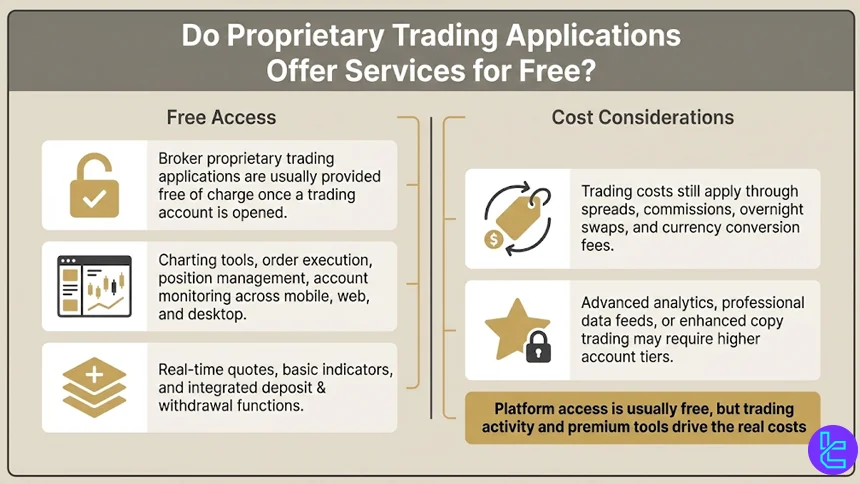
Access to the platform itself, whether on mobile, web, or desktop, is usually free once an account is opened. This includes core features such as charting tools, order execution, position management, and account monitoring.
Many brokers also bundle additional services like real-time quotes, basic technical indicators, and integrated deposit or withdrawal functions at no extra cost.
However, while the application usage is free, trading-related costs still apply. Spreads, commissions, overnight swap rates, and currency conversion fees are how brokers monetize platform access.
In some proprietary platforms, premium features, such as advanced analytics, professional-grade data feeds, or enhanced copy trading tools, may be restricted to specific account types or higher deposit tiers.
Do I Need to Connect Proprietary Applications to Forex Brokers?
No separate connection is required when using a proprietary trading application, because these platforms are developed andoperated directly by the forex broker itself. Unlike third-party platforms, where traders must link an external trading terminal to a broker’s servers, proprietary applications are already fully integrated into the broker’s trading infrastructure.
Once an account is created and verified with the broker, traders simply log in to the proprietary application using their existing credentials. Pricing feeds, order execution, account balance updates, and trade history are automatically synchronized without additional setup.
Popular Strategies Among Forex Traders on Brokers’ Mobile Apps
Mobile trading applications, especially broker proprietary apps in this case, have shaped how forex traders approach the market.
Due to smaller screens and on-the-go execution, mobile strategies tend to prioritize clarity, speed, and reduced complexity.
Here are some of the popular strategies.
- Trend-following strategies: Traders use higher time frames (H1, H4, Daily) to identify directional bias and manage positions with minimal screen interaction, relying on moving averages or simple trend structures;
- Breakout trading: Monitoring key support and resistance levels allows traders to enter positions when price breaks consolidation zones, a strategy well-suited to mobile alerts and push notifications;
- Scalping during high-liquidity sessions: Short-term trades executed during London and New York sessions are popular among mobile traders using fast execution and predefined stop-loss levels;
- Pullback entries: After identifying a dominant trend, traders wait for temporary retracements to enter at more favorable prices, reducing the need for constant chart monitoring;
- Copy trading and signal-based strategies: Many mobile-focused traders prefer following experienced traders or automated signal providers directly within proprietary applications, minimizing manual analysis;
- News-driven trading: Economic calendar alerts and real-time news integration enable traders to react quickly to high-impact events without desktop access.
What Non-Trading Services and Features Do Forex Brokers’ Applications Offer?
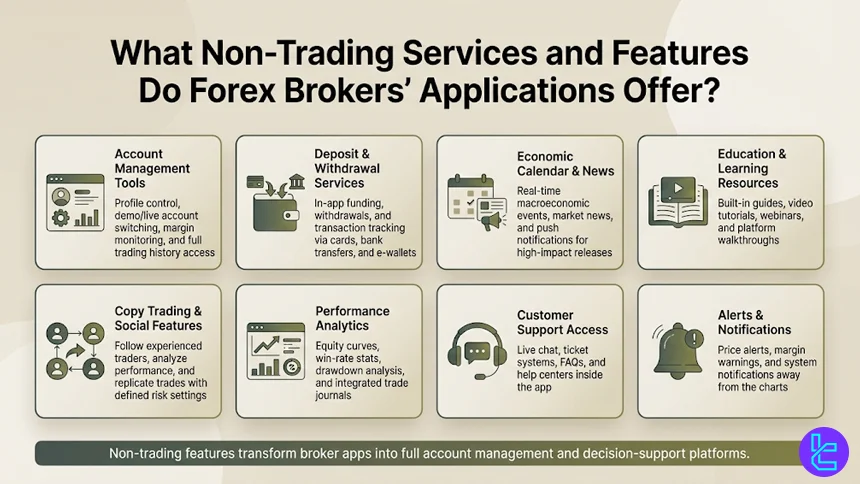
Beyond order execution and charting, modern forex brokers’ applications, especially proprietary trading apps, include a wide range of non-trading services designed to improve usability, decision-making, and overall account management. These features play an important role for traders who rely heavily on mobile platforms.
- Account management tools: Users can manage profiles, switch between demo and live accounts, monitor margin levels, and review full trading history directly within the application;
- Deposit and withdrawal services: Integrated funding systems allow traders to deposit, withdraw, and track transactions without leaving the app, often supporting cards, bank transfers, and e-wallets;
- Economic calendars and news feeds: Real-time macroeconomic calendars, market news, and push notifications help traders stay informed about high-impact events affecting forex markets;
- Education and learning resources: Many broker apps include built-in educational content such as trading guides, video tutorials, webinars, and platform walkthroughs aimed at improving trader knowledge;
- Copy trading and social features: Some applications allow users to follow experienced traders, analyze performance statistics, and automatically replicate trades with predefined risk parameters;
- Performance analytics: Equity curves, win-rate statistics, drawdown analysis, and trade journals help traders evaluate and refine their strategies over time;
- Customer support access: Live chat, ticket systems, FAQs, and help centers are commonly embedded in broker applications for faster issue resolution;
- Alerts and notifications: Price alerts, margin warnings, and system notifications help traders manage risk even when they are away from the charts.
How do Forex Broker Trading Applications Compare to Third-party Platforms?
While broker-developed apps focus on seamless account integration, simplified interfaces, and mobile-first execution, third-party platforms emphasize advanced analytics, automation, and customization.
Comparing these solutions helps traders understand where each platform excels; whether the priority is execution speed, algorithmic trading, multi-asset access, or integrated account management.
Feature / Platform | Proprietary Broker Trading Applications | |||
Platform Ownership | Developed and controlled by the broker | Developed by MetaQuotes | Developed by MetaQuotes | Developed by NinjaTrader Group |
Primary Use Case | Mobile trading, account management, fast execution | Retail forex trading | Multi-asset trading (forex, stocks, futures) | Professional analysis, futures & forex |
Custom Indicators & EAs | Usually not supported | Supported (MQL4) | Supported (MQL5) | Supported (NinjaScript) |
Automated Trading | Limited or none | Yes (Expert Advisors) | Yes (advanced EAs) | Yes (strategies & automation) |
Built-in Account Services | Deposits, withdrawals, profile management | External to platform | External to platform | External to platform |
Charting & Indicators | Simplified, broker-selected tools | ~30 built-in indicators | 80+ built-in indicators | Advanced, highly customizable |
Market Coverage | Broker-specific instruments | Mainly forex & CFDs | Forex, stocks, indices, crypto | Futures, forex, stocks |
Backtesting Capabilities | Rare or basic | Single-threaded | Multi-threaded | Advanced, high-precision |
Learning Curve | Low | Low to moderate | Moderate | High |
Typical User Profile | Mobile-focused retail traders | Beginner to intermediate traders | Intermediate to advanced traders | Advanced & professional traders |
Conclusion
Proprietary trading apps are mainly used on mobile phones, offering simpler and modern-looking user interface to those who prefer convenience more than anything.
Considering Trustpilot ratings and broker applications, IC Markets, BlackBull Markets, AvaTrade, and FBS are some of the best options with proprietary platforms.
We curated the list of best brokers in this article based on our Forex methodology with certain parameters.






