












MetaTrader 5 is the famous successor to the popular MT4, developed by MetaQuotes and emerged 5 years after its predecessor in 2010. The platform offers additional features and more technical tools for charts.
If you prefer the user interface and the approach of MT4 to trading necessities and items but want an upgraded version with more features, here are some of the best broker choices.
 | XM Group | |||
 | Pepperstone | |||
 | FP Markets | |||
| 4 |  | FxPro | ||
| 5 |  | xChief | ||
| 6 |  | Exness | ||
| 7 |  | Tickmill | ||
| 8 |  | FBS |
Trustpilot Ratings in MT5 Brokers
Trustpilot is a reliable source for submitting users’ ratings and experiences. Therefore, it’s recommended to consider it while choosing a Forex broker.
Broker Name | Trustpilot Rating | Number of Reviews |
25,811 | ||
FP Markets | 9,746 | |
Pepperstone | 3,197 | |
FBS | 8,088 | |
866 | ||
xChief | 59 | |
Tickmill | 1,061 | |
XM | 2,840 |
Lowest Spreads Among MT5 Brokers
Choosing a broker with lowest of spreads is always good practice, leading to optimal trading conditions with highest profits possible.
Broker Name | Min. Spreads |
Exness | 0 Pips |
FP Markets | 0 Pips |
0 Pips | |
FxPro | 0 Pips |
0 Pips | |
FOREX.com | 0 Pips |
Interactive Brokers | 0 Pips |
IUX | 0 Pips |
Non-Trading Fees of the Brokers for MetaTrader 5
Besides spreads, non-trading commissions also play a part in a trade’s net profits. The table below outlines the best choices for MT5 users.
Broker Name | Deposit Fee | Withdrawal Fee | Inactivity Fee |
None | None | None | |
IUX | None | None | None |
Pepperstone | None | None | None |
None | 1% on Some Methods | None | |
FxPro | None | None | $15 Once, then $5 Monthly |
xChief | None | Variable | Variable |
FOREX.com | None | None | €15 |
ACY Securities | None | $25 for Over Three Withdrawals per Month | None |
Number of Tradable Instruments in MetaTrader 5 Forex Brokers
With a high number of tradable assets, more options will be available for diversifying investment. Therefore, it is a benefit to have more.
Broker Name | Number of Instruments |
FOREX.com | 5,500+ |
ACY Securities | 2,200+ |
FxPro | 2,100+ |
1,400+ | |
Pepperstone | 1,200+ |
600+ | |
Libertex | 300+ |
xChief | 150+ |
Top 6 Forex Brokers for MetaTrader 5
The next sections will review six of the mentioned brokers in detail with a look at the pros and cons.
Exness
Exness is a global forex and CFD broker founded in 2008, backed by a multinational team of over 2,100 professionals across nearly 100 countries. The company reports monthly trading volumes exceeding $4 trillion, positioning it among the largest retail brokers worldwide.

Operating through multiple licensed entities, Exness is regulated by top-tier and mid-tier authorities such as the FCA (UK), CySEC (Cyprus), FSCA (South Africa), and CMA (Kenya). Client funds are segregated, Negative Balance Protection is applied, and eligible traders may benefit from compensation schemes.
Exness offers a broad account lineup, including Standard, Standard Cent, Pro, Raw Spread, and Zero accounts. Trading costs remain competitive, with spreads starting from 0.0 pips and commissions ranging between $0.2 and $3.5 per lot, depending on the account structure.
The broker supports MT4, MT5, Web Terminal, and proprietary platforms, alongside copy trading and algorithmic solutions. With a $10 minimum deposit, instant withdrawals, and leverage options reaching up to 1:2000, or unlimited under conditions, Exness targets both retail and professional traders.
If you are interested in opening an account with the broker, go through our Exness registration guide.
Exness Specifics
Account Types | Standard, Standard Cent, pro, Raw Spread, Zero |
Regulating Authorities | FSA, CySEC, FCA, FSCA, CBCS, FSC, CMA |
Minimum Deposit | $10 |
Deposit Methods | Neteller, Skrill, Perfect Money, Sticpay, Bank cards |
Withdrawal Methods | Neteller, Skrill, Perfect Money, Sticpay, Bank cards |
Maximum Leverage | Unlimited (Subject to account) |
Trading Platforms & Apps | Exness Trade (mobile), Exness Terminal (web), MT4, MT5 |
Exness Pros & Cons
Exness stands out for its execution speed, pricing model, and regulatory diversity, while certain limitations appear in education depth, regional availability, and product consistency across account types.
Pros | Cons |
Multi-regulated by reputable global authorities | Restricted availability in several countries |
Tight spreads and flexible commission structures | Educational content less comprehensive than peers |
Fast, fee-free deposits and withdrawals | No traditional trading bonuses or promotions |
Advanced platforms with high leverage flexibility | Some instruments limited by account type |
FP Markets
FP Markets (First Prudential Markets) is a multi-regulated Forex and CFD broker founded in 2005, operating under several regulatory authorities, including ASIC (Australia) and CySEC (Cyprus) as its two top-tier regulators. This dual Tier-1 oversight enforces strict rules such as segregation of client funds, regular audits, and investor-protection standards.
The broker offers Standard and RAW trading accounts, both with a minimum deposit of $50. The RAW account features spreads from 0.0 pips with a $3 commission per lot, while the Standard account is commission-free with wider spreads. FP Markets supports MetaTrader 4, MetaTrader 5, and cTrader, catering to discretionary, algorithmic, and high-frequency traders.
FP Markets provides access to 10,000+ instruments, including Forex pairs, indices, commodities, metals, ETFs, cryptocurrencies, and global share CFDs. Additional services include copy trading, PAMM/MAM accounts, and algorithmic trading via Expert Advisors, making it suitable for both self-directed and managed trading approaches.
Client protection varies by entity and jurisdiction. EU clients benefit from Investor Compensation Fund (ICF) coverage up to €20,000, while offshore entities rely on fund segregation and negative balance protection rather than statutory compensation schemes. Leverage limits range from 1:30 under ASIC/CySEC to significantly higher ratios under offshore regulators.
If you are considering signing up on the broker, you may use our FP Markets registration guide.
Summary of Features
Account Types | Standard, RAW |
Regulating Authorities | ASIC, CySEC, FSC, FSCA, FSA |
Minimum Deposit | $50 |
Deposit Methods | Visa and Master card, Skrill, PayPal, Neteller, Bank Transfer |
Withdrawal Methods | Visa and Master card, Skrill, PayPal, Neteller, Bank Transfer |
Maximum Leverage | 1:500 |
Trading Platforms & Apps | MT4, MT5, cTrader |
FP Markets Pros and Cons
The table below outlines the broker’s important strengths and weaknesses.
Pros | Cons |
Regulated by Tier-1 authorities (ASIC, CySEC) | Not available to U.S. clients |
Low minimum deposit ($50) | No proprietary trading platform |
Tight RAW spreads from 0.0 pips | Investor compensation depends on entity |
Supports MT4, MT5, and cTrader | Higher leverage only via offshore entities |
Pepperstone
Pepperstone is a global forex and CFD broker founded in 2010 in Melbourne, Australia. Today, it processes around $9.2 billion in daily trading volume and serves 400,000+ clients worldwide, highlighting its scale, liquidity depth, and institutional-grade trading infrastructure.
Operating under a strong regulatory framework, Pepperstone is authorized by ASIC, FCA, CySEC, BaFin, DFSA, and CMA, ensuring high compliance standards across multiple jurisdictions. Client funds are held in segregated accounts, and negative balance protection is applied, reinforcing capital safety for retail traders.
Pepperstone supports 10 base currencies and offers flexible trading conditions, including 0.01–100 lot order sizes and leverage up to 1:500 (jurisdiction-dependent). Traders can access Forex, commodities, indices, crypto, shares, and ETFs through advanced platforms such as MT4, MT5, cTrader, and TradingView.
Cost efficiency is a core strength of Pepperstone. Spreads start from 0.0 pips on Razor accounts with commissions from $3.5 per side, while Standard accounts offer commission-free pricing. With no inactivity or account maintenance fees, the broker appeals to both active and cost-conscious traders.
Overall, Pepperstone combines regulatory strength, deep liquidity, and multi-platform access, making it a competitive choice across different trading styles. Below is a clear overview of the broker’s key advantages and limitations.
Details and Specifics
Account Types | Standard, Razor |
Regulating Authorities | ASIC, SCB, FCA, DFSA, CMA, BaFin, CySEC |
Minimum Deposit | $1 |
Deposit Methods | Apple Pay, Google Pay, Visa, Mastercard, Bank transfer, PayPal, Neteller, Skrill, Union Pay, USDT, ZotaPay |
Withdrawal Methods | Apple Pay, Google Pay, Visa, Mastercard, Bank transfer, PayPal, Neteller, Skrill, Union Pay, USDT, ZotaPay |
Maximum Leverage | 1:500 |
Trading Platforms & Apps | Proprietary Platform, cTrader, Trading View, MetaTrader 4&5 |
Pepperstone Pros and Cons
If you are about to fill out the Pepperstone registration form, check out a demonstration of the broker’s notable advantages and disadvantages.
Pros | Cons |
Regulated by multiple tier-1 authorities (ASIC, FCA, BaFin) | No deposit bonuses or promotions |
Tight spreads from 0.0 pips with deep liquidity | No PAMM or managed account services |
Wide platform support (MT4, MT5, cTrader, TradingView) | Leverage restrictions in EU/UK regions |
No inactivity or account maintenance fees | Limited passive investment options |
FBS
FBS is an international forex and CFD broker founded in 2009, serving over 27 million users worldwide. The broker provides access to 550+ CFD instruments across Forex, indices, commodities, shares, and cryptocurrencies, with trading available on MetaTrader 4, MetaTrader 5, and a proprietary mobile app.
From a regulatory perspective, FBS operates through multiple entities. Its European operations fall under CySEC regulation (license 331/17), offering Investor Compensation Fund coverage of up to €20,000, while its global arm is regulated by the Belize FSC.
An ASIC-regulated entity serves Australian clients, reflecting a multi-jurisdictional structure with segregated funds and negative balance protection.
Trading costs are structured around floating spreads starting from 0.7 pips, with zero commission on standard accounts. It’s worth noting that you can participate in the FBS rebate program to reduce costs.
The broker supports high leverage up to 1:3000, a low minimum deposit, and flexible order sizing from 0.01 lots, positioning it toward cost-sensitive and high-leverage trading strategies.
FBS also emphasizes accessibility through 24/7 multilingual support, a streamlined registration process, swap-free (Islamic) accounts, and a feature-rich mobile app offering 90+ technical indicators, making it suitable for both developing and experienced traders.
Summary of Features
Account Types | Standard |
Regulating Authorities | FSC, CySEC |
Minimum Deposit | $5 |
Deposit Methods | Bank Transfers, Payment Systems, Credit/Debit Cards |
Withdrawal Methods | Bank Transfers, Payment Systems, Credit/Debit Cards |
Maximum Leverage | 1:3000 |
Trading Platforms & Apps | MT4, MT5, Mobile App |
FBS Pros and Cons
You should learn about the broker’s advantages and disadvantages before going through with FBS registration.
Pros | Cons |
Low Minimum Deposit | No Service Available for Some Countries |
Regulated By a Top-Tier Authority | Only One Trading Account Offered |
Fast Order Execution (0.01 Seconds) | - |
User-Friendly Mobile App | - |
FxPro
Founded in 2006, FxPro has grown into a global brokerage serving more than 7.8 million client accounts. The broker is known for ultra-fast execution speeds of under 12 milliseconds and a strong focus on infrastructure-driven trading performance.
FxPro provides access to 2,100+ tradable instruments across Forex, CFDs, indices, commodities, shares, futures, and cryptocurrencies. Traders can operate via MetaTrader 4, MetaTrader 5, cTrader, WebTrader, and mobile apps, ensuring flexibility across desktop and mobile environments. Visit our FxPro dashboard page for details about the broker’s interface.
From a regulatory perspective, FxPro operates through multiple licensed entities. These include oversight by the Financial Conduct Authority (UK), Cyprus Securities and Exchange Commission, Financial Sector Conduct Authority, and the Securities Commission of The Bahamas, offering region-specific client protections.
Account options at FxPro include Standard, Raw+, and Elite, with spreads starting from 0.0 pips on commission-based accounts. Features such as Negative Balance Protection, segregated funds, copy trading, EAs, and scalping support position FxPro as a broker designed for both active and professional traders.
To open an account with the broker, check out our FxPro registration tutorial.
The table below goes through the broker’s parameters.
Account Types | Standard, Raw+, Elite |
Regulating Authorities | FCA, FSCA, CySEC, SCB |
Minimum Deposit | $100 |
Deposit Methods | Visa, Mastercard, Bank Wire Transfer, Broker to Broker Transfer, Skrill, Neteller, PayPal |
Withdrawal Methods | Visa, Mastercard, Bank Wire Transfer, Broker to Broker Transfer, Skrill, Neteller, PayPal |
Maximum Leverage | 1:500 |
Trading Platforms & Apps | MT4, MT5, cTrader, Web Trader, Mobile App |
FxPro Pros & Cons
Before reviewing the detailed advantages and drawbacks below, it is worth noting that FxPro’s strengths are primarily rooted in regulation, execution quality, and platform diversity, while its limitations tend to relate to promotions, regional availability, and cost structure for smaller accounts.
Pros | Cons |
Regulated by multiple tier-1 and tier-2 authorities | Limited availability in some countries |
Fast execution with advanced trading infrastructure | Fewer bonus and promotional offers |
Wide choice of platforms (MT4, MT5, cTrader) | Higher entry requirements for Elite accounts |
Strong client protection and fund segregation | No 24/7 customer support |
xChief
xChief is an online forex and CFD broker offering access to over 150 instruments across six asset classes, including Forex, stocks, indices, commodities, metals, and crypto CFDs. The broker supports MT4, MT5, and a proprietary platform, with no minimum deposit requirement for standard accounts.
Operating through XCHIEF LTD and XCHIEF ZA (PTY) LTD, the broker is regulated by the Mwali International Services Authority (MISA) and South Africa’s FSCA. While these are not Tier-1 regulators, xChief applies segregated client funds and a 30% deposit insurance scheme capped at $10,000.
xChief utilizes STP/NDD execution with trading servers located in London, Ireland, the UAE, and Singapore. Maximum leverage reaches up to 1:1000, and order execution is market-based, supporting scalping, expert advisors, and arbitrage strategies without restrictive trading policies.
The broker also provides investment features such as copy trading via the DirectFX account, requiring a $200 minimum balance, alongside PAMM accounts and Islamic swap-free options. Flexible funding via bank transfer, crypto, and e-payments further broadens its global accessibility, excluding U.S. residents.
Overall, xChief presents a mix of high-leverage trading conditions, platform variety, and investment services, balanced against lighter regulatory oversight. Note that to access all of the broker’s features, you must go through the xChief verification process.
Summary of Features
Account Types | Cent, Classic+, DirectFX, xPRIME |
Regulating Authorities | MISA, FSCA |
Minimum Deposit | $0 |
Deposit Methods | Bank Transfers (Swift), PerfectMoney, Cryptocurrencies |
Withdrawal Methods | Bank Transfers (Swift, SEPA), Perfect Money, Cryptocurrencies, Credit/Debit Cards |
Maximum Leverage | 1:1000 |
Trading Platforms & Apps | MT4, MT5, Proprietary platform |
xChief Pros and Cons
The following pros and cons summarize the broker’s main strengths and limitations.
Pros | Cons |
No minimum deposit on Cent accounts | No Tier-1 regulatory license |
MT4, MT5, and copy trading support | Not available to U.S. clients |
High leverage up to 1:1000 | Limited investor compensation compared to EU brokers |
Flexible strategies (EAs, scalping allowed) | Mixed user feedback on withdrawals |
How Did We Select the Best Brokers for MetaTrader 5?
Selecting the best MetaTrader 5 Forex brokers requires a structured, transparent, and data-driven approach, as traders are entrusting real capital to these platforms.
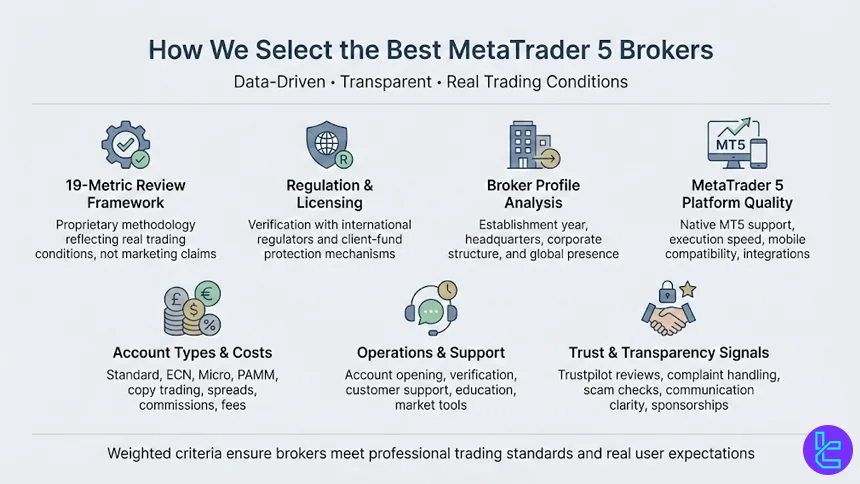
At TradingFinder, each broker featured in this article is evaluated using a proprietary 19-metric review methodology designed to reflect real trading conditions rather than marketing claims.
Our analysis begins with regulations and licenses, where brokers are verified against international supervisory authorities to confirm legal operation and client-fund protection mechanisms. This is followed by a detailed broker profile assessment, covering establishment year, headquarters, corporate structure, and global presence.
For MetaTrader 5 traders, special emphasis is placed on trading platforms, including native MetaTrader 5 support, execution quality, mobile compatibility, and additional platform integrations.
Account diversity is another core factor. We examine whether brokers offer flexible options such as standard, ECN, micro, or PAMM accounts, alongside access to copy trading and investment services. Cost efficiency is measured through real-account testing of spreads, commissions, deposit and withdrawal fees, and inactivity charges, as these directly impact long-term profitability.
Operational quality is assessed through account opening and verification, customer support responsiveness, and the availability of educational tools, market news, and infographics.
We also analyze Trustpilot scores, broker responses to user complaints, scam alerts, and transparency in communications. Finally, softer metrics, such as sponsorships, charitable activities, and content updates, are included to provide a holistic view of each broker’s reliability.
Together, these weighted criteria ensure that every broker listed aligns with professional trading standards and real user expectations. For a detailed breakdown of this framework, refer to our Forex methodology.
What is MetaTrader 5?
MetaTrader 5 (MT5) is a multi-asset trading platform developed by MetaQuotes for online trading in Forex, stocks, indices, commodities, and CFDs. It is the advanced successor to MetaTrader 4, designed to support faster execution, deeper market data, and a broader range of trading instruments.
MetaTrader 5 provides traders with advanced charting tools, 21 timeframes, multiple order types, and an integrated economic calendar, making it suitable for both discretionary and systematic trading.
One of its core strengths is the multi-threaded strategy tester, which allows traders to backtest automated strategies (Expert Advisors) using historical data with higher accuracy and speed.
The platform supports algorithmic trading through the MQL5 programming language, enabling the development of custom indicators, trading robots, and scripts. In addition, MT5 offers Depth of Market (DOM), partial order filling, and improved order management compared to earlier platforms.
Thanks to its flexibility, asset coverage, and institutional-grade features, MetaTrader 5 has become a standard platform offered by leading Forex brokers worldwide.
What Benefits Does MetaTrader 5 Offer?
MetaTrader 5 offers a wide range of benefits that make it a preferred platform among modern Forex and CFD traders. One of its primary advantages is multi-asset support, allowing traders to access Forex pairs, stocks, indices, commodities, and cryptocurrencies from a single interface.
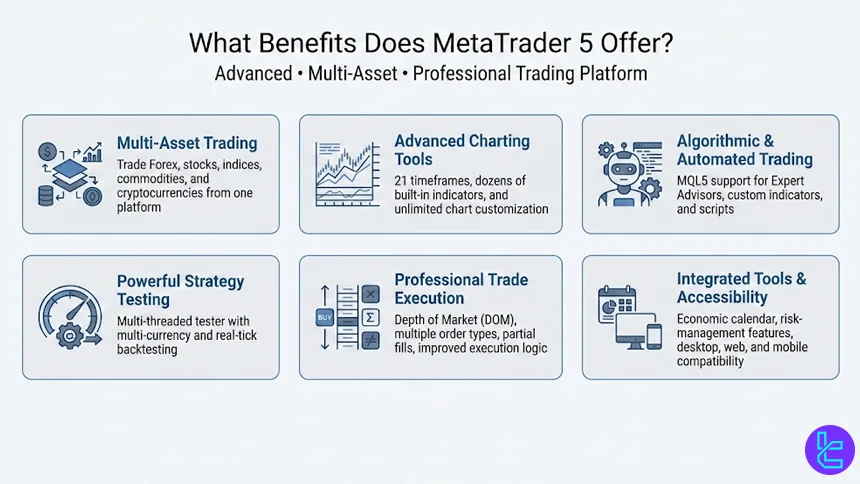
From a technical perspective, MetaTrader 5 delivers advanced charting capabilities, including 21 timeframes, dozens of built-in indicators, and unlimited chart customization. Traders can perform detailed technical analysis while managing multiple instruments simultaneously without compromising platform performance.
Another key benefit is algorithmic and automated trading. MT5 uses the MQL5 programming language, enabling the creation of Expert Advisors (EAs), custom indicators, and scripts. Its multi-threaded strategy tester supports faster and more precise backtesting, including multi-currency and real-tick modeling-an essential feature for systematic traders.
MetaTrader 5 also enhances execution quality through Depth of Market (DOM), multiple order types, partial fills, and improved order-handling logic. These features make MT5 suitable for both retail traders and professional strategies that rely on precise execution.
Finally, the platform includes an integrated economic calendar, built-in risk management tools, and compatibility across desktop, web, and mobile devices. Together, these benefits position MetaTrader 5 as a robust, future-ready trading platform offered by top-tier Forex brokers worldwide.
Does MetaTrader 5 Support Custom Indicators?
MetaTrader 5 fully supports custom indicators, making it highly adaptable for traders who rely on personalized technical analysis. MT5 uses the MQL5 programming language, which allows users to design, modify, and deploy proprietary indicators tailored to specific strategies, market conditions, or trading styles.
Custom indicators in MetaTrader 5 offer the following capabilities:
- Analyze price action, volume, volatility, and external data inputs across all timeframes and asset classes;
- Utilize faster calculations and event-driven logic compared to older platforms, enabling more complex indicator structures;
- Support advanced data handling suitable for multi-market and professional-grade indicators.
In addition to self-developed tools, traders can access a wide range of ready-made solutions through the built-in MQL5 Market:
- Thousands of free and paid custom indicators available for direct integration
- Seamless installation and real-time operation on MT5 charts without compromising platform stability
- Support for alerts, visual signals, and dynamic indicator outputs
MetaTrader 5 Pricing and Usage Fees
MetaTrader 5 itself is provided free of charge to traders by most Forex and CFD brokers. There are no direct licensing, subscription, or installation fees for using the MetaTrader 5 desktop, web, or mobile platforms.
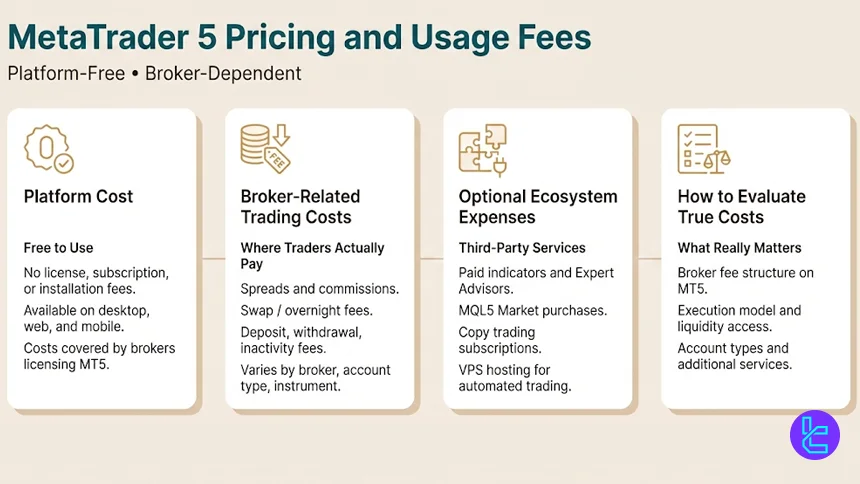
Instead, the platform cost is typically absorbed by brokers that license MT5 from MetaQuotes and offer it as part of their trading infrastructure.
However, while MetaTrader 5 does not impose usage fees, traders may still incur broker-related costs when operating on the platform. These expenses include spreads, commissions, swap rates, and non-trading fees such as deposits, withdrawals, or account inactivity charges.
The exact cost structure depends on the broker, account type, and trading instruments available on MT5.
Additional optional expenses can arise from third-party services within the MT5 ecosystem. For example, traders who purchase custom indicators, Expert Advisors, or automated strategies from the MQL5 Market may pay one-time or subscription-based fees.
Similarly, copy trading services or VPS hosting for uninterrupted algorithmic trading can introduce extra costs, depending on the provider.
In practice, MetaTrader 5 pricing is best understood as platform-free but broker-dependent. Traders should therefore focus on comparing MT5 Forex brokers based on their trading fees, execution model, and additional services rather than the platform itself.
What Operating Systems Does MT5 Support?
MetaTrader 5 is designed as a cross-platform solution, allowing traders to access global markets from a wide range of devices and operating systems. This flexibility ensures uninterrupted trading and account management across different environments.
MetaTrader 5 supports the following operating systems and access methods:
- Windows: Full-featured desktop version with complete access to advanced charting tools, algorithmic trading, and the strategy tester;
- macOS: Available via compatible installation methods, enabling Mac users to run MT5 with core trading and analytical features
- iOS: Native mobile application optimized for iPhone and iPad, offering real-time quotes, charting, and order execution
- Android: Dedicated mobile app providing flexible trading, account monitoring, and push notifications
- Web-based (WebTrader): Browser-based access that requires no installation, suitable for quick trading and account management from any modern browser
How Can I Connect a Broker to MetaTrader 5?
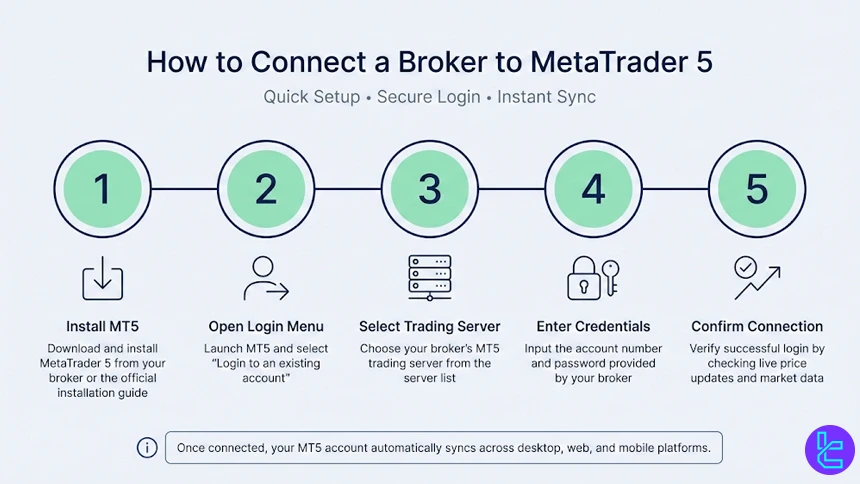
Connecting a trading account to MetaTrader 5 is a straightforward process once your broker supports MT5. After opening and verifying an account, the connection is completed directly inside the platform.
Follow these steps:
- Download and install the platform from your broker or the official platform source using the MetaTrader 5 Installation guide;
- Open MT5 and select “Login to an existing account”;
- Choose your broker’s trading server from the server list;
- Enter the account number and password provided by the broker;
- Confirm the connection and verify live market data appears.
Once connected, your MT5 account syncs automatically across desktop, web, and mobile versions.
Does MetaTrader 5 Offer VPS Service and Auto-Trading Features?
MetaTrader 5 supports both VPS services and advanced auto-trading features, making it well suited for algorithmic and latency-sensitive strategies. Automated trading on MT5 is powered by Expert Advisors developed in the MQL5 programming language, allowing trades, risk parameters, and execution logic to run automatically without manual input.
For uninterrupted operation, MetaTrader 5 is compatible with broker-provided and third-party VPS solutions. Hosting the platform on a VPS ensures stable 24/7 connectivity, reduced latency, and consistent execution even when the trader’s local device is offline.
In addition, MT5 includes a built-in strategy tester for evaluating and optimizing automated systems before live deployment. Together, VPS compatibility and auto-trading functionality make MetaTrader 5 a reliable environment for professional, systematic, and long-term automated trading strategies.
What Regulatory Authorities do MT5 Brokers Operate Under?
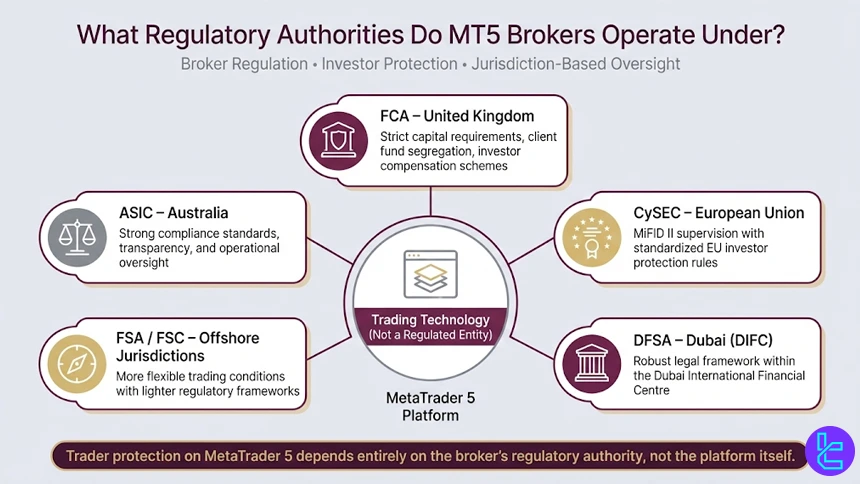
MetaTrader 5 itself is a trading technology and is not regulated as a financial institution. Instead, regulation applies to the brokers that offer MT5, and the level of protection traders receive depends on the regulatory authority overseeing each broker.
MT5 Forex brokers typically operate under one or more of the following well-known regulatory bodies:
- Financial Conduct Authority (FCA): Oversees brokers in the United Kingdom, enforcing strict capital requirements, client fund segregation, and investor compensation schemes;
- Cyprus Securities and Exchange Commission (CySEC): Regulates many EU-based brokers under MiFID II, with standardized investor protection rules;
- Australian Securities and Investments Commission (ASIC): Known for strong compliance standards, transparency, and operational oversight;
- Financial Services Authority (FSA) and Financial Services Commission (FSC): Commonly supervise offshore brokers with more flexible trading conditions;
- Dubai Financial Services Authority (DFSA): Regulates brokers operating in the Dubai International Financial Centre under a robust legal framework.
Non-Trading Services Available in MetaTrader 5
In addition to trade execution, MetaTrader 5 includes several non-trading services designed to support analysis, automation, and account monitoring. One of the most widely used features is the built-in economic calendar, which provides real-time access to macroeconomic events and key data releases directly within the platform environment.
MetaTrader 5 also integrates access to the MQL5 ecosystem, where traders can explore trading signals, copy trading services, and a wide marketplace of custom indicators, Expert Advisors, and analytical tools.
These services allow users to enhance their strategies, follow experienced traders, or test automated systems without engaging in manual trading.
Additional non-trading functionalities include strategy testing and optimization tools for evaluating automated strategies, as well as push notifications and custom alerts that keep users informed of market conditions and platform activity across devices. Together, these services position MetaTrader 5 as a complete trading infrastructure rather than a standalone execution platform.
What Tradable Instruments Do MT5 Brokers Offer?
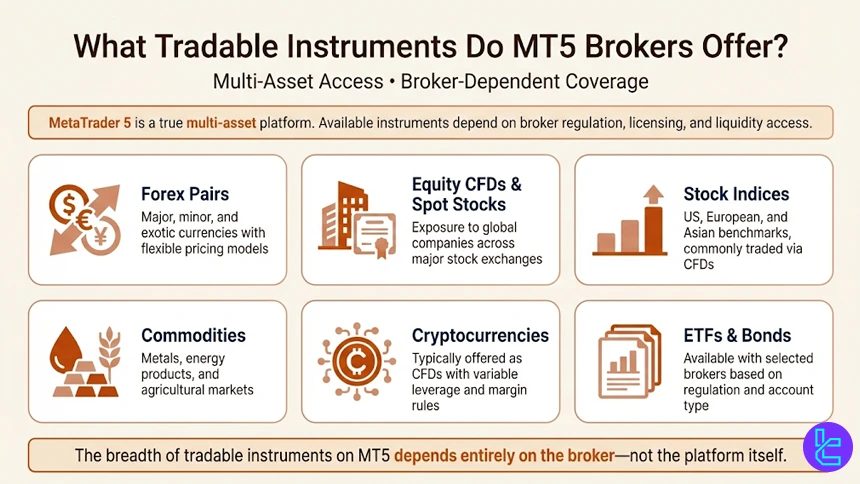
MetaTrader 5 is built as a true multi-asset platform, and the range of tradable instruments available depends on the broker’s licensing, liquidity providers, and regulatory framework. As a result, MT5 brokers typically offer access to a broader set of markets compared to single-asset trading platforms.
Common tradable instruments available through MT5 brokers include:
- Forex pairs: Covering major, minor, and exotic currencies with flexible pricing models
- Equity CFDs and spot stocks: Allowing exposure to global companies across major exchanges
- Stock indices: Such as US, European, and Asian benchmarks, often traded via CFDs
- Commodities: Including metals, energy products, and agricultural assets
- Cryptocurrencies: Usually offered as CFDs with variable leverage and margin requirements
- ETFs and bonds: Available with selected brokers depending on regulation and account type
MetaTrader 5 Forex Brokers with Proprietary Platforms
Many brokers that offer MetaTrader 5 also provide proprietary trading platforms alongside MT5. These in-house platforms are designed to complement MT5 by offering simplified interfaces, broker-specific tools, or web-based access for traders who prefer flexibility without installing desktop software.
Proprietary platforms typically focus on usability and integration, while MT5 remains the primary choice for advanced analysis and automation.
Brokers use these platforms to deliver features such as enhanced account management, integrated research, or faster onboarding for new users, while still allowing seamless switching to MT5 for professional trading. Proprietary platforms offered by the mentioned brokers include:
- Exness Trade, available on Android and iOS
- Pepperstone Trading App for iPhones and Android devices
- FBS App on Google Play Store and the App Store
- FxPro mobile app on Android and iOS
- xChief mobile app for Android and iOS devices
How Does MT5 Compare to Other Trading Platforms?
MetaTrader 5 is positioned as a modern, multi-asset trading platform that expands on the capabilities of MetaTrader 4 while competing directly with chart-centric solutions like TradingView and execution-focused platforms such as cTrader.
Compared to its peers, MT5 emphasizes broader market coverage, faster multi-threaded backtesting, and advanced order management.
The table below highlights how MetaTrader 5 differs from MetaTrader 4, TradingView, and cTrader across key technical and functional parameters.
Comparison Parameter | cTrader | |||
Primary Use Case | Multi-asset trading | Forex & CFD trading | Charting & market analysis | ECN Forex & CFD trading |
Tradable Assets | Forex, stocks, indices, commodities, crypto | Mainly Forex, CFDs | Forex, stocks, crypto, futures | Forex, indices, commodities, crypto (CFDs) |
Order Types | Market, Buy/Sell Limit, Buy/Sell Stop, Buy/Sell Stop Limit, Trailing Stop | Market, Buy/Sell Limit, Buy/Sell Stop, Trailing Stop | Market & Limit (broker-dependent), alerts-based execution | Market, Limit, Stop, Stop Limit, Market Range, Trailing Stop |
Algorithmic Trading | Yes (MQL5 EAs) | Yes (MQL4 EAs) | Limited (Pine Script strategies) | Yes (cAlgo / C#) |
Chart Types | Candlestick, Bar, Line | Candlestick, Bar, Line | Candlestick, Heikin Ashi, Renko, Kagi, Line Break, Point & Figure | Candlestick, Bar, Line, Heikin Ashi, Renko |
Strategy Backtesting | Multi-threaded | Single-threaded | Bar Replay (manual) | Tick-accurate backtesting |
Social / Community Features | No | No | Yes (ideas, streams, chat) | Limited (cTrader Copy) |
Platform Access | Desktop, Web, Mobile | Desktop, Web, Mobile | Web, Desktop, Mobile | Desktop, Web, Mobile |
Typical User Profile | Advanced multi-asset traders | Algorithmic & retail Forex traders | Analysts & discretionary traders | ECN-focused & professional traders |
Price | Free platform (broker-provided) | Free platform (broker-provided) | Free plan + paid subscriptions | Free platform (broker-provided) |
Conclusion
Many brokers offer MetaTrader 5 as one of the primary options for trading. However, other parameters such as the regulatory licenses, spreads, commissions, account types, and more are crucial.
Exness, FP Markets, Pepperstone, and FBS are 4 of the best options among MT5 Forex brokers with fair trading conditions and positive user experiences on Trustpilot.
Interested in how we chose the brokers mentioned? Check out our Forex methodology.






