












Forward Test is a method for live evaluation of a trading strategy’s performance on real future data; a method that shows how the strategy behaves in the dynamic and unpredictable conditions of the market and what level of behavioral stability it has in the price flow. The best way to run a Forward Test is to trade at the current market price on demo accounts.
For Forward Testing, you can also use the tools provided by brokers, exchanges, and analysis platforms such as TradingView. In addition, if you intend to run a Forward Test in a real account with a small amount of capital, you can use account monitoring websites such as MyFxBook to examine the very detailed results of the Forward Test.
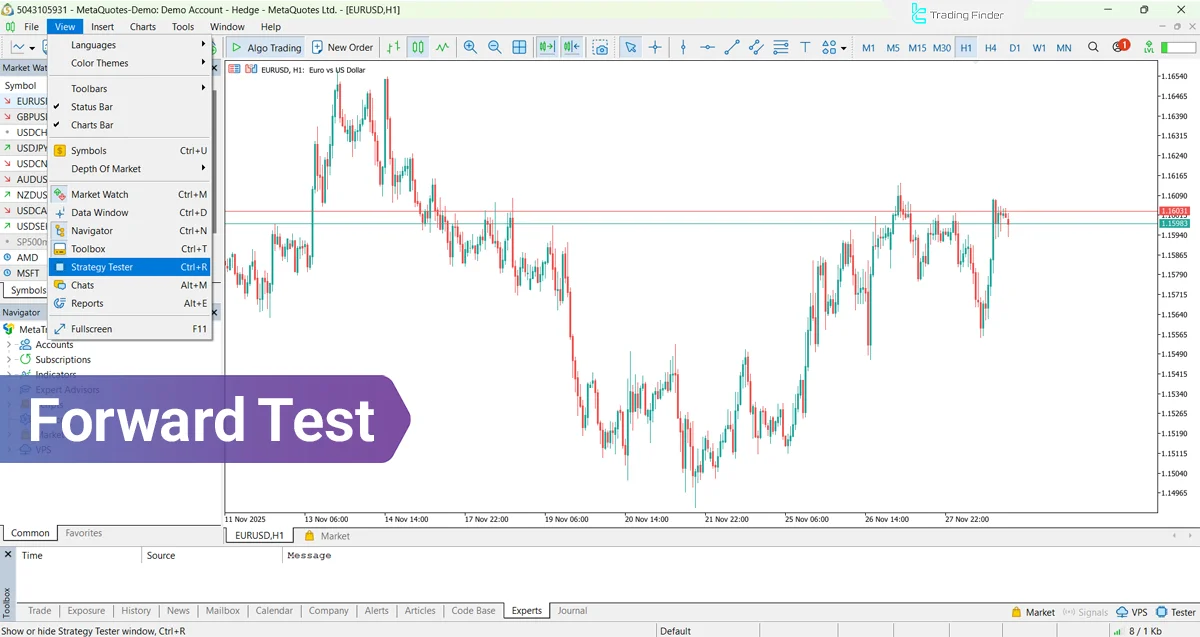
What is Forward Test?
Forward Test is the live test of a trading strategy and is considered one of the important stages in the process of evaluating the performance of a trading system or strategy. This method is performed after the Backtest and its goal is to examine the real behavior of the strategy in live market conditions.
In other words, Forward Test means testing a strategy before entering the real market on new price data, in order to evaluate its efficiency in the future.
Applications of Forward Test :
- Testing the strategy before using it in a real account;
- Examining the technical behavior of the strategy in changing market conditions (range, trending, or choppy);
- Evaluating real risk and the trader’s psychology in executing the strategy.
Main Features of Forward Test
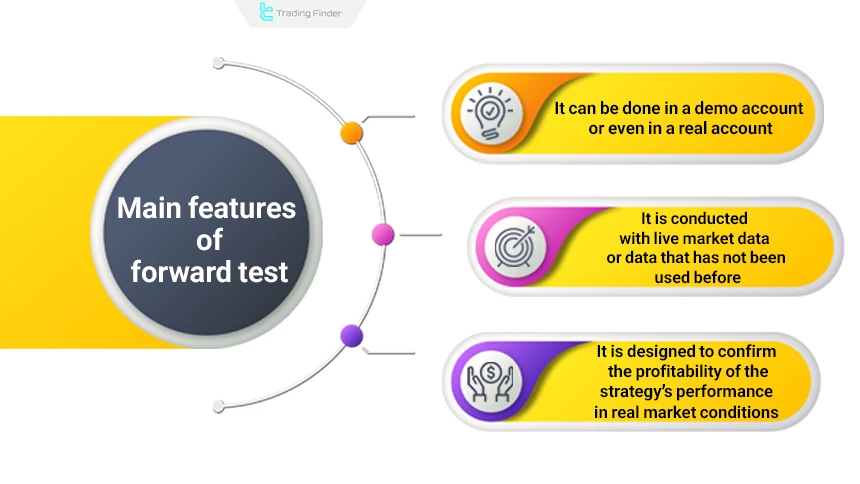
Forward Test is a method for evaluating and optimizing trading strategies and gaining more confidence before entering the real market. The main features of Forward Test:
- This test can be done in a demo account or even in a real account;
- Unlike Backtest, which is run on historicaldata, Forward Test is conducted with live market data or data that has not been used before;
- Forward Test is used to confirm the profitability and stability of the strategy’s performance in real market conditions.
Advantages and Disadvantages of Forward Test
Forward Test also has some advantages and disadvantages, which are mentioned below:
Advantages | Disadvantages |
Real performance evaluation | Need for real time |
Detection of execution errors | Missed opportunities |
Practical experience for the trader | Limited test data volume |
Examining reaction to different market conditions | Impact of human emotions |
Higher credibility compared to Backtest | Need for continuous follow-up |
Manual or Automated Forward Test – Which is Better?
Forward Test can be conducted in two ways: manual and automated. The table below compares these two methods:
Category | Manual Forward Test | Automated Forward Test |
Execution method | Recording trades in Paper Trading | Automatic execution with Pine scripts |
Advantages | Full control, trading discipline | High speed, elimination of human error |
Disadvantages | Time-consuming, possibility of human error | Need for coding, no emotional flexibility |
Recommended use | Manual execution with active monitoring | Systematic analysis and automated execution |
Forward Test Training for a Trading Strategy
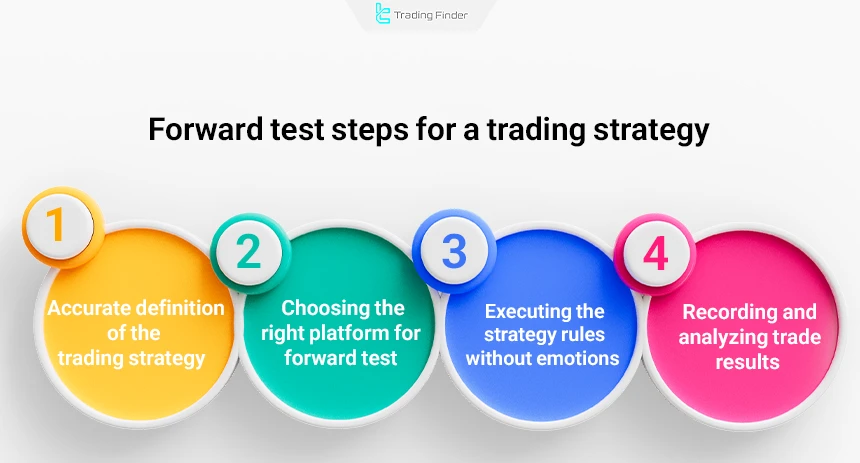
To perform a Forward Test on a trading strategy, you must follow the steps below in a step-by-step manner:
- Accurate definition of the trading strategy;
- Choosing the right platform for Forward Test;
- Executing the strategy rules without emotions;
- Recording and analyzing trade results.
#1 Accurate Definition of the Trading Strategy
The first and most important step is to choose or design a complete and precise strategy. This strategy must include specified entry and exit times, stop loss and take profit levels, trade risk size, and the type of market being traded.
Without determining these items and properly choosing them, the Forward Test results will not be analyzable or reviewable.
#2 Choosing the Right Platform for Forward Test
Many exchanges or trading analysis platforms in financial markets such as TradingView provide features for Forward Test on demo accounts, which can be used for free.
If you performForward Testing on real accounts, you can use monitoring websites such as MyFxBook to examine the details of the Forward Test with very high precision.
#3 Executing Strategy Rules Without Emotions
In the execution stage of Forward Test, you must act exactly according to the rules and frameworks of the strategy. During implementation, fear, greed,and excitement must not affect your trading decisions, because the goal is not to examine your emotions; the benchmark is the performance of the trading strategy itself.
#4 Recording and Analyzing Trade Results
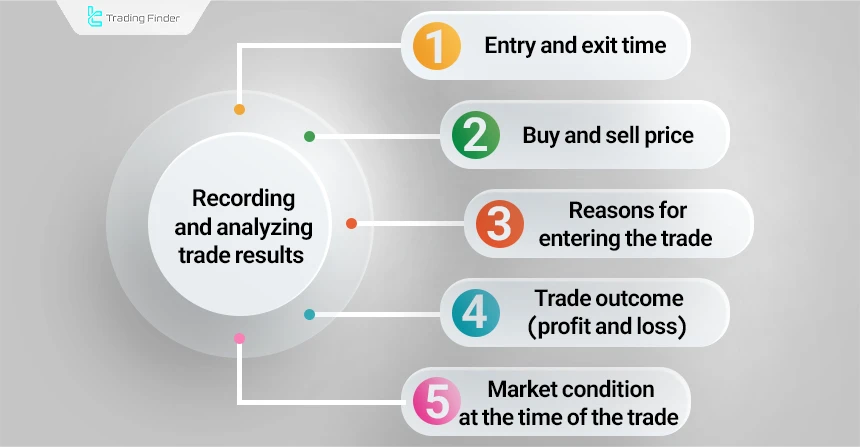
Trades must be recorded one by one with accuracy and detail. These details include the following:
- Entry and exit time
- Buy and sell price
- Reasons for entering the trade
- Trade outcome (profit and loss)
- Market condition at the time of the trade
Forward Test with the Paper Trading Feature in Tradingview
The method of Forward Test in TradingView using the Paper Trading tool is one of the practical ways to evaluate a strategy under real market conditions and makes it possible to conduct a live test without the risk of losing capital.
In this method, the trader executes their trading strategy manually and evaluates its results live but without using real money. The steps for carrying out a Forward Test in TradingView with Paper Trading are:
#1 Logging in to Your Tradingview Account
To use TradingView services, you must have a user account. After creating and logging in to your account, you can use the free services of this platform, including technical analysis tools and Paper Trading.
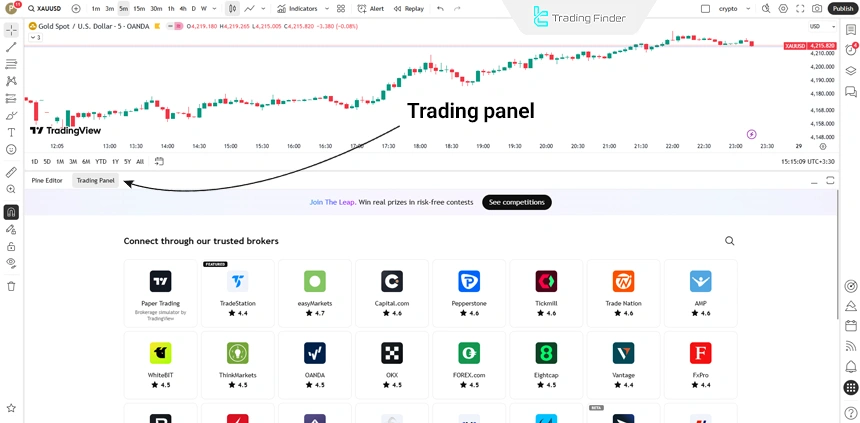
#2 Opening the Desired Chart
After logging in, you need to select the trading symbol and display its price chart in order to carry out trades and access the Trading Panel of the website.
#3 Activating the “Paper Trading” Feature
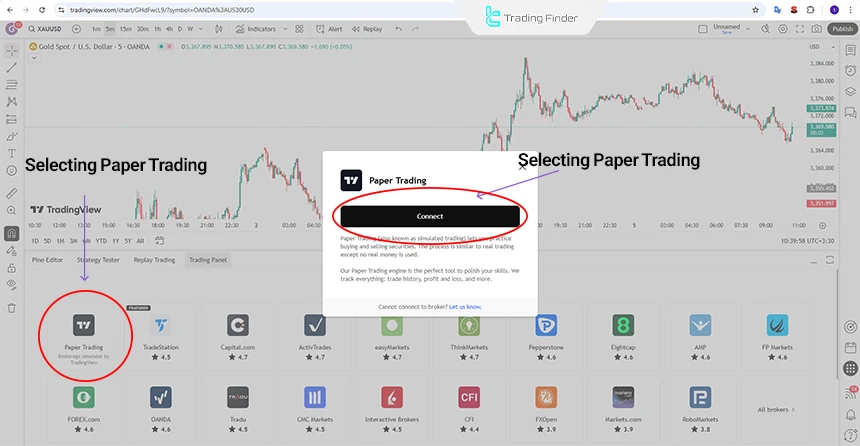
At the bottom of the price chart page, there is an option called Trading Panel. After entering this section, you must select Paper Trading and then click on Connect.
#4 Executing Test Trades
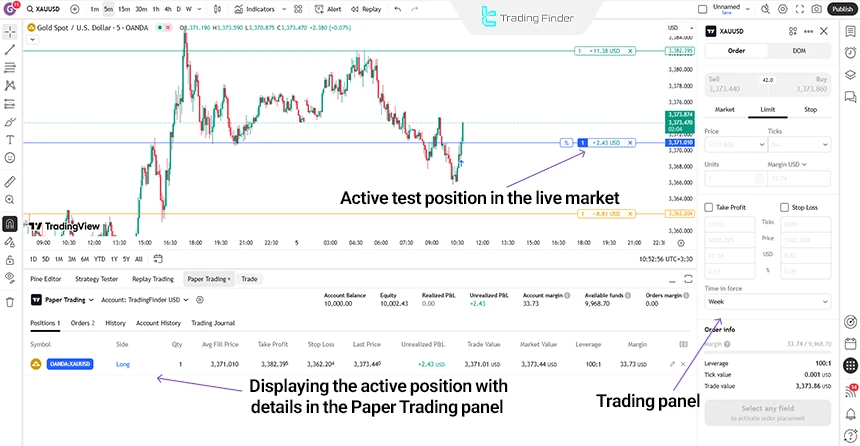
Using the trading panel and the main positions panel, you can execute trades and then collect the desired information.
These trades are done without real money, but they are executed at the same real market time. From the Account History and Positions sections, you can monitor the performance of the trades.
#5 Tracking Test Results
By examining the results of the Forward Test and the trades executed at current market prices, you can assess whether the trading strategy is suitable for use in a real account.
To monitor the strategy’s progress, review the Account History reports, profit or loss percentage, and trade accuracy.
Forward Test in Metatrader 4 & 5
Both MetaTrader 4 (MT4) and MetaTrader 5 (MT5) platforms provide the necessary tools for running a Forward Test in the Strategy Tester section, but their processes and features differ significantly. The following explains how to perform Forward Test in MetaTrader.
Forward Test in Metatrader 5 (Mt5)
The MetaTrader 5 (MT5) platform offers more accurate tools for running Forward Test compared to MT4, and its Strategy Tester section has more advanced functionality for analyzing unused data. Below we provide Forward Test training in MetaTrader 5:
#1 Accessing the Strategy Tester
To open the section where strategies are tested and evaluated, first choose “Strategy Tester” from the “View” menu. Also, for faster access to this section, you can enable it directly using the “Ctrl+R” keyboard shortcut, which immediately displays the test window in the software environment without needing to browse the menus.
#2 Setting Test Parameters and Selecting the Expert Advisor
In the Tester section, the following main components are specified:
- Desired Expert Advisor;
- Symbol or currency pair;
- Interval or timeframe;
- Mode with “Every tick based on real ticks” selected for greater accuracy and precise simulation of real data.
#3 Activating the Forward Testing Section
MetaTrader 5 has a dedicated section for Forward Testing, which includes the following modes:
- No Forward for no Forward Test;
- 1/2 for allocating half of the data;
- 1/3 for allocating one-third;
- Custom for separately and precisely defining the Backtest and Forward ranges;
- The Custom mode provides the highest level of control and capabilities beyond MT4.
#4 Starting the Test Process
By clicking Start, Backtest is processed first, and after that, the Forward Testing stage is automatically run, with the results of both parts being calculated separately.
#5 Viewing Forward Results
MetaTrader 5 displays Forward data in separate tabs. The Forward tab includes:
- Equity Curve chart for the Forward period
- Full Forward trade report
- Direct comparison of Backtest and Forward results
- Performance and equity fluctuation charts
The Optimization/Graph tab, if the test is run with Optimization:
- Segregation of the best parameters based on Forward results;
- Displaying Forward outputs in a distinct color.
Note: When using MT5, the following points must be observed to improve test accuracy:
- The “Every tick based on real ticks” model produces the most accurate output;
- The MT5 testing engine considers real market parameters, including live spread, latency, real trading volume, and real tick data;
- To increase result reliability, at least 30 percent of all data should be allocated to the Forward section.
The educational video on the FXIGOR YouTube channel explains Forward Test in MetaTrader 5 in greater detail, and interested traders can see the steps in a real and step-by-step manner.
Forward test in Metatrader 4 (Mt4)
The MT4 environment has a simpler structure but makes it possible to separate Backtest and Forward Test independently and creates a suitable environment for live evaluation of a strategy. Below we explain how to perform a Forward Test in MetaTrader 4 step by step:
#1 Accessing the Strategy Tester
To enter the strategy test section, simply choose “Strategy Tester” from the “View” menu. In addition, if you need greater speed, you can use the “Ctrl+R” keyboard shortcut to activate this section directly and have the test window available without going through other paths.
#2 Selecting the Expert Advisor and Initial Settings
In this section, the following parameters are specified:
- Desired Expert Advisor;
- Symbol or trading instrument;
- Model, preferably Every Tick;
- Period or timeframe;
- Selecting Use Date to set the test range.
#3 Activating Forward Testing
After Use Date is enabled, the Forward Testing section becomes usable. At this stage, the Forward period or a percentage of the data is allocated to the Forward section. Typically, using the last 20 to 30 percent of the data is a suitable choice.
#4 Running The Test
By clicking Start, the testing process begins. First, the Backtest portion is processed and completed, and immediately after that, the Forward section starts automatically without any additional action by the user.
#5 Viewing the Forward Report
MT4 reports display the Backtest and Forward sections separately:
- The Forward Equity Curve chart can be seen in the Graph tab;
- The full report is available in the Report tab;
- Differences in trade behavior in Backtest and Forward are clearly visible.
Note: When using Forward Test in MT4, attention to the following key points is necessary:
- Every Tick model is the most accurate testing mode;
- Incomplete or inconsistent data reduces Forward accuracy;
- The Forward section must cover at least 20 percent of the total data period.
Evaluation Metrics in Forward Test
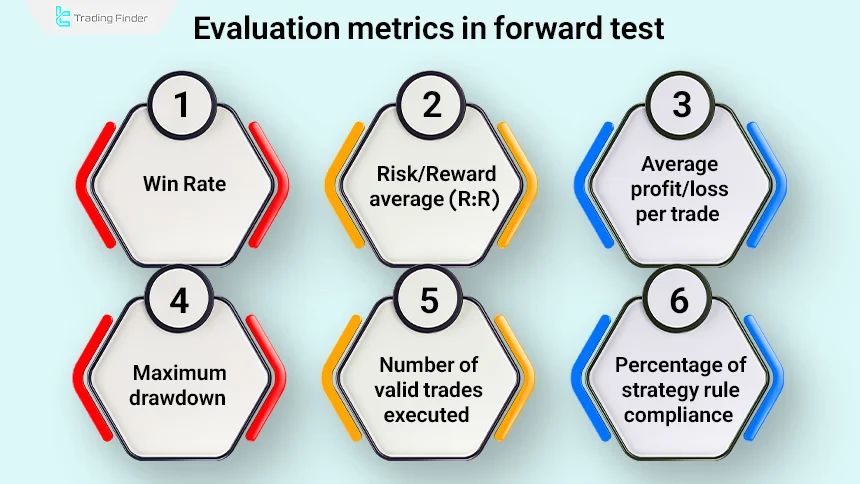
For a Forward Test result to be measurable, certain metrics must be evaluated at the end of the testing period. The most important metrics are:
- Win rate
- Risk/Reward average
- Expectancy or average profit/loss per trade
- Maximum drawdown
- Number of valid trades executed
- Percentage of strategy rule compliance
These metrics provide an accurate picture of how suitable the strategy is for a real account.
Standard Duration for Forward Test
The standard duration for performing a Forward Test depends on the timeframe and type of strategy; however, typically the following time spans are required for each strategy:
- For scalping and 5-minute strategies: 2 to 4 weeks
- For swing-trading on lower timeframes: 4 to 8 weeks
- For swing systems and daily timeframes: at least 2 to 3 months
The purpose of defining this period is to collect enough trades to assess the real performance of the system. If the number of trades is below the standard level, the result will not be reliable.
Example of Forward Test Duration for a Swing Strategy
For a swing strategy, a Forward Test needs at least a 2- to 3-month period. In this example, a three-month period is chosen on a demo account so that enough data can be collected to evaluate the system’s behavior.
In the first month, this strategy generates 9 trades, resulting in 5 winning trades and 4 losing trades, with an overall return of +3 percent. These data are considered preliminary but provide a relative picture of the strategy’s behavior.
The second month includes 11 trades: 6 winning and 5 losing, with a total return of 4 percent. In this month, a 2 percent drawdown is also recorded, which is a natural part of any trading system’s performance, and observing it in Forward Testing is very important.
In the third month, the number of trades reaches 10, of which 7 are profitable and 3 are losing. The result of this month is a +6 percent return and shows that the strategy can maintain stable performance under different market conditions.
In total over three months, 30 trades are recorded, and the performance summary is organized as follows:
- Overall win rate of 60 percent;
- Average monthly profit of 4.3 percent;
- Maximum drawdown of -3 percent;
- Profit-to-loss ratio of 1 to 1.7.
This output shows that the strategy also offers a stable andreliable structure in real market conditions.
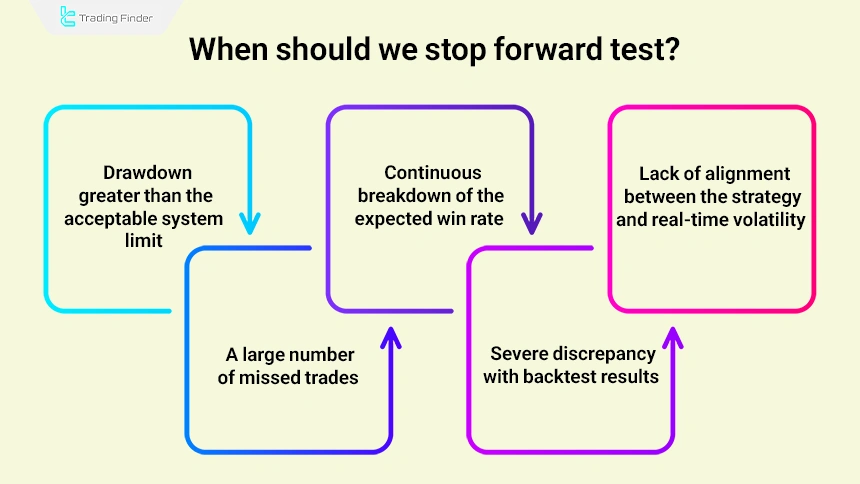
When Should We Stop Forward Test?
If in the early stages of Forward Test, one of the following conditions is observed, it is better to stop the test and adjust the strategy:
- Drawdown greater than the acceptable system limit;
- Continuous breakdown of the expected win rate;
- Lack of alignment between the strategy and real-time volatility;
- A large number of missed trades;
- Severe discrepancy with Backtest results.
Continuing Forward Testing of an ineffective system only wastes time, and stopping it in such a situation is essential. At this stage, the trading strategy must be reviewed and adjusted so that it can be tested again on a more efficient and optimized structure.
What is the Difference Between Backtest and Forward Test?
The main difference between Backtest and Forward Test lies in the time of their execution. When you are doing a Backtest, you are evaluating your trading tool with historical data, and when you are performing a Forward Test, you are using new data. In the following, we examine the difference between Backtest and Forward Test:
Backtest | Forward Test |
On historical data | On future data |
Fast Execution (in a few minutes) | Slow (requires real time to pass) |
Known historical market information | Unknown and real information |
Historical examination of the strategy | Confirming performance in the future |
Why is Forward Test More Reliable Than Backtest?
Forward Test is not just an additional step but acts as the final filter for validating a strategy. The reason is that, in Backtest, strategies are often over-optimized to historical data, while Forward Test reveals the real behavior of the market in future time.
At this stage, it becomes clear whether the strategy will remain consistent and profitable in future conditions or whether its good performance is limited to past data.
For this reason, when a trader wants to apply a trading system in practice, the results obtained from Forward Test provide more confidence than Backtest.
During Forward Test, a set of real problems appear that are not seen in Backtest, including:
- Delays in real entries or exits;
- Price slippage in fast markets;
- Partial non-execution of orders in dynamic conditions;
- Lack of alignment between the strategy and current high- or low-volatility markets;
- Differences in indicator behavior on live data compared to historical data.
These factors help the trader identify and correct the practical weaknesses of their trading system before entering a real account.
The article on Forward Test training for trading strategies at academy.ftmo.com provides more detailed information to traders.
Forward Test in Different Markets (Forex, Crypto, Stocks, And Commodities)
Forward Test can produce very different results depending on the chosen market, because each market has its own behavior and volatility characteristics:
Category | Forex | Cryptocurrency | Stocks | Commodities And Futures |
Market characteristics | High liquidity, impact of real-time news | High volatility, 24/7 market | Limited trading hours, price gaps | Dependence on macro data and periodic reports |
Challenges | Fast spikes, slippage, session differences | Exchange price differences, algorithmic behavior, sudden jumps | Morning gaps, corporate events, order limitations | Fundamental jumps, contract rollovers |
Forward Test standards | 3-month period, avoiding news times, session-based risk adjustment | Cross-exchange testing, real-time data, 4–6 week period | 3-month seasonal test, checking Earnings days, gap risk hedging | 30–90 day test, attention to contract expiration, caution around key reports |
Common Mistakes in Forward Testing a Strategy
In the process of Forward Testing a trading strategy, traders, instead of using past data (Backtest), test it in the live market or on future data.
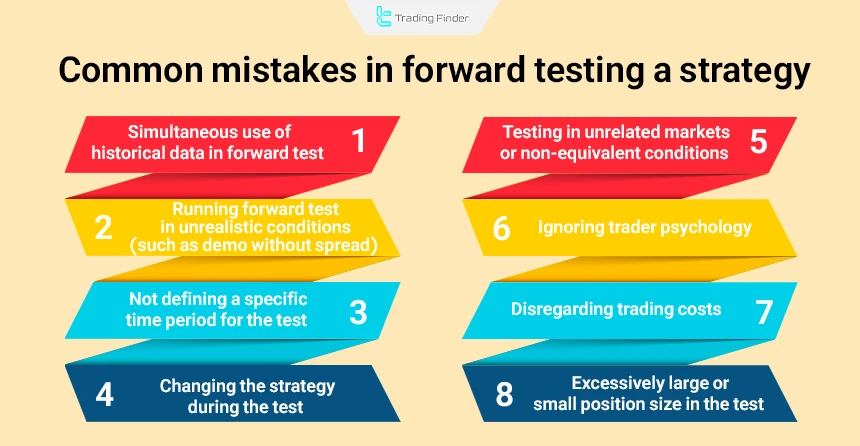
However, many traders make mistakes during Forward Test in Trading that can completely invalidate the results. Below are the most important common mistakes in Forward Testing a strategy:
- Simultaneous use of historical data in Forward Test: some traders unintentionally use previously seen (and analyzed) data for Forward Test, which is essentially a Backtest again, not a real Forward Test;
- Running Forward Test in unrealistic conditions (such as demo without spread): using demo accounts with zero spread or no execution delay can generate unrealistic and exaggerated results;
- Not defining a specific time period for the test: if the test period is vague or too short, the test output will not be a valid statistical sample;
- Changing the strategy during the test: changing entry, exit, or risk management rules during the test makes the results unreliable and leads to over-optimization;
- Testing in unrelated markets or non-equivalent conditions: performing Forward Test in markets with volatility or price behavior different from the target market can lead to misleading results;
- Ignoring trader psychology: in live testing, if the trader comes under emotional pressure and deviates from the strategy, the test results reflect human emotional reactions rather than the true behavior of the strategy;
- Ignoring trading costs: in live or demo Forward Test, disregarding spread, commission, slippage, or swap rates will lead to an incorrect estimate of the strategy’s profitability;
- Using excessively large or small position sizes in the test: extremely large or very small trade sizes disrupt real evaluation of money management and prevent an accurate understanding of risk, return, and system fluctuations.
Trade Manager TF Expert Advisor in Metatrader
The Trade Manager TF Expert Advisor is one of Tradingfinder’s professional tools for precise trade management in MetaTrader, which, with its two main modules, Trade Manager and Magic Panel, provides full control over risk, capital, and entry and exit management.
This Expert Advisor is designed for different styles such as day trading, intraday trading, and scalping and has fully compatible performance in markets such as forex, indices, and company stocks.
The core of this Expert Advisor is built around intelligent management of stop loss and take profit. Users can set multi-level take profits, perform partial exits, and define position size based on lots, equity percentage, or a specific dollar amount.
- Download Trade Management Expert Advisor for MetaTrader 5
- Download Trade Management Expert Advisor for MetaTrader 4
The BreakEven feature also allows the trade to continue without risk after price reaches a certain level, thus preventing potential losses.
One of the important strengths of Trade Manager TF is its Trailing Stop section, which can adjust the stop loss dynamically with the markettrend using 8 different methods such as MA Trailing Stop, ATR Trailing Stop, Fractal, ZigZag, Parabolic SAR, and Bollinger Bands.
This feature helps the trader preserve accumulated profits during periods of high volatility and have a more controlled exit.
In practical examples, this Expert Advisor provides full trade management on the 1-hour chart of BNB and the 30-minute chart of ETH.
The trader can set the initial stop loss, multiple take profit levels, 50 percent partial exit, stop loss based on points or percentage, and pending orders with just a few clicks.
In addition, the ability to freely move panels and use the Minimize mode helps keep the chart from becoming cluttered.
In the main panel, functions such as displaying the spread, time to candle close, selecting the position size calculation model, and placing instant or pending orders are available.
In the Magic Panel, options such as activating One-Click Trading, BreakEven, Trailing Stop, C50 for half exit, and C ALL for closing all trades are provided.
Overall, Trade Manager TF is a powerful trade management system that, by combining risk tools, exit management, and professional trailing, makes the trader’s decision-making process faster, safer, and more accurate.
Conclusion
Forward Test is performed to evaluate a trading strategy after Backtest. This method allows the trader to test their strategy in real market conditions without financial risk, for example, in a demo account or with the Paper Trading tool in the TradingView platform.
By strictly following strategy rules and analyzing real-time results, the trader can gain confidence in the strategy’s future performance.
Running the test in environments such as TradingView and reviewing data on monitoring websites such as MyFxBook are among the precise and practical methods of conducting Forward Test in Trading.







