












NinjaTrader is a trading platform dedicated to futures markets with high popularity in the space. However, Forex traders also use the platform for its charting tools and high customizability.
If you are considering trading with the platform, consider the fees and useful features in the chosen Forex broker.
 | FXCM | |||
 | City Index | |||
 | Oanda | |||
| 4 |  | FOREX.com | ||
| 5 |  | Interactive Brokers |
Trustpilot Ratings in NinjaTrader Forex Brokers
Learning about the way a Forex broker is seen by users is essential before deciding to make any investments. The table below summarizes the brokers’ Trustpilot ratings.
Broker Name | Trustpilot Ratings | Number of Reviews |
2,238 | ||
FXCM | 818 | |
City Index | 393 | |
Oanda | 1,190 | |
Interactive Brokers | 5,022 |
Spreads in NinjaTrader Forex Brokers
If you are choosing a broker to trade via NinjaTrader, it is better to select one with lowest spreads possible.
Broker Name | Min. Spreads |
0 Pips | |
FOREX.com | 0 Pips |
FXCM | 0.2 Pips |
0.5 Pips | |
Oanda | Varies |
NinjaTrader Brokers Non-Trading Fees
The table in this section provides an insight into the select brokers’ non-trading costs, including deposits/withdrawals and inactivity commissions.
Broker Name | Deposit Fees | Withdrawal Fees | Inactivity Fees |
FOREX.com | None | None | €15 |
City Index | None | None | $12 |
None | None | $14 | |
Interactive Brokers | None | One Free Withdrawal per Month | None |
FXCM | None | Only for Bank Transfers | $50 Annually |
Number of Tradable Instruments in NinjaTrader Brokers
The table below mentions the number of available trading symbols in each of the top Forex brokers for NinjaTrader users.
Broker Name | Min. Spreads |
City Index | 13,500+ |
13,000+ | |
FOREX.com | 5,500+ |
Interactive Brokers | 4,900+ |
Oanda | 76 |
Top 4 Forex Brokers for NinjaTrader
Some of the best Forex brokers mentioned above will be introduced with detail in the following sections.
City Index
Founded in London in 1983, City Index is one of the longest-established Forex and CFD brokers globally. Operating under the StoneX Group, it serves over one million traders across retail and professional segments.

City Index provides access to more than 13,500 tradable markets, covering Forex, indices, shares, commodities, bonds, options, and crypto CFDs. This broad asset coverage allows multi-asset portfolio diversification from a single trading account, supported by both proprietary and third-party platforms.
Regulation is a core strength of City Index. The broker operates under multiple tier-1 authorities, including the Financial Conduct Authority (FCA), Monetary Authority of Singapore (MAS), and Australian Securities and Investments Commission (ASIC), ensuring strict compliance and client-fund segregation.
From a trading-cost perspective, City Index follows a commission-free pricing model, with spreads starting from 0.5 points on MT4 accounts. Traders can access NinjaTrader, MetaTrader 4, TradingView integration, and City Index’s proprietary Web Trader, alongside mobile apps for iOS and Android.
Overall, City Index combines long-term market experience, strong regulation, and extensive market coverage.
City Index Features and Specifics
Account Types | Standard, MT4 account |
Regulating Authorities | FCA, ASIC, MAS |
Minimum Deposit | $150 |
Deposit Methods | Visa/MasterCard, Paypal, Bank wired |
Withdrawal Methods | Visa/MasterCard, Paypal, Bank wired |
Maximum Leverage | 1:1000 |
Trading Platforms & Apps | NinjaTrader, MT4, proprietary platform |
City Index Pros and Cons
Below is a balanced overview of the broker’s main advantages and limitations, helping traders quickly assess its overall profile.
Pros | Cons |
Regulated by multiple tier-1 authorities (FCA, ASIC, MAS) | Inactivity fee on dormant accounts |
Access to 13,500+ global markets | No Islamic (swap-free) account |
Commission-free trading with competitive spreads | No copy or social trading features |
Strong educational resources and market research | Proprietary web platform design feels dated |
FOREX.com
FOREX.com is a multi-asset brokerage brand founded in 2001 in New Jersey and later expanded into the UK and Japan (2009). The broker operates within a global infrastructure that includes 800+ employees and 1,200+ partners, positioning it as a scaled, institutional-grade CFD/FX provider.

Since StoneX Group Inc. acquired GAIN Capital in 2020, FOREX.com has been integrated into StoneX’s wider financial-services network. StoneX reported $19.68B in total assets and $277M income before tax (annual report referenced in the source text), supporting FOREX.com’s balance-sheet narrative and operational resilience.
A key differentiator is multi-jurisdiction regulation, including CFTC/SEC (US), FCA (UK), ASIC (Australia), MAS (Singapore), CIRO (Canada), FSA (Japan), and CySEC (Cyprus). Clients are onboarded under region-specific legal entities.
On product depth and execution, FOREX.com lists 80+ forex pairs and broad CFD coverage across indices, commodities, shares, and crypto CFDs, with a reported 0.02s average trade speed. Platform support includes NinjaTrader in addition to MetaTrader 5, a proprietary web trader, and TradingView connectivity for charting and community-driven workflows.
The table below outlines some of the broker’s features.
Account Types | Standard, Raw Spread, MetaTrader |
Regulating Authorities | CFTC, SEC, FCA, ASIC, MAS, CIRO, FSA, CySEC |
Minimum Deposit | $100 |
Deposit Methods | Local Transfer, Credit/Debit Cards, Wire Transfer, Neteller, Skrill |
Withdrawal Methods | Credit/Debit Cards, Wire Transfer |
Maximum Leverage | 1:1000 |
Trading Platforms & Apps | NinjaTrader, MT5, TradingView, Proprietary Platform |
FOREX.com Pros and Cons
Before reviewing the pros and cons, it’s worth noting that FOREX.com’s strengths mostly come from its regulatory footprint, platform variety, and market coverage, while trade-offs typically appear in cost structure, eligibility limits, and region-specific feature availability.
Pros | Cons |
Strong multi-jurisdiction regulation (CFTC/SEC, FCA, ASIC, MAS, CIRO, FSA, CySEC) | Higher spreads vs some ultra-low-cost brokers (especially outside Raw Spread pricing) |
Platform flexibility: MT5 + proprietary web trader + TradingView integration | Geo-restrictions and entity-based limitations (availability varies by country) |
Broad market access (FX, indices, commodities, shares CFDs, crypto CFDs) | Inactivity fee after extended no-trade periods (e.g., $15/month after 12 months) |
Institutional backing via StoneX Group and segregated client funds across entities | Offshore entity may offer higher leverage but typically lacks an investor compensation scheme |
FXCM
FXCM, short for Forex Capital Markets, is a globally recognized Forex and CFD broker established in 1999. With more than two decades of industry presence, FXCM serves retail and institutional traders through a multi-entity structure spanning Europe, Australia, Africa, and Israel.
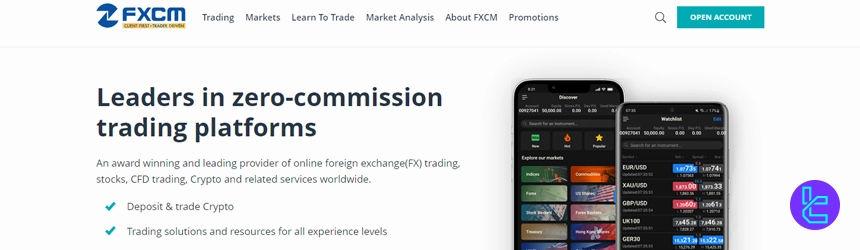
Operating under top-tier regulators such as the Financial Conduct Authority (FCA), Australian Securities and Investments Commission (ASIC), Cyprus Securities and Exchange Commission (CySEC), Financial Sector Conduct Authority (FSCA), and the Israel Securities Authority (ISA), FXCM applies strict compliance standards, client fund segregation, and negative balance protection across its regulated entities.
FXCM provides three core account types, CFD, Active Trader, and Corporate, supporting trading across Forex, indices, commodities, shares, and crypto CFDs. In addition to NinjaTrader, traders can access platforms such as MT4, TradeStation, and TradingView, with leverage varying by jurisdiction and reaching up to 1:1000 under certain entities.
Following regulatory challenges and restructuring in 2017, FXCM was acquired by Jefferies Financial Group. Today, the broker maintains a strong global footprint under the leadership of Brendan Callan, focusing on platform innovation, transparent pricing, and multi-asset market access.
Overall, FXCM combines long-standing market experience with robust regulation and advanced trading technology. However, its history of regulatory penalties and certain non-trading fees remain key considerations, which are reflected in the following pros and cons.
Summary of Specifics
Account Types | CFD account, Active Trader account, Corporate account |
Regulating Authorities | FCA, ASIC, CySEC, ISA, FSCA |
Minimum Deposit | $50 |
Deposit Methods | Visa/MasterCard, Bank wired, Neteller, Skrill |
Withdrawal Methods | Visa/MasterCard, Bank wired, Neteller, Skrill |
Maximum Leverage | 1:1000 |
Trading Platforms & Apps | NinjaTrader, MT4, TradingView, TradeStation |
FXCM Pros and Cons
Before going on with FXCM registration, the table below summarizes the broker’s important benefits and drawbacks.
Pros | Cons |
Regulated by multiple tier-1 authorities (FCA, ASIC, CySEC) | Historical regulatory fines and past bankruptcy record |
Access to MT4, TradingView, TradeStation, and proprietary tools | Inactivity fee charged after prolonged account dormancy |
Competitive spreads from 0.2 pips with zero CFD commissions | Bank wire withdrawals incur a fixed fee |
Copy trading and AI-based automation options available | Limited availability in several major countries |
Oanda
OANDA US is a New York-based forex and crypto broker founded in 1996, offering access to 68+ currency pairs and 8 spot cryptocurrencies. The broker supports NinjaTrader, MetaTrader 4, TradingView, and its proprietary OANDA Web & App platforms for U.S. traders.
Operating under Commodity Futures Trading Commission (CFTC) and National Futures Association (NFA) oversight, OANDA US holds Tier-1 regulation status. Client funds are segregated, maximum leverage is capped at 1:50, and services are strictly tailored to U.S. regulatory standards.
OANDA US offers Standard and Elite Trader accounts with $0 minimum deposit, floating spreads averaging 2.0 pips, and commissions starting from $0.01. The Elite program targets high-volume traders with $10M+ monthly volume, rebates, and dedicated account management.
Unlike international entities, OANDA US provides spot cryptocurrency trading via Paxos Trust, allowing direct ownership rather than CFDs. While asset coverage is limited to forex and crypto, execution quality, pricing transparency, and platform stability remain key strengths.
Overall, OANDA US balances strict regulation and transparent pricing with a streamlined product offering.
Specifics and Parameters
Account Types | Standard, Elite Trader |
Regulating Authorities | CFTC, NFA |
Minimum Deposit | $0 |
Deposit Methods | Credit/Debit Cards, ACH Bank Transfers, Wire Transfers, Bpay |
Withdrawal Methods | Credit/Debit Cards, bank transfer |
Maximum Leverage | 1:50 |
Trading Platforms & Apps | NinjaTrader, OANDA web, OANDA app, TradingView, MT4 |
Oanda Pros and Cons
Below is a clear breakdown of its main advantages and limitations to help assess whether it fits specific trading objectives.
Pros | Cons |
Tier-1 regulation by CFTC & NFA | Limited to forex and cryptocurrencies |
$0 minimum deposit for Standard accounts | No negative balance protection |
Supports MT4, TradingView, and proprietary platforms | Higher average spreads than some competitors |
Spot crypto trading via Paxos partnership | No bonuses or copy-trading features |
How Were the NinjaTrader Brokers Selected?
Choosing the Best NinjaTrader Brokers requires a structured, data-driven approach, as traders entrust real capital to these platforms. At TradingFinder, broker selection is based on a transparent and objective review framework designed to reflect real trading conditions and long-term reliability, especially for brokers supporting NinjaTrader.
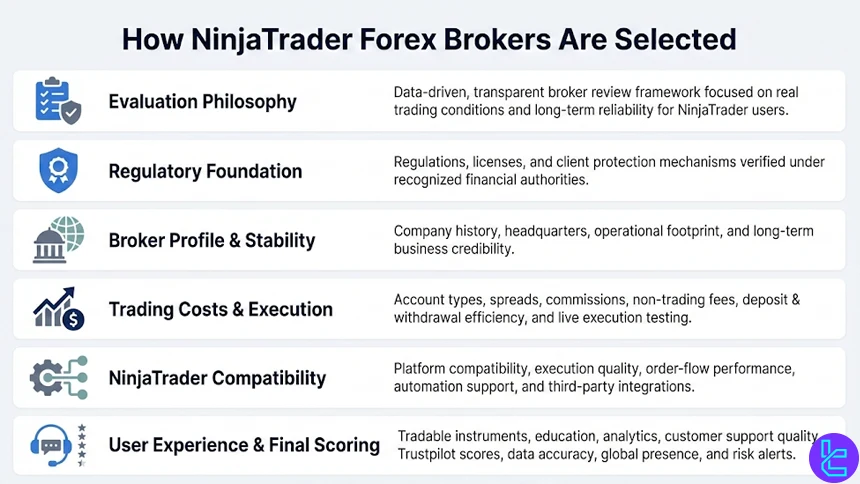
Our evaluation is built on 19 core metrics that collectively measure broker quality from both regulatory and user-experience perspectives. The first layer focuses on regulations and licenses, ensuring brokers operate under recognized authorities and provide client protection mechanisms.
This is followed by a detailed broker profile analysis, including company history, headquarters, and operational footprint, which helps assess stability and credibility.
We then examine account type diversity, commissions, spreads, and non-trading fees, as these directly affect trading costs for NinjaTrader forex users. Equal attention is given to deposit and withdrawal efficiency, transparency of charges, and real-world execution conditions tested through live broker environments.
Since NinjaTrader traders often rely on advanced order flow and automation, platform compatibility, execution quality, and integration with third-party tools are key decision factors.
Beyond pricing and technology, our methodology evaluates tradable instrument depth, copy trading availability, educational resources, and analytical tools. We also analyze customer support responsiveness, Trustpilot scores, broker communication quality, and the accuracy of published micro-data such as contract specifications and margin requirements.
Additional factors, including global office presence, news updates, scam alerts, and even sponsorship or charitable activity, contribute to the final score.
This multi-layered framework ensures every listed NinjaTrader forex broker meets professional standards, not marketing claims.
What is NinjaTrader?
NinjaTrader is a professional trading platform built for advanced market analysis, order execution, and strategy automation. While it is best known for futures trading, NinjaTrader is also widely used in Forex trading through broker integrations that support its infrastructure.
The platform is designed for active and technically oriented traders who require precise market data, flexible execution, and deep customization. Instead of operating as a broker, NinjaTrader connects traders to supported Forex brokers, making broker selection a critical part of the trading setup.
Key features that define NinjaTrader include:
- Advanced charting and analysis tools: Customizable charts, multiple timeframes, and professional technical indicators;
- Order Flow and Depth of Market (DOM): Detailed insight into liquidity, bid–ask behavior, and volume dynamics;
- Automated trading via NinjaScript: A C#-based framework for building, backtesting, and deploying Forex trading strategies;
- Flexible order management: Support for advanced order types, trade templates, and execution rules;
- High-performance desktop environment: Optimized for low-latency execution when paired with compatible Forex brokers.
NinjaTrader supports real-time data feeds and broker-side execution, allowing traders to apply discretionary, algorithmic, and hybrid Forex strategies within a single ecosystem.
Its emphasis on precision, automation, and professional-grade tools makes it a preferred choice among experienced Forex traders who demand more than standard retail trading platforms.
NinjaTrader Benefits
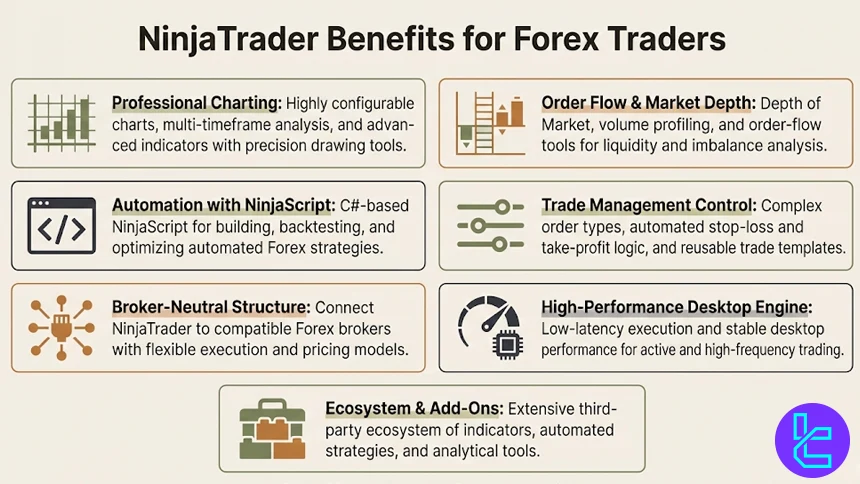
NinjaTrader offers a range of benefits that distinguish it from standard retail trading platforms, particularly for Forex traders who rely on precision, automation, and advanced market data. Its architecture is designed to support professional-grade analysis and execution when paired with compatible Forex brokers.
Key benefits of using NinjaTrader include:
- Professional-level charting capabilities: Highly customizable charts, multi-timeframe analysis, and support for advanced technical indicators and drawing tools;
- Order Flow and Market Depth analysis: Access to Depth of Market (DOM), volume profiling, and order flow tools that help identify liquidity, absorption, and short-term price imbalances;
- Advanced automation with NinjaScript: A C#-based scripting environment that enables traders to build, backtest, and optimize automated Forex strategies with precise execution rules;
- Flexible trade management: Support for complex order types, automated stop-loss and take-profit logic, and reusable trade templates;
- Broker-neutral platform structure: The ability to connect NinjaTrader to selected Forex brokers, giving traders flexibility in choosing execution conditions, pricing models, and liquidity sources;
- High-performance desktop environment; Optimized for low-latency execution and stable performance, especially for active and high-frequency trading approaches;
- Extensive ecosystem and add-ons; Access to third-party indicators, automated strategies, and analytical tools developed specifically for the NinjaTrader platform.
Are There Custom Indicators Available in NinjaTrader?
NinjaTrader offers extensive support for custom indicators, making it one of the most flexible platforms for advanced Forex traders. The platform allows users to create fully customized indicators using NinjaScript, a C#-based programming language specifically designed for developing trading tools, indicators, and automated strategies within the NinjaTrader environment.
Custom indicators in NinjaTrader can be tailored to analyze price action, volume, order flow, volatility, or any proprietary market logic a trader wants to apply. Traders are not limited to visual signals; custom indicators can also generate alerts, interact with automated strategies, and influence trade execution logic in real time.
This level of integration is particularly valuable for systematic Forex traders who rely on data-driven decision-making rather than standard built-in indicators.
In addition to self-developed tools, NinjaTrader provides access to a large third-party ecosystem where professional developers publish paid and free custom indicators. These tools often focus on advanced concepts such as market profile, volume delta, liquidity mapping, and algorithmic signal detection.
Because NinjaTrader operates as a broker-connected platform rather than a broker itself, the availability and performance of custom indicators can also depend on the data quality and execution environment provided by the connected Forex broker.
Overall, NinjaTrader’s custom indicator framework is built for traders who demand full control over their analytical tools and want the ability to translate complex trading ideas into executable, testable logic within a professional trading platform.
Is NinjaTrader Free to Use for Traders?
NinjaTrader can be used for free, but the level of access depends on the trading plan a trader chooses. NinjaTrader follows a flexible pricing model that allows traders to start with no monthly platform fee and upgrade only if lower commissions or advanced features are required.
NinjaTrader’s Free plan is designed for traders who want access to the platform without ongoing costs. It includes NinjaTrader Desktop, Web, and Mobile platforms, top-of-book market data, advanced charting tools, third-party integrations, and free simulated trading.
Traders can practice strategies, analyze markets, and customize their workspace without funding a live account, making it suitable for testing workflows and strategy development.
For active traders, NinjaTrader offers Monthly and Lifetime plans that reduce trading commissions in exchange for a fixed fee. The Monthly plan charges a recurring subscription, while the Lifetime plan requires a one-time payment and provides the lowest available commissions. Pricing Details:
- Free plan: $0 monthly fee, $0.39/micro & $1.29/standard commissions per side, full platform access, and simulated trading
- Monthly plan: $99/month with reduced commissions ($0.29/micro, $0.99/standard) for frequent traders
- Lifetime plan: One-time $1,499 fee, lowest commissions ($0.09/micro, $0.59/standard), no recurring costs
These paid plans are primarily aimed at high-volume traders who want to minimize per-trade costs over time.
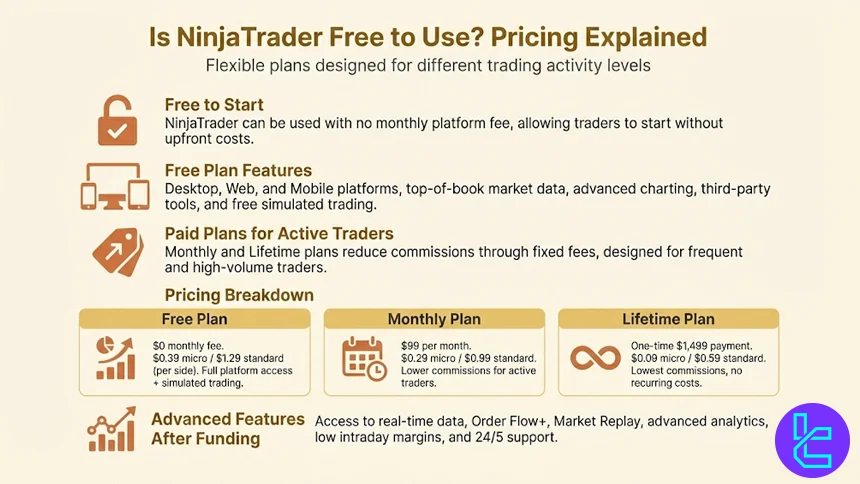
Once a live account is funded, traders can unlock additional professional features such as real-time market data, Order Flow+, Market Replay, and advanced analytical tools. Regardless of the plan, all users benefit from low intraday margins, customizable trading environments, multiple account types, and 24/5 technical support.
What Operating Systems is NinjaTrader Supported on?
NinjaTrader is primarily built as a high-performance desktop trading platform, with official support focused on the Windows operating system. The NinjaTrader Desktop application runs natively on Windows.
For traders using other operating systems, NinjaTrader provides alternative access options:
- Web-Based Platform: browser access through NinjaTrader Web, compatible with Windows, macOS, and Linux for basic trading and account management;
- Mobile Apps: NinjaTrader Mobile supports both iOS and Android, allowing trade monitoring, chart review, and position management on the go.
How Can I Connect a Forex Broker to NinjaTrader?
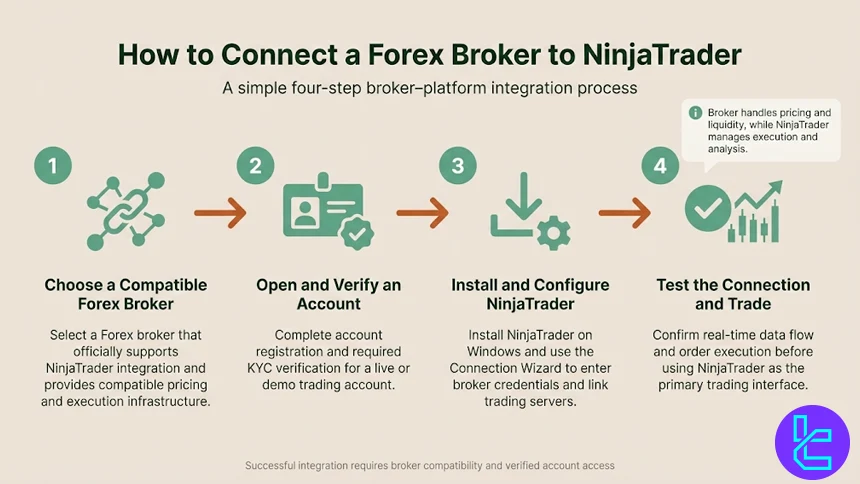
Connecting a Forex broker to NinjaTrader is a straightforward process, but it requires choosing a broker that officially supports NinjaTrader’s trading infrastructure.
#1 Choose a NinjaTrader-Compatible Forex Broker
To connect a Forex broker to NinjaTrader, the first requirement is selecting a broker that officially supports NinjaTrader connectivity. NinjaTrader does not function as a broker itself; instead, it relies on direct integrations with specific Forex brokers that provide compatible pricing feeds, execution infrastructure, and account access.
Using a non-supported broker will prevent proper data synchronization and order execution.
#2 Open and Verify Your Trading Account
After selecting a compatible Forex broker, the next step is completing the account registration and verification process.
This includes submitting identity documents and passing KYC checks required by regulated brokers.
A fully verified live or demo account is essential before attempting to connect it to the NinjaTrader platform.
#3 Install and Configure NinjaTrader
NinjaTrader must be installed on a Windows system to access full functionality. Once installed, the platform’s built-in Connection Wizard guides traders through selecting their broker and entering account credentials. This process links the broker’s trading servers to NinjaTrader, enabling real-time pricing, account balance updates, and trade execution from within the platform.
#4 Test the Connection and Start Trading
After the connection is established, traders should verify that market data is streaming correctly and that orders are executed as expected. At this stage, NinjaTrader becomes the primary trading interface, while the broker handles pricing, liquidity, and transaction processing.
Which Regulatory Authorities Supervise NinjaTrader Brokers?
NinjaTrader itself is a trading platform, not a broker, which means regulatory oversight applies to the Forex brokers that integrate with NinjaTrader, not to the platform directly. These brokers are typically supervised by well-established financial authorities that enforce strict rules on transparency, capital adequacy, and client fund protection.
Common regulatory authorities supervising NinjaTrader-compatible Forex brokers include:
- Commodity Futures Trading Commission (CFTC): Oversees futures and derivatives markets in the United States and enforces strict compliance standards for registered brokers;
- National Futures Association (NFA): A self-regulatory body in the US responsible for auditing brokers, monitoring conduct, and protecting market participants;
- Financial Conduct Authority (FCA): Regulates Forex and CFD brokers in the United Kingdom, with a strong focus on client fund segregation and fair dealing;
- Australian Securities and Investments Commission (ASIC): Supervises Australian brokers and enforces strict licensing, reporting, and risk management standards;
- Cyprus Securities and Exchange Commission (CySEC): Regulates EU-based Forex brokers under MiFID II, allowing passporting across European Economic Area countries;
- Financial Services Authority (FSA): Commonly oversees offshore brokers operating in jurisdictions such as Seychelles.
The specific regulator overseeing a NinjaTrader Forex broker depends on the broker’s legal entity and jurisdiction.
Does NinjaTrader Include Any Non-Trading Services?
NinjaTrader offers several non-trading services that support traders beyond direct market execution. While the platform is primarily known for advanced trading and automation, its ecosystem also includes tools and services focused on education, strategy development, and performance improvement.
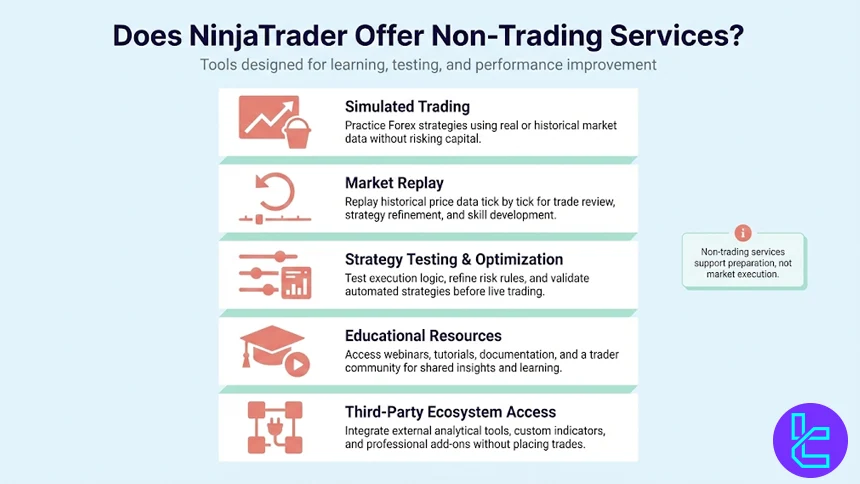
One of the most important non-trading services in NinjaTrader is simulated trading. This feature allows traders to practice strategies in real market conditions using historical or real-time data without risking capital. Simulation plays a key role for Forex traders who want to test execution logic, refine risk management rules, or validate automated strategies before going live.
NinjaTrader also provides market replay functionality, enabling traders to replay historical price data tick by tick. This service is widely used for strategy optimization, trade review, and skill development, especially for traders working with order flow and intraday Forex setups.
In addition, the platform offers access to educational resources, including webinars, tutorials, documentation, and a large community forum where traders share insights, indicators, and system logic.
Beyond education and simulation, NinjaTrader supports third-party ecosystem access, allowing users to integrate external analytical tools, custom indicators, and professional add-ons without placing trades.
Do NinjaTrader Brokers Also Offer Proprietary Platforms?
Many brokers that support NinjaTrader also provide their own proprietary trading platforms alongside third-party solutions. This multi-platform approach allows brokers to serve different trader profiles, from advanced algorithmic users to discretionary traders who prefer simpler interfaces.
Proprietary platforms are typically developed in-house and optimized for the broker’s specific execution model, pricing engine, and liquidity relationships. These platforms often focus on ease of use, streamlined order execution, and integrated account management features.
In contrast, NinjaTrader is usually offered as an advanced alternative for traders who require professional-grade charting, automation, and order flow analysis.
In addition to proprietary platforms, NinjaTrader brokers frequently support other well-known third-party platforms such as MetaTrader or TradingView. This gives traders the flexibility to choose between a broker’s native solution and specialized external platforms depending on their strategy, experience level, and technical requirements.
All of the Forex brokers mentioned in this article offer proprietary platforms:
- City Index mobile and web platform
- com mobile and web apps
- FXCM Trading Station platform
- Oanda mobile app
- IBKR and Trader Workstation platforms for Interactive Brokers
The availability of a proprietary platform does not limit access to NinjaTrader’s features. Instead, it expands choice. Traders can test execution quality and spreads on the broker’s own platform while reserving NinjaTrader for advanced analysis, automation, or high-precision trade management.
NinjaTrader Compared to Other Trading Platforms
NinjaTrader stands out as a professional-grade platform built around advanced execution, order flow analysis, and strategy automation. While MetaTrader 4 and MetaTrader 5 remain industry standards for retail Forex and multi-asset trading, and cTrader focuses on ECN transparency, NinjaTrader is optimized for high-precision trading and systematic workflows.
The comparison below highlights how NinjaTrader differs from MetaTrader 4, MetaTrader 5, and cTrader across core features, supported markets, and typical trader profiles, helping identify which platform best aligns with different trading objectives.
Comparison Parameter | cTrader | |||
Primary Use Case | Futures & advanced Forex trading | Forex & CFD trading | Multi-asset trading | ECN Forex & CFD trading |
Tradable Assets | Futures, Forex (via brokers) | Mainly Forex, CFDs | Forex, stocks, indices, commodities, crypto | Forex, indices, commodities, crypto (CFDs) |
Order Types | Market, Limit, Stop, Stop Limit, OCO, Advanced brackets | Market, Buy/Sell Limit, Buy/Sell Stop, Trailing Stop | Market, Buy/Sell Limit, Buy/Sell Stop, Buy/Sell Stop Limit, Trailing Stop | Market, Limit, Stop, Stop Limit, Market Range, Trailing Stop |
Algorithmic Trading | Yes (NinjaScript / C#) | Yes (MQL4 EAs) | Yes (MQL5 EAs) | Yes (cAlgo / C#) |
Chart Types | Candlestick, Bar, Line, Heikin Ashi, Renko | Candlestick, Bar, Line | Candlestick, Bar, Line | Candlestick, Bar, Line, Heikin Ashi, Renko |
Strategy Backtesting | Tick-accurate, advanced replay | Single-threaded | Multi-threaded | Tick-accurate backtesting |
Order Flow / DOM Tools | Yes (advanced Order Flow & DOM) | No | Limited | Yes (Level II DOM) |
Social / Community Features | No | No | No | Limited (cTrader Copy) |
Platform Access | Desktop, Web, Mobile | Desktop, Web, Mobile | Desktop, Web, Mobile | Desktop, Web, Mobile |
Typical User Profile | Professional & systematic traders | Algorithmic & retail Forex traders | Advanced multi-asset traders | ECN-focused & professional traders |
Price | Free platform + paid add-ons | Free platform (broker-provided) | Free platform (broker-provided) | Free platform (broker-provided) |
Conclusion
NinjaTrader is the special platform for futures trading; however, traders on the Forex market can also use it. Nevertheless, it’s not available on most brokers because of the high license fee.
City Index, FOREX.com, FXCM, Oanda, and Interactive Brokers are some of the few brokerages offering NinjaTrader with better trading conditions and high reputation.
For a comprehensive and detailed article on the way we choose each broker, check out our Forex methodology page.






