












Choosing the best cTrader brokers matters because platform performance directly impacts execution quality, strategy efficiency, and overall trading results. Developed by Spotware Systems and launched in 2011, cTrader delivers institutional-grade execution, advanced charting, and deep market transparency.
Today, cTrader is supported by many top-tier brokers and is widely used for forex and CFD trading across currencies, commodities, indices, shares, and cryptocurrencies. The platform features services like one-click trading, algorithmic automation, copy trading, and ultra-fast order routing.
 | Fibo Group | |||
 | LiteFinance | |||
 | FxPro | |||
| 4 |  | BlackBull Markets | ||
| 5 |  | IC Markets | ||
| 6 |  | Pepperstone | ||
| 7 |  | FP Markets | ||
| 8 |  | FXPrimus |
cTrader Brokers Ranked by Trustpilot Ratings
Independent Trustpilot data covering over 67,000 verified reviews highlights how leading cTrader brokers are perceived by real traders worldwide.
Several top platforms achieve ratings as high as 4.8 out of 5, reflecting strong execution quality, competitive pricing, transparent operations, and consistently reliable customer support.
Broker Name | Trustpilot Rating | Number of Reviews |
IC Markets | 49,951 | |
FP Markets | 9,726 | |
2,916 | ||
Pepperstone | 3,197 | |
88 | ||
FxPro | 862 | |
LiteFinance | 408 | |
Fibo Group | 16 |
cTrader Brokers with Lowest Spreads
Spread efficiency is a decisive factor for high-performance trading on cTrader, especially for scalping and algorithmic strategies.
Current market data shows multiple leading cTrader brokers offering minimum spreads from 0.0 pips, delivering ultra-low transaction costs, fast ECN execution, and deep liquidity access across major currency pairs and CFDs.
Broker Name | Min. Spread |
Fusion Markets | 0.0 Pips |
BlackBull Markets | 0.0 Pips |
0.0 Pips | |
0.0 Pips | |
Pepperstone | 0.0 Pips |
Axiory | 0.0 Pips |
VARIANSE | 0.0 Pips |
TopFX | 0.0 Pips |
cTrader Brokers Ranked by Non-Trading Fees
Non-trading costs can significantly impact long-term profitability, especially for active and swing traders using cTrader.
A comparison of leading brokers shows many offering zero deposit and withdrawal fees, while others apply inactivity charges from $5 to $10 per month, highlighting major differences in overall cost efficiency across trading environments.
Broker | Deposit Fee | Withdrawal Fee | Inactivity Fee |
FP Markets | No | No | No |
IC Markets | No | No | No |
Go Markets | No | No | No |
No | No | $5/month | |
TopFX | No | No | $5/month |
BlackBull Markets | No | $5 | No |
Up to 4.9% | Up to $50 | No | |
LiteFinance | Up to 4.5% | Up to 4.5% | $10/month |
cTrader Brokers’ Trading Instruments
Asset diversity is a major advantage for traders using the cTrader platform. Leading cTrader brokers now provide access to 26,000+ tradable instruments, while others offer between 200 and 2,200+ markets, covering forex, commodities, indices, shares, cryptocurrencies, and CFD contracts.
Broker Name | Tradable Instruments |
BlackBull Markets | 26,000+ |
IC Markets | 2,200+ |
FxPro | 2,100+ |
1,200+ | |
GO Markets | 1,000+ |
FP Markets | 1,000+ |
Fusion Markets | 250+ |
200+ |
Top 6 cTrader Forex Brokers
In 2026, the leading cTrader Forex brokers combine top-tier regulation, ultra-low spreads from 0.0 pips, and institutional-grade execution.
The strongest performers in this category include brokers offering 1,000+ to 26,000+ instruments, leverage up to 1:500–1:1000, advanced platforms such as cTrader, MT4, MT5, TradingView, and full support for algorithmic, copy, and ECN trading.
FP Markets
FP Markets is an Australian multi-asset brokerage founded in 2005, operating under top-tier regulation from ASIC and CySEC, with additional oversight from FSCA, FSA, and FSC. The broker offers access to 10,000+ instruments, spreads from 0.0 pips, and a minimum deposit of $50.
Through its global entities, including First Prudential Markets Pty Ltd and FP Markets Limited, the broker provides institutional-grade trading conditions with segregated client funds, negative balance protection, and leverage up to 1:500 for professional clients, while EU retail leverage remains capped at 1:30 under CySEC rules.
By completing the FP Markets registration process, traders get access to multiple advanced platforms, including MT4, MT5, and cTrader, delivering instant execution, copy trading, algorithmic trading, PAMM, and MAMM investment structures.
Traders can operate across Forex, CFDs, ETFs, indices, commodities, metals, cryptocurrencies, and stocks from a single account.
The broker maintains competitive pricing with RAW spreads from 0.0 pips and $3 commission per lot, no fees for FP Markets deposit and withdrawal methods, and 24/7 customer support. Payment system supports Visa, MasterCard, Skrill, PayPal, Neteller, and bank transfers.
Account Types | Standard, RAW |
Regulating Authorities | ASIC, CySEC, FSC, FSCA, FSA |
Minimum Deposit | $50 |
Deposit Methods | Visa and Master card, Skrill, PayPal, Neteller, Bank Transfer |
Withdrawal Methods | Visa and Master card, Skrill, PayPal, Neteller, Bank Transfer |
Maximum Leverage | 1:500 |
Trading Platforms & Apps | MT4, MT5, cTrader |
FP Markets Pros and Cons
FP Markets offers a well-balanced trading environment that combines strong regulation, low trading costs, and a broad product range. Below is a concise evaluation of its main strengths and limitations.
Pros | Cons |
Top-tier regulation under ASIC & CySEC | Not available to U.S. residents |
Spreads from 0.0 pips with low commission | No proprietary trading platform |
10,000+ tradable instruments | Limited internal educational depth |
Advanced platforms: MT4, MT5, cTrader | Some regional restrictions apply |
Pepperstone
Pepperstone is a globally established forex and CFD broker founded in 2010 in Melbourne, processing over $9.2 billion in daily trading volume for 400,000+ clients worldwide. The broker provides access to 1,200+ instruments across forex, indices, commodities, shares, ETFs, and cryptocurrencies with ultra-fast execution.
The company operates under a powerful multi-jurisdiction regulatory framework, holding licenses from ASIC, FCA, CySEC, BaFin, DFSA, and CMA. Client funds are fully segregated, negative balance protection is enforced, and leverage reaches up to 1:500 for eligible accounts, ensuring both safety and flexibility.
Traders get access to one of the industry’s deepest platform ecosystems, including MT4, MT5, cTrader, TradingView, and a proprietary web/mobile platform by completing the Pepperstone registration process.
Trading conditions include raw spreads from 0.0 pips, commission from $3.5 per lot, minimum trade size of 0.01 lots, seamless execution for scalping and algorithmic strategies, and up to 12.857% commission cashbacks via the Pepperstone rebate program.
Traders benefit from broad funding access through Apple Pay, Google Pay, PayPal, Skrill, Neteller, Visa, Mastercard, USDT, and bank transfers, with no deposit, withdrawal, or inactivity fees.
Continuous 24/7 multilingual support, advanced research tools, and institutional-grade infrastructure strengthen Pepperstone’s global reputation.
Account Types | Standard, Razor |
Regulating Authorities | ASIC, SCB, FCA, DFSA, CMA, BaFin, CySEC |
Minimum Deposit | $1 |
Deposit Methods | Apple Pay, Google Pay, Visa, Mastercard, Bank transfer, PayPal, Neteller, Skrill, Union Pay, USDT, ZotaPay |
Withdrawal Methods | Apple Pay, Google Pay, Visa, Mastercard, Bank transfer, PayPal, Neteller, Skrill, Union Pay, USDT, ZotaPay |
Maximum Leverage | 1:30 |
Trading Platforms & Apps | Proprietary Platform, cTrader, Trading View, MetaTrader 4&5 |
Pepperstone Pros & Cons
Pepperstone offers a highly competitive trading environment combining regulation, technology, and pricing efficiency. Below is a balanced snapshot of its main strengths and limitations.
Pros | Cons |
Strong global regulation across six top-tier authorities | Not available to clients in the United States |
Spreads from 0.0 pips with fast execution | No PAMM investment accounts |
Multiple advanced platforms including MT4, MT5, cTrader, TradingView | Limited promotional offerings |
No deposit, withdrawal, or inactivity fees | Demo account access may be region-restricted |
BlackBull Markets
BlackBull Markets is a New Zealand–based ECN broker founded in 2014, delivering access to 26,000+ instruments across six asset classes. It operates under FMA and FSA oversight, supports leverage up to 1:500, and serves global traders seeking institutional-grade execution and deep liquidity.

BlackBull Markets registration provides access to ECN Standard, ECN Prime, and ECN Institutional accounts with spreads from 0.0 pips, commission from $0–$6 per lot, and no minimum deposit on standard accounts.
Its infrastructure connects traders directly to tier-1 liquidity via NY4/LD5 Equinix servers for ultra-fast order execution.
BlackBull Markets provides a broad multi-platform environment including MT4, MT5, cTrader, TradingView, and proprietary solutions such as BlackBull CopyTrader and BlackBull Invest.
Traders gain exposure to forex, stocks, indices, commodities, energies, metals, and cryptocurrencies from a single integrated ecosystem after completing the BlackBull Markets verification procedure.
With 24/7 multilingual support, segregated client funds, negative balance protection, and advanced social trading tools, BlackBull attracts both professional and growth-focused traders. Its education hub hosts 3,000+ videos, webinars, podcasts, and real-time market resources, strengthening its appeal for skill development and long-term trading.
Account Types | ECN Standard, ECN Prime, ECN Institutional |
Regulating Authorities | FSA, FMA |
Minimum Deposit | $0 |
Deposit Methods | Visa, MasterCard, Apple Pay, Google Pay, Bank Wire, Crypto, Neteller, Skrill, SEPA, FasaPay |
Withdrawal Methods | Visa, MasterCard, Apple Pay, Google Pay, Bank Wire, Crypto, Neteller, Skrill, SEPA, FasaPay |
Maximum Leverage | 1:500 |
Trading Platforms & Apps | MT4, MT5, TradingView, cTrader, BlackBull CopyTrader, BlackBull Invest |
BlackBull Markets Pros and Cons
BlackBull Markets combines ultra-low spreads, vast market coverage, and professional-grade infrastructure with strong regional regulation. The following overview summarizes the broker’s core strengths and potential limitations.
Pros | Cons |
26,000+ tradable instruments across global markets | Limited availability in some regions |
Spreads from 0.0 pips with ECN execution | ECN Prime requires a higher minimum deposit |
Multiple advanced platforms including MT4, MT5, cTrader, TradingView | A broad feature set may overwhelm beginners |
24/7 multilingual support and a strong education ecosystem | No proprietary trading platform |
IC Markets
IC Markets is a global multi-asset brokerage founded in 2007, offering access to 2,100+ stocks, 60+ currency pairs, and thousands of CFDs. With a $200 minimum deposit, leverage up to 1:500, and 10 base currencies, it serves both retail and professional traders worldwide.
The broker operates under strong regulatory oversight from ASIC, CySEC, and FSA, applying strict fund segregation, anti-money-laundering controls, external audits, and negative balance protection on most entities. European clients also benefit from investor compensation coverage up to €20,000.
IC Markets delivers institutional-grade trading via MT4, MT5, cTrader, WebTrader, and mobile apps, supporting scalping, algorithmic trading, EAs, and copy trading. Spreads start from 0.0 pips, average EUR/USD around 0.1 pips, with commissions from $3 per lot on raw accounts.
Traders gain access to Forex, Stocks, Indices, Bonds, Commodities, Cryptocurrencies, and advanced social trading tools.
With 24/7 customer support, no inactivity fees, IC Markets rebate program with $3 per lot cashback, zero deposit and withdrawal charges, and ultra-fast execution, IC Markets is widely regarded as a top-tier execution broker.
Account Types | Standard, Raw Spread, Islamic |
Regulating Authorities | FSA, CySEC, ASIC |
Minimum Deposit | $200 |
Deposit Methods | Bank Cards, Wire Transfers, Electronic payments, etc. |
Withdrawal Methods | Bank Cards, Wire Transfers, Electronic payments, etc. |
Maximum Leverage | 1:500 |
Trading Platforms & Apps | Metatrader 4, Metatrader 5, cTrader, cTrader Web, IC Markets Mobile |
IC Markets Pros and Cons
IC Markets combines deep liquidity, professional execution, and advanced platforms. The following summary highlights the broker’s key strengths and potential limitations.
Pros | Cons |
Spreads from 0.0 pips with low commissions | $200 minimum deposit may be high for some beginners |
Multiple advanced platforms including MT4, MT5, and cTrader | Leverage restrictions under ASIC and CySEC for EU clients |
Extremely fast execution and deep liquidity | No built-in PAMM investment programs |
Wide market coverage with 2,250+ instruments | Services unavailable in certain countries |
FXPrimus
FXPrimus is a globally recognized Forex and CFD broker serving over 300,000 active traders, offering access to 140+ tradable instruments across Forex, indices, commodities, metals, stocks, ETFs, and crypto CFDs. With a minimum deposit of just $15 and leverage up to 1:1000, the broker suits both beginners and professionals.
The company operates under dual regulatory oversight from CySEC and VFSC, with EU clients benefiting from fund segregation, negative balance protection, and investor compensation coverage up to €20,000.
Founded by CEO Terry Thompson, FXPrimus combines strict compliance with modern trading infrastructure and institutional-grade risk controls.
FXPrimus provides a complete platform ecosystem including MT4, MT5, cTrader, and WebTrader, enabling scalping, algorithmic trading, copy trading, and automated strategies. Spreads start from 0.0 pips on Zero accounts, with commissions from $5, supporting cost-efficient execution for high-frequency traders.
Clients can choose between Classic, Pro, and Zero accounts, access 24/5 multilingual support, utilize copy trading, Islamic accounts, PAMM services, and benefit from bonuses such as 100% deposit bonuses up to $20,000 and 8% cashback programs, by completing the FXPrimus registration process.
Over 42 currency pairs and fast market execution make FXPrimus a competitive global broker. FXPrimus rebate program also offers extra cashbacks of up to $6 per lot on Forex trading.
Account Types | Classic, Pro, Zero |
Regulating Authorities | CySEC, VFSC |
Minimum Deposit | $15 |
Deposit Methods | Bank Wire Transfer, Local Bank Payment, E-Wallets (Neteller, Skrill, etc.), Cryptocurrencies |
Withdrawal Methods | Bank Wire Transfer, Local Bank Payment, E-Wallets (Neteller, Skrill, etc.), Cryptocurrencies |
Maximum Leverage | 1:1000 |
Trading Platforms & Apps | MT4, MT5, cTrader, WebTrader |
FXPrimus Pros and Cons
FXPrimus offers a flexible trading environment with strong technology, regulatory coverage, and diverse account structures. Below is a summary of the broker’s main advantages and potential drawbacks.
Pros | Cons |
Low minimum deposit starting from $15 | Higher minimum deposit for Pro and Zero accounts |
Supports MT4, MT5, and cTrader platforms | Limited asset range compared to some large competitors |
Ultra-low spreads from 0.0 pips | Inactivity fee policy lacks transparency |
Copy trading, PAMM, and Islamic accounts available | Not available to traders in USA, Australia, Belgium, Iran, and North Korea |
Fibo Group
Fibo Group is an international Forex and CFD broker founded in 1998, delivering over 25 years of brokerage services across Europe and Asia. The broker supports MetaTrader 4, MT5, and cTrader platforms, offering access to 60+ currency pairs and diversified multi-asset markets.
Operating through multiple regulated entities, Fibo Group maintains compliance with both EU and offshore standards. Its European arm is licensed under CySEC, while its international entity operates under FSC regulation. This structure enables global client access with region-specific trading conditions and protections.
Traders can choose from six core account types, including MT4 Cent, MT4 Fixed, MT5 NDD, and cTrader NDD. Minimum deposits start from $0 on Cent accounts and $50 on standard accounts, with leverage reaching up to 1:1000 for eligible non-EU clients.
Fibo Group’s pricing environment remains highly competitive, with raw spreads from 0.0 pips on NDD and ECN accounts, commission models from $3 per lot, and access to over 800 global stocks, 50+ Forex pairs, commodities, indices, and cryptocurrencies.
Account Types | MT4 Cent, MT4 Fixed, MT4 NDD, MT4 NDD No Commission, MT5 NDD, cTrader NDD |
Regulating Authorities | CySEC, FSC (BVI) |
Minimum Deposit | $0 |
Deposit Methods | Bank Transfer, Visa/MasterCard, Neteller, Skrill, Crypto, E-wallets |
Withdrawal Methods | Bank Transfer, Visa/MasterCard, Neteller, Skrill, Crypto, E-wallets |
Maximum Leverage | 1:1000 |
Trading Platforms & Apps | MT4, MT5, cTrader (Desktop & Mobile) |
Fibo Group Pros & Cons
Fibo Group’s combination of long-term industry experience, diversified account structures, and multi-platform support positions it as a technically strong brokerage solution for traders seeking both stability and flexibility.
Pros | Cons |
Over 25 years of brokerage experience | Regional service restrictions |
Access to MT4, MT5, and cTrader | Trust scores vary by review platform |
Raw spreads from 0.0 pips | Higher commissions on ECN accounts |
Extensive asset coverage across 5+ markets | Limited promotions for some regions |
What Factors Should I Consider to Select the Best cTrader Broker?
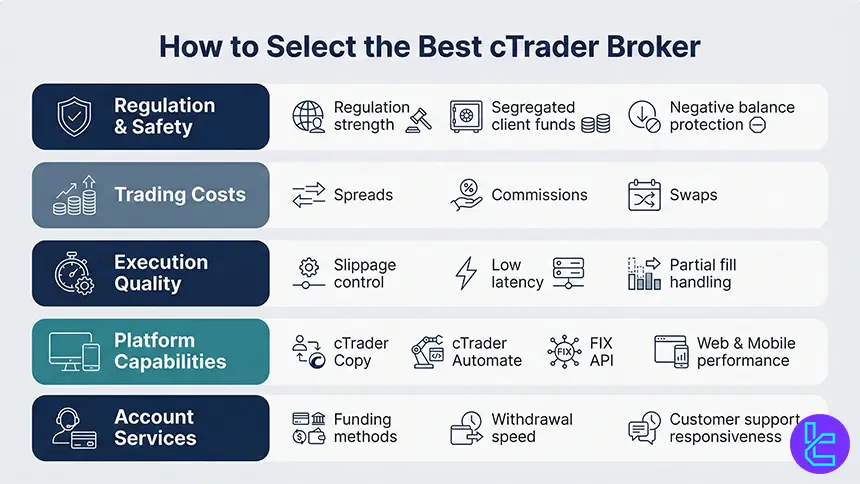
Selecting the best cTrader broker starts with trading conditions that match your strategy. Focus on minimum spreads, commission structure, execution speed, and depth of liquidity, because cTrader is often used for scalping and automation.
Safety and usability matter just as much as pricing. Prioritize regulation quality, segregated client funds, negative balance protection, and a clean operational record. Then confirm platform depth, such as cTrader Copy, cTrader Automate, FIX API access, and stable web and mobile performance across peak session hours.
- Regulation strength and client fund safeguards
- True all in costs: spreads, commissions, swaps
- Execution quality: slippage, latency, partial fills
- Platform completeness: Copy, Automate, API, mobile
- Funding methods, withdrawals, and support response
What is cTrader?
cTrader is a multi-module trading platform built for forex and CFD trading, launched in 2011 by Spotware Systems. It combines charting, order execution, copy trading, and automation in one ecosystem designed for transparency and modern workflow, with a consistent interface across desktop, web, and mobile.
The platform is widely adopted by ECN-style brokers and emphasizes market depth, fast order handling, and flexible order types. It supports manual trading, copy trading through cTrader Copy, and algorithmic development through cTrader Automate using C# for cBots and custom indicators.
What Are the Advantages of cTrader?
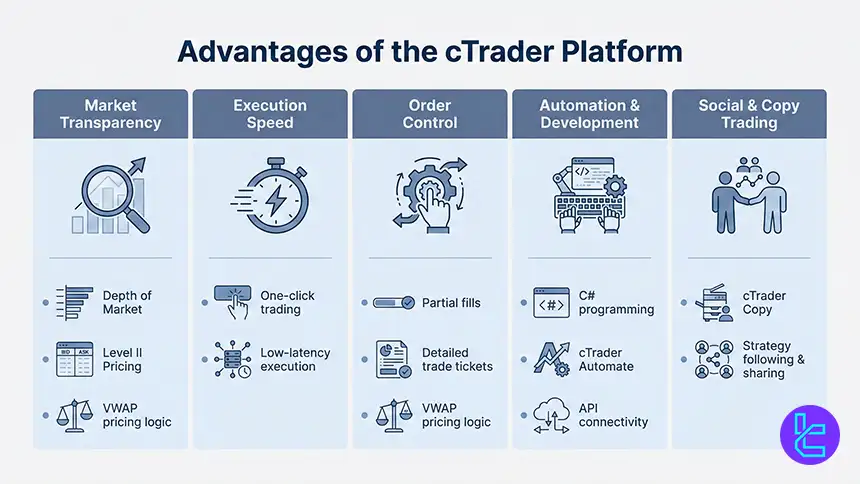
cTrader stands out for its advanced charting and depth of market tools that help traders assess liquidity and order flow. It supports Level II pricing, multiple chart types, and extensive timeframes, while keeping the interface clean and efficient for fast decision-making under volatile conditions.
For active traders, cTrader offers one-click execution, partial fills with volume-weighted average pricing logic, and detailed trade tickets. For systematic traders, cTrader Automate enables cBots and custom indicators in C#, plus backtesting controls that can include commissions and spreads for more realistic simulations.
- Depth of Market and Level II pricing tools
- Fast order entry with one-click trading
- Partial fills supported and detailed order tickets
- C# automation via cTrader Automate and APIs
- Copy trading built in through cTrader Copy
Is cTrader Free?
cTrader is free to download and use as a platform suite, including web and mobile access. You can also open demo accounts to practice without risking real funds. The platform itself does not charge a subscription fee for standard access to charting and execution tools.
Your trading costs depend on the broker and the account type connected to cTrader. Brokers may charge commissions, spreads, and swaps, and some may apply account level fees, such as inactivity or withdrawals. Always evaluate total cost per trade rather than platform price alone.
Custom Indicators on cTrader
cTrader supports custom indicators through its automation environment and developer ecosystem. Traders can install indicators from community libraries or build proprietary tools in C# for specific workflows, such as liquidity filters, session trackers, or volatility-based risk overlays.
Custom indicators integrate directly into charts and can be combined with alerts, watchlists, and template layouts. This flexibility helps traders standardize setups across multiple instruments and timeframes. For serious system builders, custom indicators can also be packaged with cBots for semi-automated or fully automated execution.
Devices and Operating Systems Supporting cTrader
cTrader supports desktop, web, and mobile usage so traders can monitor and execute across devices. Desktop versions are commonly used for advanced workflows and automation, while the cTrader web version provides quick access without installation and works across major browsers for flexibility in different environments.
Mobile apps for iOS and Android provide charting, watchlists, alerts, and order execution for on-the-go management. This multi-device access helps traders manage risk during high volatility sessions, monitor overnight positions, and respond quickly to price moves without being tied to a single workstation. cTrader download links:
Does cTrader Support VPS Trading and Auto Trading?
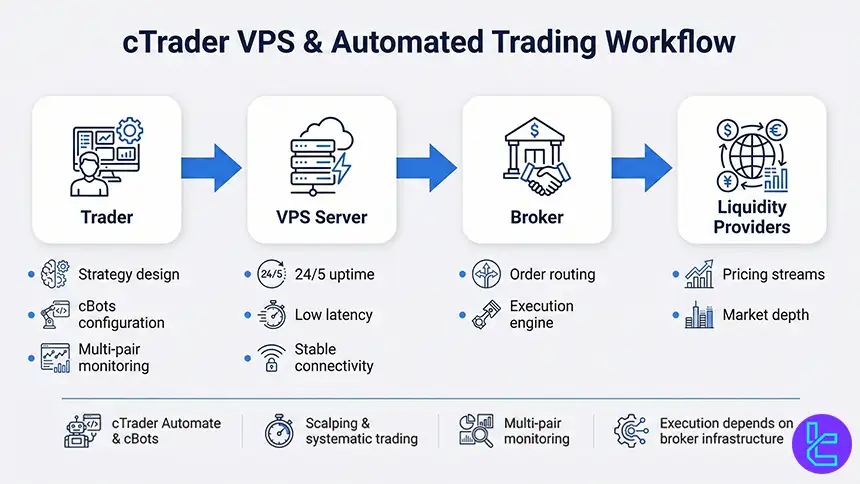
cTrader supports automated trading through cTrader Automate, where algorithms called cBots can execute strategies based on predefined rules. Auto trading is typically used for systematic execution, scalping, and multi-pair monitoring, especially when consistency and reaction speed are critical.
Many traders run cTrader automation on a VPS to maintain uptime and reduce latency, particularly during major session overlaps and news releases. A VPS setup can keep cBots active 24 hours during the trading week, reduce connection drops, and stabilize execution for strategies sensitive to slippage.
- Automated trading via cTrader Automate and cBots
- VPS improves uptime and execution stability
- Useful for scalping, systematic strategies, and multi-pair monitoring
- Latency and reliability depend on broker infrastructure
How to Connect cTrader to Your Broker
Connecting cTrader to a broker usually starts with creating a cTrader ID, which acts as a single login across supported brokers and devices. After opening a broker account that supports cTrader, you link or access that account inside the platform using the credentials provided during registration.
Once logged in, you can switch between demo and live accounts and sync watchlists and layouts.
Using the same email across broker registration and cTrader ID helps reduce account linkage issues. After connection, confirm symbols, leverage settings, and trading hours before placing your first live order.
Does cTrader Support Back-Testing?
cTrader includes backtesting for automated strategies using historical data, allowing traders to evaluate how a cBot might have performed under past market conditions. Backtesting helps measure drawdowns, win rate, and expectancy, which are essential for validating a system before risking capital.
The platform can generate detailed reports after tests, showing executed trades and balance changes.
Traders can also configure trading conditions during testing, such as spreads and commissions, to make results more realistic. This feature is especially valuable for refining parameters and stress testing risk rules.
cTrader Brokers’ Regulations
Regulation quality is a core filter when choosing a cTrader broker because it influences client fund segregation, disclosures, and dispute handling. Strong regulators typically enforce clear operational standards, periodic reporting, and strict rules on marketing claims, which reduces the probability of abusive practices.
Because cTrader is offered through brokers rather than directly regulated by a single authority, traders should evaluate each broker entity and its license.
Confirm the legal company name, jurisdiction, and whether negative balance protection and segregation are mandatory under that license, not just advertised in marketing pages.
Non-Trading Services on cTrader
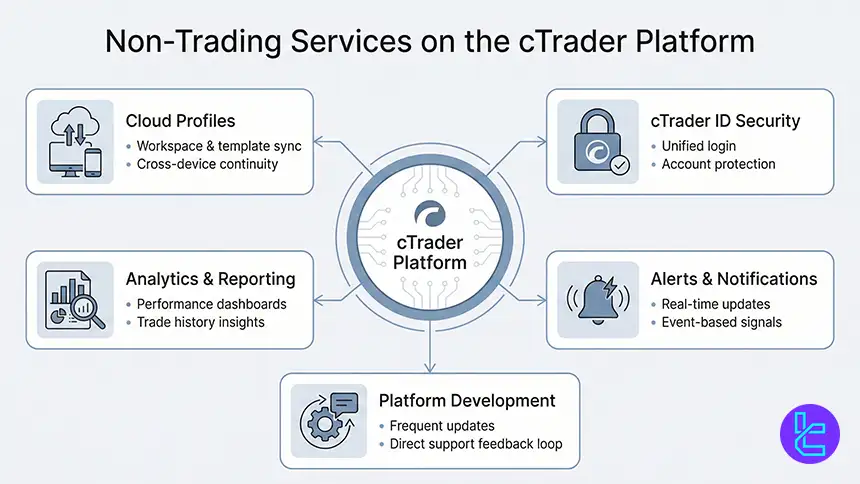
Beyond trading execution, cTrader provides a complete ecosystem of support services designed to enhance the overall user experience.
The platform includes integrated cloud profiles, allowing traders to synchronize settings, templates, and watchlists across devices, as well as secure account management through a single cTrader ID login system.
cTrader also offers built-in analytics dashboards, performance tracking, trade history reporting, and customizable notifications.
Its continuous development cycle delivers frequent platform upgrades, bug fixes, and feature expansions, while direct communication channels with the cTrader support team ensure rapid issue resolution and ongoing product improvements.
What Trading Markets Does cTrader Support?
cTrader supports forex and CFDs across multiple market types, with availability determined by the broker. Common coverage includes currency pairs, indices, commodities, metals, and cryptocurrencies, while some brokers also provide share CFDs and ETF style exposures depending on regional rules.
This multi-asset structure helps traders apply the same execution interface across diversified strategies, such as hedging risk with indices, trading macro themes via commodities, or running relative value setups across correlated FX pairs.
Always confirm contract specifications, swaps, and margin rules per instrument with your broker.
Do cTrader Brokers Offer Proprietary Platforms, too?
Many brokers that support cTrader also provide alternative platforms, such as proprietary web terminals or MetaTrader suites. This gives traders flexibility to choose cTrader for execution and charting while using other platforms for specific tools like broader community indicators or different copy trading networks.
A multi-platform broker can be useful for teams or mixed skill groups, where some users prefer cTrader and others prefer MT4 or MetaTrader 5. When comparing options, confirm whether pricing and execution are consistent across platforms, because costs can differ by account type and routing.
cTrader Copy Trading and Social Features
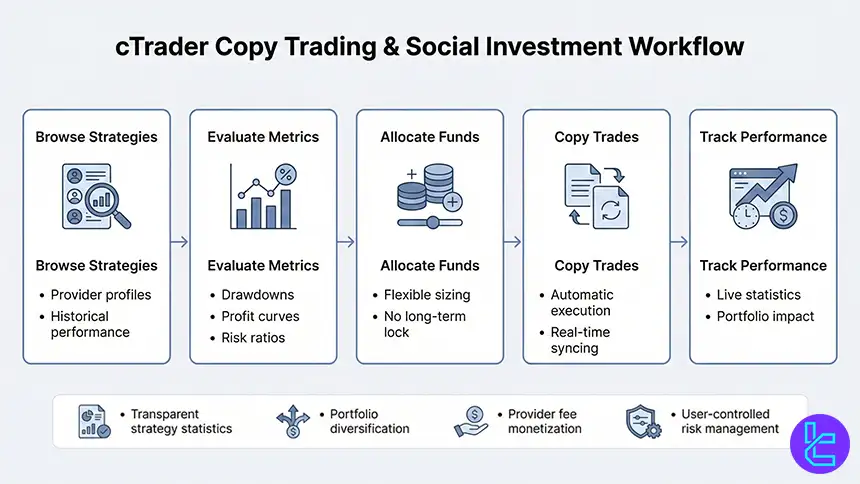
cTrader Copy is an integrated copy trading environment that lets users follow strategies or become providers with defined fee structures. Traders can compare performance metrics, drawdowns, and costs before allocating funds, and can adjust allocations without being locked into long-term commitments.
For providers, cTrader Copy offers a streamlined path to publish strategies and earn performance or management style fees depending on broker configuration. This creates a structured marketplace where transparency is higher than informal signal groups, while still requiring due diligence on risk, track record, and strategy behavior.
- Integrated copy trading with clear strategy statistics
- Flexible allocation and easier portfolio diversification
- Providers can monetize strategies through transparent fees
- Risk control still depends on user settings and discipline
Execution Model and Liquidity on cTrader
cTrader is commonly paired with ECN or STP execution models that route orders to liquidity providers without a traditional dealing desk. This can reduce conflict of interest and improve pricing transparency, especially when combined with depth of market and detailed order ticket information.
Execution quality still depends on the broker’s liquidity stack, server location, and risk controls. Traders should evaluate average spreads, slippage behavior during news, and whether partial fills occur at fair volume-weighted prices. For scalpers and bots, latency and stability are critical selection factors.
cTrader Compared to Popular Trading Platforms
Compared with MT4 and MT5, cTrader emphasizes modern UI, depth of market, and transparent order handling, making it attractive for ECN-style execution and active trading. It supports multiple order types and fast workflow, while using C# for automation, which appeals to developers familiar with .NET ecosystems.
Comparison Parameter | cTrader | |||
Primary Use Case | ECN Forex & CFD trading | Multi-asset trading | Charting & market analysis | Forex & CFD trading |
Tradable Assets | Forex, indices, commodities, crypto (CFDs) | Forex, stocks, indices, commodities, crypto | Forex, stocks, crypto, futures | Mainly Forex, CFDs |
Order Types | Market, Limit, Stop, Stop Limit, Market Range, Trailing Stop | Market, Buy/Sell Limit, Buy/Sell Stop, Buy/Sell Stop Limit, Trailing Stop | Market & Limit (broker-dependent), alerts-based execution | Market, Buy/Sell Limit, Buy/Sell Stop, Trailing Stop |
Algorithmic Trading | Yes (cAlgo / C#) | Yes (MQL5 EAs) | Limited (via Pine Script strategies) | Yes (MQL4 EAs) |
Chart Types | Candlestick, Bar, Line, Heikin Ashi, Renko | Candlestick, Bar, Line | Candlestick, Heikin Ashi, Renko, Kagi, Line Break, Point & Figure | Candlestick, Bar, Line |
Strategy Backtesting | Tick-accurate backtesting | Multi-threaded | Bar Replay (manual) | Single-threaded |
Social / Community Features | Limited (copy trading via cTrader Copy) | No | Yes (ideas, streams, chat) | No |
Platform Access | Desktop, Web, Mobile | Desktop, Web, Mobile | Web, Desktop, Mobile | Desktop, Web, Mobile |
Typical User Profile | ECN-focused & professional traders | Advanced multi-asset traders | Analysts & discretionary traders | Algorithmic & retail Forex traders |
Price | Free platform (broker-provided) | Free platform (broker-provided) | Free plan + paid subscriptions | Free platform (broker-provided) |
Conclusion and Final Words
Today’s top cTrader brokers combine ultra-low spreads from 0.0 pips, institutional-grade liquidity, advanced automation via cTrader Automate, copy trading with cTrader Copy, and deep market transparency.
These factors make cTrader environments especially suitable for ECN execution, algorithmic trading, multi-asset strategies, scalping, high-frequency systems, and professional portfolio execution.
“As with all broker rankings and platform evaluations, the final selection is based on the TradingFinder Forex methodology, which systematically analyzes regulation strength, execution performance, total trading costs, platform integration, liquidity depth, client protection standards, and real-world trading conditions.”






