












Mac users have access to a various Forex and CFD brokerages that offer macOS compatible trading platforms such as TradingView, MetaTrader 4, MetaTrader 5, Trade Station, cTrader, Ninja Trader, and more.
The best trading platforms for Mac users listed below offer, low spreads from 0.0 pips, minimal commissions, over 200 tradable assets and various other features.
 | Pepperstone | |||
 | IC Markets | |||
 | AvaTrade | |||
| 4 |  | FxPro | ||
| 5 |  | FXCM | ||
| 6 |  | eToro | ||
| 7 |  | XM Group | ||
| 8 |  | Errante |
Trustpilot Rating of Trading Platforms for Mac Users
Traders must consider the ratings of best Forex trading platforms for Mac users to ensure they trade with a good brokerage.
Broker | Trustpilot Rating | Number of Reviews |
IC Markets | 4.8/5⭐️ | +50000 |
AvaTrade | 4.7/5⭐️ | +11500 |
FXCM | 4.6/5⭐️ | +800 |
Pepperstone | 4.3/5⭐️ | +3000 |
4.2/5⭐️ | +29500 | |
FxPro | 3.8/5⭐️ | +850 |
3.4/5⭐️ | +2500 | |
Errante | 2.6/5⭐️ | +30 |
Minimum Spreads in Trading Platforms for Mac Users
Spread is the main cost of trading for Mac users. Here are the minimum spreads of the best brokers for traders who use Mav OS
Broker | Minimum Spreads |
0.0 Pips | |
OANADA | 0.0 Pips |
IC Markets | 0.0 Pips |
Interactive Brokers | 0.1 Pips |
IG Markets | 0.6 Pips |
0.6 Pips | |
FXCM | 0.8 Pips |
eToro | 1.0 Pip |
Non-Trading Fees of Trading Platforms for Mac Users
Non-trading fees in Forex brokers, include currency conversion, deposit, withdrawal, and inactivity fees. The table below offers insights on the amount non-trading fees in the best trading platforms for Mac users.
Broker | Deposit Fee | Withdrawal Fee | Inactivity Fee |
Exness | $0 | $0 | $0 |
$0 | $0 | $0 | |
Saxo Bank | $0 | $0 | $0 |
FP Markets | $0 | $0 | $0 |
FXCM | $0 | Varies (Maximum $30) | $5 |
$0 | Varies (Maximum $50) | $15 | |
XTB | Varies (Maximum 2%) | Free Withdrawals above $50 | €10 |
Swissquote | Varies (Maximum $10) | Varies (Maximum $10) | €50 per quarter |
Number of Tradable Instruments in Trading Platforms for Mac Users
Mac users can diversify their trading portfolio by choosing a broker that offers a wide variety of tradable assets. Here’s a list of the best brokers that offer a wide variety of symbols and markets.
Broker | Number of Tradable Instruments |
FP Markets | 10000+ |
eToro | 5000+ |
3000+ | |
2100+ | |
Go Markets | 2000+ |
FBS | 550+ |
OctaFX | 300+ |
JustMarkets | 250+ |
Top 6 Trading Platforms for Mac Users
Since MT4, MT5, cTrader, and TradingView (the most well-known trading apps and platforms in the world) are available on Mac, traders who use Apple products can use any Forex brokerage that offer one of these trading platforms.
Pepperstone
Pepperstone is an established multi-asset forex and CFD broker that has operated globally since 2010, serving a broad international client base under regulatory supervision from authorities such as ASIC, FCA, CySEC, BaFin, DFSA, and CMA.

The broker provides access to more than 1,200 tradable instruments across Forex, commodities, indices, cryptocurrencies, shares, and ETFs, with leverage structures reaching up to 1:500 depending on jurisdiction.
Its infrastructure processes an average daily volume of 9.2 billion USD for over 400,000 clients worldwide.
Trading is supported through MetaTrader 4, MetaTrader 5, cTrader, TradingView, and Pepperstone’s proprietary web and mobile platforms, all available on Windows, browser environments, mobile devices, and fully compatible with Mac systems.
Account types include Standard, Razor, Demo, and Islamic options, with no fixed minimum deposit and pricing models based on variable spreads, raw spreads, and commission-based execution structures.
From an operational standpoint, Pepperstone registration follows a structured KYC and account-verification workflow aligned with global compliance standards.
Pepperstone broader trading ecosystem incorporates Signal Start, DupliTrade, MetaTrader Signals, TradingView community features, Expert Advisors, algorithmic trading modules, automated execution engines, VPS hosting environments, and copy trading infrastructures.
Traders can use the TradingFinder IB services and reduce trading costs up to 12.857% by leveraging Pepperstone rebates.
Account Types | Standard, Razor, Demo, Islamic |
Regulating Authorities | ASIC (Australia), FCA (United Kingdom), CySEC (Cyprus), BaFin (Germany), DFSA (UAE), CMA (Kenya), SCB (Bahamas) |
Minimum Deposit | No fixed minimum (technical minimum around $10 depending on payment method) |
Deposit Methods | Apple Pay, Google Pay, Visa, Mastercard, Bank Transfer, PayPal, Neteller, Skrill, UnionPay, USDT, ZotaPay |
Withdrawal Methods | Apple Pay, Google Pay, Visa, Mastercard, Bank Transfer, PayPal, Neteller, Skrill, UnionPay, USDT, ZotaPay |
Maximum Leverage | Up to 1:500 |
Trading Platforms & Apps | MetaTrader 4, MetaTrader 5, cTrader, TradingView, Pepperstone Web Platform, Pepperstone Mobile App |
Pepperstone Pros and Cons
Consider the following benefits and drawbacks before joining the Pepperstone broker.
Pros | Cons |
Regulated by multiple tier-1 authorities including ASIC, FCA, CySEC, BaFin, DFSA, and CMA | Limited availability of traditional bonuses and promotions |
Broad access to 1,200+ instruments across Forex, indices, commodities, crypto, shares, and ETFs | No built-in PAMM or managed investment accounts |
Advanced trading platforms including MetaTrader 4, MetaTrader 5, cTrader, and TradingView | - |
Deep liquidity environment with low-latency execution infrastructure | - |
IC Markets
IC Markets is a globally active multi-asset Forex and CFD broker founded in Australia in 2007, with regulated entities operating under ASIC, CySEC, and the Seychelles FSA.
The brokerage supports clients across Europe, Australia, and international jurisdictions, while maintaining regulatory standards such as segregated client funds, financial audits, anti-money laundering compliance, and negative balance protection for eligible regions.
European clients under CySEC supervision are additionally covered by the Investor Compensation Fund up to €20,000
The trading environment delivers access to over 2,250 instruments across Forex, indices, commodities, stocks, bonds, and cryptocurrencies, with execution handled through MetaTrader 4, MetaTrader 5, cTrader, cTrader Web, and IC Markets Mobile.
Account structures include Standard, Raw Spread, and Islamic accounts, each aligned with distinct cost models combining variable spreads, raw pricing, and commission-based execution.
Pricing on major pairs such as EUR/USD regularly reflects spreads from 0.0 pips on Raw accounts, with commission levels averaging $1.5 per lot. Traders can reduce trading costs by joining this broker using TradingFinder’s exclusive link and earn $3 per lot IC Markets rebate.
The broker offers automated trading, Expert Advisors, scalping, copy trading via cTrader, and institutional-grade liquidity routing, supported by a minimum deposit requirement of $200 and base currencies spanning USD, EUR, AUD, GBP, SGD, NZD, JPY, CHF, HKD, and CAD.
Account Types | Standard, Raw Spread, Islamic |
Regulating Authorities | ASIC, CySEC, FSA |
Minimum Deposit | $200 |
Deposit Methods | Bank Cards, Wire Transfer, PayPal, Skrill, Neteller, UnionPay, Bpay, POLI, Electronic Payments |
Withdrawal Methods | Bank Transfer, Credit/Debit Cards, PayPal, Skrill, Neteller, E-wallets |
Maximum Leverage | Up to 1:500 |
Trading Platforms & Apps | MetaTrader 4, MetaTrader 5, cTrader, cTrader Web, IC Markets Mobile |
IC Markets Pros and Cons
Just like any other broker, IC Markets has it’s own pros and cons that traders must consider before joining it.
Pros | Cons |
Strong regulation under ASIC, CySEC, and FSA | $200 minimum deposit may be high for beginners |
Very low spreads from 0.0 pips | Leverage restrictions in EU and ASIC-regulated regions |
Advanced platforms MT4, MT5, and cTrader | No PAMM or managed account services |
Over 2,250 tradable instruments | - |
AvaTrade
AvaTrade is a globally regulated multi-asset brokerage operating under licenses from major authorities including the Central Bank of Ireland (CBI), ASIC, CySEC, FSCA, FSA (Japan), ADGM, ISA, and compliance with MiFID II across Europe.

This regulatory framework is supported by client fund segregation, negative balance protection, and region-specific investor compensation coverage up to €20,000 for eligible EU clients.
The broker provides access to more than 1,250 instruments spanning Forex, metals, stocks, commodities, indices, cryptocurrencies, bonds, and options after completing the AvaTrade registration.
Trading is supported via MetaTrader 4, MetaTrader 5, AvaTrade WebTrader, mobile applications for iOS and Android, and AvaOptions, with availability for macOS users through web-based and platform installations.
Account structures include Retail, Professional, Islamic, and Demo, with a minimum deposit requirement of $100.
AvaTrade applies fixed-spread pricing with no commission on deposits or withdrawals, while overnight financing and inactivity policies define its non-trading cost framework.
The trading environment in the AvaTrade dashboard integrates copy trading through DupliTrade and AvaSocial, automated execution, advanced charting, and diversified risk-management tools.
Operational metrics include margin call and stop-out levels of 25% and 10% respectively, combined with multi-language client support operating on a 24/5 basis.
Traders have access to various AvaTrade deposit and withdrawal methods, including Neteller, Visa, MasterCard, wire transfers, and more.
Account Types | Retail, Professional, Islamic, Demo |
Regulating Authorities | CBI, ASIC, CySEC, FSCA, FSA, MiFID, ADGM, ISA |
Minimum Deposit | $100 |
Deposit Methods | Credit/Debit Cards, Bank Wire Transfer, Skrill, Neteller, WebMoney, PayPal, E-wallets |
Withdrawal Methods | Credit/Debit Cards, Bank Wire Transfer, Skrill, Neteller, WebMoney, PayPal, E-wallets |
Maximum Leverage | Up to 1:400 |
Trading Platforms & Apps | MetaTrader 4, MetaTrader 5, AvaTrade WebTrader, Mobile App, AvaOptions |
AvaTrade Pros and Cons
The table below provides deeper insights on the benefits and drawbacks of trading with AvaTrade broker.
Pros | Cons |
Strong multi-jurisdiction regulation | Inactivity fees after extended periods ($10 per quarter) |
Over 1,250 tradable instruments | No PAMM investment accounts |
Wide platform ecosystem including MT4, MT5, WebTrader, AvaOptions | Regional restrictions on bonuses |
Integrated copy trading via DupliTrade and AvaSocial | - |
FXCM
FXCM, short for Forex Capital Markets, is a long-standing global Forex and CFD broker operating since 1999 and regulated across multiple jurisdictions by authorities such as the FCA in the United Kingdom, ASIC in Australia, CySEC in Cyprus, FSCA in South Africa, and ISA in Israel.
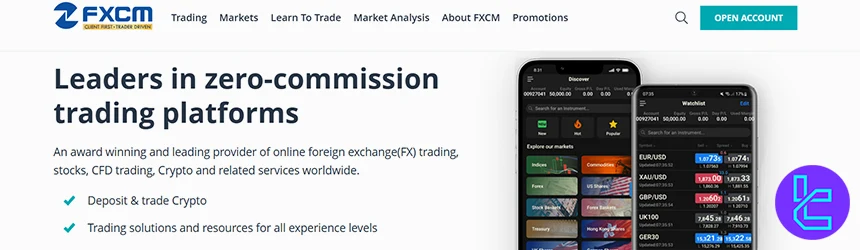
Client protection is reinforced through segregated accounts, negative balance protection, regular audits, and investor compensation schemes including FSCS coverage up to £85,000 for eligible UK clients.
The broker offers CFD, Active Trader, and Corporate account structures, with trading access to Forex, indices, commodities, cryptocurrencies, and shares.
FXCM supports advanced multi-platform trading through MetaTrader 4, TradingView, TradeStation, Trading Station, and AI-based automation via Capitalize AI, alongside copy trading through ZuluTrade.
Traders can use all these feature and trading platforms after completing the FXCM registration process.
All major platforms are accessible on Windows, web, mobile, and fully compatible with macOS environments, ensuring seamless functionality for Mac users via both native installations and browser-based interfaces.
Trading conditions feature floating spreads from 0.2 pips, market execution, leverage up to 1:1000 (jurisdiction-dependent), a $50 minimum deposit, and comprehensive funding support through bank transfer, Visa, MasterCard, Skrill, and Neteller.
The infrastructure is further supported by 24/5 multilingual client service, diversified educational resources, and integrated algorithmic trading ecosystems.
Traders can also use the FXCM rebate program to lower trading costs up to $2 per lot for gold and other precious metals.
Account Types | CFD Account, Active Trader Account, Corporate Account |
Regulating Authorities | FCA, ASIC, CySEC, ISA, FSCA |
Minimum Deposit | 50 USD |
Deposit Methods | Credit/Debit Cards (Visa, MasterCard), Bank Transfer, Skrill, Neteller |
Withdrawal Methods | Credit/Debit Cards (Visa, MasterCard), Bank Transfer, Skrill, Neteller |
Maximum Leverage | Up to 1:1000 (jurisdiction dependent) |
Trading Platforms & Apps | MetaTrader 4 (MT4), TradingView, TradeStation, FXCM Trading Station (Web, Android, iOS) |
FXCM Pros and Cons
Considering the following benefits and limitations is essential when trading with the FXCM broker.
Pros | Cons |
Regulated by multiple tier-1 authorities | History of regulatory penalties and bankruptcy in 2017 |
Over 20 years of market presence | $50 annual inactivity fee |
Advanced platforms including MT4, TradingView, TradeStation | $40 fee on bank withdrawals |
Support for algorithmic and copy trading | - |
FxPro
FxPro is a global multi-asset brokerage operating since 2006, providing access to more than 2,100 instruments across Forex, shares, indices, futures, metals, energy, and cryptocurrencies.
The broker operates under a multi-jurisdiction regulatory framework with licenses from FCA, CySEC, FSCA, and SCB, supported by investor protection mechanisms such as segregated client funds and negative balance protection. Traders must complete the FxPro verification process to comply with AML and KYC laws.
FxPro supports a diversified execution environment with Market and Instant Execution models, advanced liquidity routing, and average execution speeds below 12 milliseconds.
Trading infrastructure is delivered through MetaTrader 4, MetaTrader 5, cTrader, WebTrader, and the FxPro Mobile App. Traders can easily download these platforms from the FxPro dashboard.
All platforms are fully compatible with Windows, web browsers, mobile devices, and macOS systems, allowing seamless operation for Mac users through native installations and browser-based terminals.
Account structures include Standard, Raw+, and Elite, complemented by Islamic (swap-free) accounts.
The cost framework combines variable spreads from 0.0 pips on Raw+ and Elite, commission-based pricing, and defined non-trading fees. However, these costs can be lowered by using the FxPro rebate.
Operational services integrate automated trading, Expert Advisors, futures trading, scalping, and copy trading via FxPro CopyTrade, within a 24/5 multi-channel client support environment.
Account Types | Standard, Raw+, Elite |
Regulating Authorities | FCA, CySEC, FSCA, SCB |
Minimum Deposit | $100 |
Deposit Methods | Visa, MasterCard, Bank Wire Transfer, Broker to Broker Transfer, Skrill, Neteller, PayPal |
Withdrawal Methods | Visa, MasterCard, Bank Wire Transfer, Broker to Broker Transfer, Skrill, Neteller, PayPal |
Maximum Leverage | Up to 1:500 |
Trading Platforms & Apps | MetaTrader 4, MetaTrader 5, cTrader, WebTrader, FxPro Mobile App |
FxPro Pros and Cons
Here are the main benefits and drawbacks of trading with FxPro broker.
Pros | Cons |
Strong regulatory coverage across multiple regions | Higher minimum deposit for Raw+ and Elite accounts |
Over 2,100 tradable instruments | Limited bonus and promotional programs |
Ultra-fast execution and deep liquidity | No 24/7 customer support |
Wide platform ecosystem including MT4, MT5, cTrader | - |
eToro
eToro is a globally recognized multi-asset investment platform founded in 2007 and headquartered in Tel Aviv, operating under the regulatory supervision of major authorities including the FCA, CySEC, ASIC, MFSA, FSRA (Abu Dhabi), FSA Seychelles, and the GFSC.
The broker provides client fund segregation, negative balance protection in regulated regions, and investor compensation coverage up to GBP 85,000 under the UK FSCS and EUR 20,000 through the Cyprus ICF.
The trading ecosystem delivers access to more than 7,000 instruments across stocks, ETFs, commodities, indices, currencies, and cryptocurrencies.
The broker provides a proprietary multi-asset trading platform available via web, desktop environments, and dedicated mobile applications for iOS and Android.
Account structures include Personal, Professional, Corporate, and Islamic which are accessible after completing the eToro registration, with a minimum deposit of $10 and diversified funding channels such as PayPal, Skrill, Neteller, Trustly, and eToro Money.
Investment functionality extends beyond conventional trading through integrated social investing services including CopyTrader, Smart Portfolios, and crypto staking for assets such as ETH, ADA, SOL, and TRX. The infrastructure combines commission-based and spread-based pricing models, advanced risk management tools, and a 24/5 multilingual client support framework.
Account Types | Personal, Professional, Corporate, Islamic |
Regulating Authorities | FCA, CySEC, MFSA, FSRA (Abu Dhabi), ASIC, FSA (Seychelles), Gibraltar FSC |
Minimum Deposit | 10 USD |
Deposit Methods | eToro Money, Credit/Debit Card, Bank Transfer, PayPal, Neteller, Skrill, Online Banking (Trustly), iDEAL, Sofort, Przelewy24 |
Withdrawal Methods | eToro Money, Credit/Debit Card, Bank Transfer, PayPal, Neteller, Skrill, Online Banking (Trustly), iDEAL, Sofort, Przelewy24 |
Maximum Leverage | Up to 1:400 (Professional clients; Retail up to 1:30) |
Trading Platforms & Apps | eToro Proprietary Platform, Web Platform, Android App, iOS App |
eToro Pros and Cons
Here’s what traders must consider before opening an account with this Forex broker.
Pros | Cons |
Strong global regulatory coverage | No MT4 or MT5 platform support |
Advanced social investing ecosystem | No phone-based customer support |
Over 7,000 tradable instruments | Inactivity fee after 12 months |
Integrated copy trading and portfolio tools | Fixed $5 withdrawal fee on USD accounts |
Can I Trade Forex on Mac?
Yes, Forex trading on macOS is fully supported across modern brokerage infrastructures and professional trading ecosystems.
Leading brokers such as eToro, FxPro, FXCM, IC Markets, Pepperstone, and AvaTrade provide Mac-compatible access through web-based terminals, dedicated macOS installations, and cross-platform mobile environments.
Core trading platforms including MetaTrader 4, MetaTrader 5, cTrader, TradingView, WebTrader, and proprietary broker platforms operate seamlessly on Mac via native applications, browser terminals, or virtual environments.
Mac users can trade Forex pairs, CFDs, commodities, indices, cryptocurrencies, ETFs, and stocks.
You also have full access to charting engines, algorithmic trading modules, Expert Advisors, copy trading, liquidity routing systems, and risk-management frameworks, while maintaining compatibility with macOS security architecture and performance optimization layers.
How to Trade Forex on a Mac Device
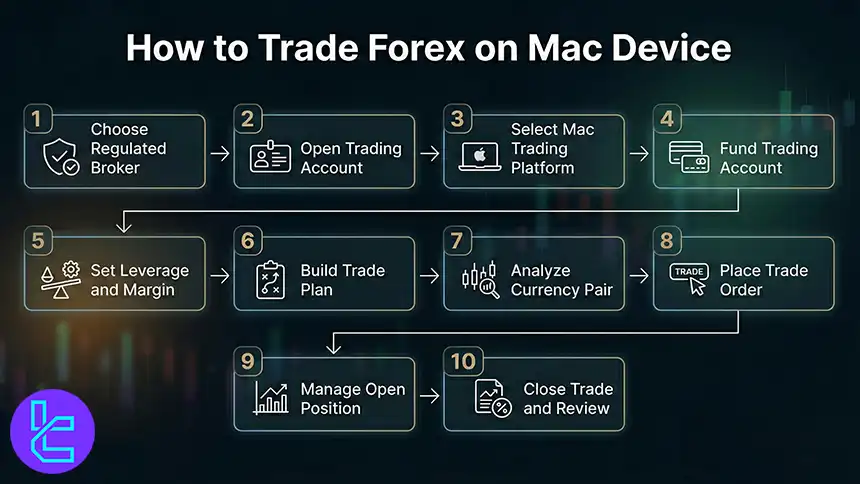
Forex trading on macOS typically involves choosing a regulated broker, setting up a live or demo account, and accessing a platform such as MetaTrader 4, MetaTrader 5, cTrader, TradingView, or a WebTrader terminal.
The workflow then moves to funding, selecting a currency pair, defining order parameters, and applying risk controls such as stop loss and take profit.
#1 Choose a Regulated Broker and Market Access
Pick a broker supervised by entities such as FCA, ASIC, CySEC, or FSCA, then confirm it offers Forex pairs and CFD markets on macOS through a web platform or a Mac-compatible desktop setup.
#2 Open a Live or Demo Account and Complete KYC
Create a live or demo account, set your account base currency, then finish KYC verification using ID and proof of address to unlock deposits, trading permissions, and withdrawals.
#3 Select a Mac-Friendly Trading Platform
Log in via TradingView Web, cTrader Web, MetaTrader Web, or install a supported desktop terminal where available, then verify chart loading, order tickets, and account synchronization on macOS.
#4 Fund the Account Using a Supported Payment Method
Deposit via bank transfer, credit or debit card, or e-wallets such as PayPal, Skrill, Neteller, or Trustly, then confirm processing time, conversion fees, and minimum deposit rules.
#5 Configure Leverage and Margin Settings
Set leverage according to your jurisdiction and broker rules, check margin requirements, then confirm free margin, margin level, and liquidation thresholds before entering exposure.
#6 Build a Trade Plan and Define Risk Parameters
Choose position sizing in lots or units, set a risk to reward target, and predefine invalidation levels so each order has a measurable stop loss distance and maximum loss limit.
#7 Select the Currency Pair and Analyze the Chart
Pick pairs such as EUR/USD, GBP/USD, USD/JPY, or XAU/USD, then apply timeframe selection, key levels, volatility context, and session behavior before placing an order.
#8 Place the Order with Precise Execution Instructions
Choose market or pending orders such as limit or stop, set entry price, volume, stop loss, and take profit, then confirm the order ticket reflects spread, swap, and commission fields.
#9 Monitor Execution, Manage the Position, and Adjust Orders
Track slippage, fill price, and spread changes, then manage the trade with partial closes, trailing stop logic, or break-even adjustments while monitoring margin usage.
#10 Close the trade and review performance metrics
Close manually or via take profit or stop loss, then review trade history, realized P and L, drawdown, and execution statistics to refine your process for the next cycle.
Which Forex Trading Platforms are Available for Mac Users?
Mac traders today can access a broad ecosystem of professional trading platforms that deliver full Forex and CFD functionality through native applications, web terminals, and cross-device environments.
These platforms integrate advanced charting, order execution systems, algorithmic trading engines, and risk-management modules while maintaining seamless compatibility with macOS.
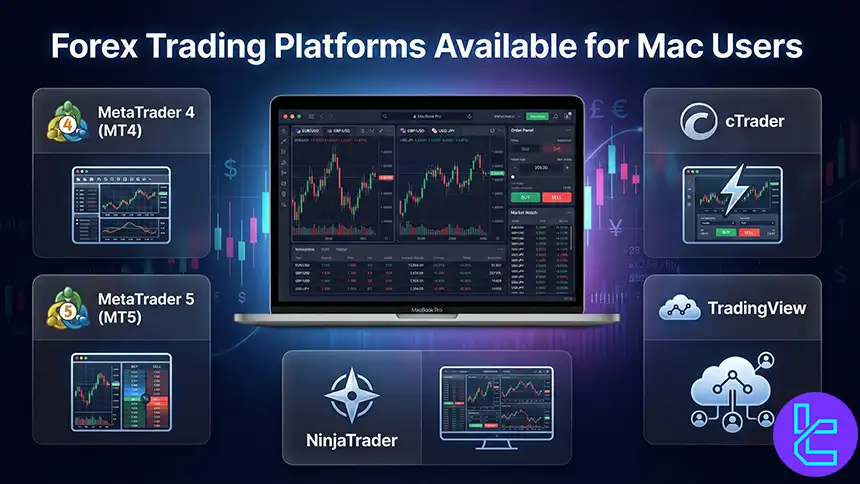
MetaTrader 4 (MT4)
MetaTrader 4 remains a core platform for Forex trading on macOS, offering extensive technical indicators, custom Expert Advisors, automated trading support, and advanced charting frameworks.
MT4 enables execution across major currency pairs, commodities, indices, and CFDs with integrated VPS hosting, strategy tester modules, and multi-account management.
MetaTrader 5 (MT5)
MetaTrader 5 expands the MT ecosystem with additional timeframes, more order types, built-in economic calendar access, and broader multi-asset coverage including stocks, futures market, options, and ETFs.
Mac users benefit from MT5’s enhanced Depth of Market, improved backtesting engine, and multi-threaded strategy optimization, making it suitable for systematic trading, portfolio analysis, and institutional-grade execution workflows.
cTrader
cTrader delivers a modern trading environment on macOS with advanced order execution, level-2 pricing, detachable chart panels, and native algorithmic trading via cAlgo.
Its infrastructure supports Forex, metals, indices, and crypto CFDs, while integrating FIX API connectivity, advanced risk controls, and ultra-low-latency execution models favored by high-frequency and professional traders.
TradingView
TradingView operates as a browser-based and cloud-native trading platform fully optimized for macOS, combining powerful charting tools, Pine Script strategy development, social trading networks, and multi-market data feeds.
Mac users can analyze Forex, stocks, cryptocurrencies, commodities, and indices, execute trades via broker integrations, and collaborate within TradingView’s global analytics community.
NinjaTrader
NinjaTrader 8 extends advanced trading capabilities to Mac users through supported environments, offering institutional-grade charting, order flow analysis, automated strategy development, and futures and Forex market access.
Its ecosystem integrates advanced backtesting, volume profiling, market replay, and algorithmic execution engines designed for professional trading operations.
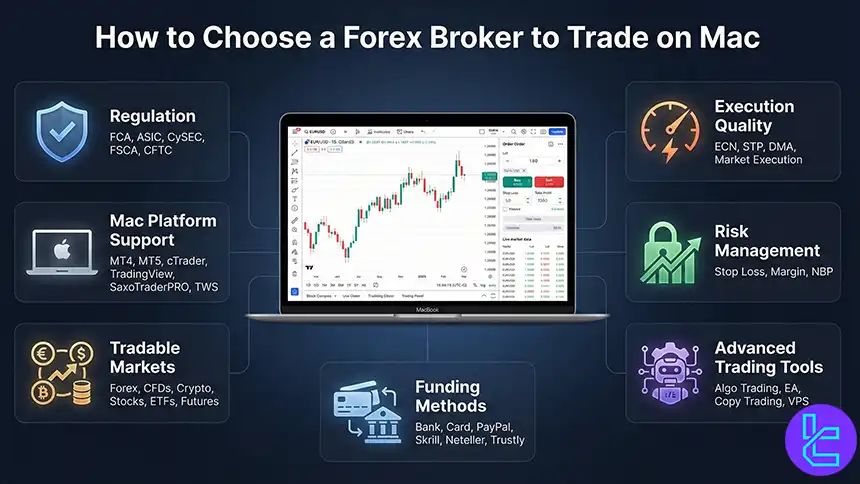
How to Choose a Forex Broker to Trade on Mac
Selecting a Forex broker for macOS requires more than basic platform availability.
The optimal choice balances regulatory oversight, platform compatibility, execution quality, and infrastructure stability while ensuring seamless performance within the Apple ecosystem.
Brokers that provide native macOS support or fully optimized web terminals deliver a smoother trading experience without reliance on emulators or virtualization layers, which can introduce latency and operational risk.
Modern Mac-based trading environments also benefit from sufficient hardware resources.
A stable setup typically includes updated macOS versions, at least 16 GB of RAM for multi-chart workloads, fast SSD storage, and reliable network connectivity to support real-time price feeds, order execution engines, and risk-management modules.
Here are the key evaluation points to include when comparing Forex brokers:
- Regulation and licensing by authorities such as FCA, ASIC, CySEC, FSCA, and CFTC;
- Mac-compatible platforms including MetaTrader 4, MetaTrader 5, cTrader, TradingView, SaxoTraderPRO, and Interactive Brokers TWS;
- Access to Forex, CFDs, indices, commodities, cryptocurrencies, stocks, ETFs, and futures;
- Execution models such as ECN, STP, DMA, and market execution;
- Risk management features including negative balance protection, stop-loss controls, and margin monitoring;
- Availability of algorithmic trading, Expert Advisors, copy trading networks, and VPS hosting;
- Multi-channel funding support via bank transfer, credit cards, PayPal, Skrill, Neteller, and Trustly.
This framework allows Mac users to align broker selection with both technical and trading performance requirements.
How Can I Set up a Forex Trading Platform on a Mac Computer?
Installing a Forex trading platform on macOS begins with obtaining the official setup package directly from your broker’s website or from the platform provider.
After downloading the installer, verify that your current macOS build meets the platform’s system requirements, then proceed with the guided installation process.
For platforms without native macOS support, operation can be achieved through virtualization environments or compatibility frameworks.
Comparison of the Trading Platforms for Mac User
Mac user who user international brokers mainly have access to 4 platforms, including MT4, MT5, TradingView, and cTrader. The table below helps traders understand the benefits, features, and drawbacks of using a trading platfrom.
Comparison Parameter | cTrader | |||
Primary Use Case | Forex & CFD trading | Multi-asset trading | Charting & market analysis | ECN Forex & CFD trading |
Tradable Assets | Mainly Forex, CFDs | Forex, stocks, indices, commodities, crypto | Forex, stocks, crypto, futures | Forex, indices, commodities, crypto (CFDs) |
Order Types | Market, Buy/Sell Limit, Buy/Sell Stop, Trailing Stop | Market, Buy/Sell Limit, Buy/Sell Stop, Buy/Sell Stop Limit, Trailing Stop | Market & Limit (broker-dependent), alerts-based execution | Market, Limit, Stop, Stop Limit, Market Range, Trailing Stop |
Algorithmic and Copy Trading | Yes | Yes | Yes (But limited) | Yes (cAlgo and cTrader Copy) |
Chart Types | Candlestick, Bar, Line | Candlestick, Bar, Line | Candlestick, Heikin Ashi, Renko, Kagi, Line Break, Point & Figure | Candlestick, Bar, Line, Heikin Ashi, Renko |
Strategy Backtesting | Single-threaded | Multi-threaded | Bar Replay (manual) | Tick-accurate backtesting |
Social / Community Features | No | No | Yes (ideas, streams, chat) | Limited |
Platform Access | Desktop, Web, Mobile | Desktop, Web, Mobile | Web, Desktop, Mobile | Desktop, Web, Mobile |
Typical User Profile | Algorithmic & retail Forex traders | Advanced multi-asset traders | Analysts & discretionary traders | ECN-focused & professional traders |
Price | Free platform (broker-provided) | Free platform (broker-provided) | Free plan + paid subscriptions | Free platform (broker-provided) |
Conclusion
Reviewing the best Forex brokers for Mac users showed us that Pepperstone, IC Markets, AvaTrade, FXCM, FxPro, and eToro are the best trading platforms that traders can choose.
Now traders must consider the variety of the platform options (such as MT4, MT5, cTrader, TradingView, or Trade Station), minimum spreads, deposit and withdrawal commissions, and customer support efficiency to choose the best brokerage that align with their trading goals.
The brokers review in the current list have been completely evaluated based on the TF experts Forex methodology. This guideline requires authors to access each Forex brokerage based on various factors such as spreads, regulation, account types, funding and withdrawal methods, and etc.






