












Algorithmic trading software automates strategy execution across forex, stocks, and crypto using rule-based logic, AI analytics, and ultra-fast execution. With the global market projected to hit 37.6 billion dollars by 2032, platforms like MetaTrader 5, NinjaTrader, TradeStation, and QuantConnect now serve both retail and institutional traders.
Modern algo trading platforms integrate OMS, backtesting, VWAP, and TWAP models. Choosing the right software depends heavily on broker infrastructure, execution quality, and API depth, which is why broker-level comparisons matter next. Best brokers with algo software:
 | Pepperstone | |||
 | FP Markets | |||
 | FXCM | |||
| 4 |  | Tickmill | ||
| 5 |  | IC Markets | ||
| 6 |  | FxPro | ||
| 7 |  | AvaTrade | ||
| 8 |  | FXTM |
Forex Brokers for Algo Trading Ranked by Trustpilot
Trustpilot rankings reveal how traders rate forex brokers that support algorithmic trading. Top-rated providers score above 4.7 out of 5 with thousands of verified reviews, signaling reliability, execution stability, and strong automation infrastructure, while lower-rated brokers highlight gaps in platform performance, support, or algo-friendly conditions.
Broker | Trustpilot Rating | Number of Reviews |
IC Markets | 49,951 | |
FP Markets | 9,750 | |
11,517 | ||
FXCM | 818 | |
3,196 | ||
FxPro | 857 | |
Tickmill | 1,066 | |
FXTM | 1,073 |
Algo Trading Brokers’ Minimum Spreads
Minimum spreads are a critical factor for algorithmic trading brokers, as tight pricing directly impacts execution costs and strategy profitability.
Several leading forex brokers now offer raw spreads from 0.0 pips, while others average between 0.2 and 0.4 pips, creating meaningful differences for high frequency and automated systems.
Broker | Min. Spread |
CapTrader | 0.0 Pips |
FOREX.com | 0.0 pts |
AvaTrade | 0.0 Pips |
Tickmill | 0.0 Pips |
0.0 Pips | |
Pepperstone | 0.0 Pips |
0.2 Pips | |
Saxo | 0.4 Pips |
Non-Trading Fees in Algo Trading Brokers
Non-trading fees play a significant role in the long-term cost of algorithmic trading. While most algo-friendly brokers eliminate deposit charges, differences emerge in withdrawal fees and inactivity costs.
Dormant fees range from zero to over $15 per month, which can materially affect low-frequency or dormant automated accounts.
Broker | Deposit Fee | Withdrawal Fee | Inactivity Fee |
IC Markets | No | No | No |
No | Up to 1% | No | |
FxPro | No | No | $5/month |
AvaTrade | No | No | $10/month |
OANDA | No | No | $14/month |
FOREX.com | No | No | $15/month |
No | Up to $30 | $10/month | |
FXCM | No | Up to $40 | $50/year |
Number of Trading Instruments in Brokers Supporting Algo Trading
The breadth of tradable instruments is a key advantage for algorithmic traders seeking diversification and multi-market strategies.
Brokers supporting algo trading now offer anywhere from 600 to over 71,000 instruments, spanning the forex market, stocks, indices, commodities, and CFDs, enabling scalable automation across global markets.
Broker | Tradable Instruments |
Saxo | 71,000+ |
13,000+ | |
CMC Markets | 12,000+ |
FOREX.com | 5,500+ |
FxPro | 2,100+ |
AvaTrade | 1,250+ |
Pepperstone | 1,200+ |
600+ |
Top 6 Algo Trading Brokers
These top 6 algo trading brokers were selected for automation-ready platforms and measurable trading conditions, from MT4 and MT5 Expert Advisors to C# robots on cTrader Automate and broker APIs.
The lineup spans 1999 to 2011 launches, $1 to $200 minimum deposits, leverage up to 1:3000, and regulator coverage from ASIC and FCA to CySEC, CBI, and ADGM.
Pepperstone
Pepperstone is an established forex and CFD broker (founded in 2010) built for systematic traders who need speed and stability. It processes about $9.2B in daily volume for 400,000+ clients, supports 10 base currencies, offers 0.01 to 100 lots per order, and provides leverage up to 1:500 in eligible regions.

Algo trading is central to Pepperstone’s stack, with MetaTrader 4 and MetaTrader 5 supporting Expert Advisors coded in MQL4 and MQL5, plus cTrader Automate for building and backtesting C# robots. Advanced users can connect custom systems through API trading for automated execution workflows.
Cost structure matters for automation, and Pepperstone targets low-friction pricing. Razor accounts can show spreads from 0.0 pips on major pairs with a $3.5 per side commission, while Standard accounts roll costs into the spread. The broker also states it charges no account-keeping or inactivity fees.
Regulation adds another layer of trust for long-term automation. Pepperstone operates under multiple authorities, including ASIC, FCA, CySEC, DFSA, BaFin, CMA, and SCB, with segregated client funds and negative balance protection, leading to a secure Pepperstone registration process.
Account Types | Standard, Razor |
Regulating Authorities | ASIC, SCB, FCA, DFSA, CMA, BaFin, CySEC |
Minimum Deposit | $1 |
Deposit Methods | Apple Pay, Google Pay, Visa, Mastercard, Bank transfer, PayPal, Neteller, Skrill, Union Pay, USDT, ZotaPay |
Withdrawal Methods | Apple Pay, Google Pay, Visa, Mastercard, Bank transfer, PayPal, Neteller, Skrill, Union Pay, USDT, ZotaPay |
Maximum Leverage | 1:30 |
Trading Platforms & Apps | Proprietary Platform, cTrader, Trading View, MetaTrader 4&5 |
Pepperstone Pros and Cons
The key pros and cons highlight where Pepperstone fits best for algo traders, from platform depth and execution tools to product limitations that may matter for certain automation styles.
Pros | Cons |
Strong automation support on MT4 and MT5 via Expert Advisors | Leverage can be capped to 1:30 under some regulators |
cTrader Automate enables C# algo development and backtesting | No traditional bonuses or promotions |
API trading access for advanced custom systems | No PAMM account option |
Pepperstone rebate program with commission cashbacks of up to 12.857% | Service is restricted in several countries, such as the United States |
FXCM
FXCM has operated in online Forex and CFD trading since 1999 and positions itself as a broker for systematic execution.
Algorithmic traders can deploy strategies on MT4, integrate TradingView for chart-driven workflows, or use TradeStation for more advanced automation, all under market execution.
For automation infrastructure, FXCM provides dedicated API options including FIX, Java, and ForexConnect, plus market data access for historical bid and ask, volume, and sentiment. This toolset supports building, testing, and scaling rule-based systems beyond basic platform scripts.
API documentation for FIX, ForexConnect, and Java connections is available on the FXCM GitHub page.
Regulation is a major factor for long-run algo deployment. FXCM operates under multiple authorities, including FCA, ASIC, CySEC, ISA, and FSCA, with safeguards such as segregated client funds, negative balance protection, and investor compensation up to £85,000 for eligible UK clients under FSCS coverage.
FXCM registration provides access to spreads floating from 0.2 pips and no CFD commission, with a $50 minimum deposit and 0.01 lot minimum order size.
Non-trading costs can matter for bots that pause, including a $50 per year inactivity fee and a $40 bank wire withdrawal fee. The FXCM rebate program offers cashbacks of up to $2 per lot on gold trading.
Account Types | CFD account, Active Trader account, Corporate account |
Regulating Authorities | FCA, ASIC, CySEC, ISA, FSCA |
Minimum Deposit | $50 |
Deposit Methods | Visa/MasterCard, Bank wired, Neteller, Skrill |
Withdrawal Methods | Visa/MasterCard, Bank wired, Neteller, Skrill |
Maximum Leverage | 1:1000 |
Trading Platforms & Apps | MT4, TradingView, TradeStation |
FXCM Pros and Cons
The pros and cons break down where FXCM fits best for algo traders, including API depth and platform choice, alongside cost and regulatory history considerations that can affect long-term automation plans.
Pros | Cons |
Multiple automation routes: MT4, TradeStation, TradingView, and APIs | Inactivity fee of $50 per year can penalize dormant bots |
API suite includes FIX, Java, and ForexConnect for custom systems | Bank wire withdrawals can cost up to $40 |
Multi regulated group with segregated funds and negative balance protection | Regulatory history includes a major 2017 CFTC enforcement action and US exit |
Access to market data tools like sentiment and historical bid and ask | Leverage and eligibility vary sharply by entity and jurisdiction |
FP Markets
FP Markets is an Australian broker founded in 2005 that targets systematic trading with multi-regulator coverage (ASIC, CySEC, FSCA, FSC, and offshore FSA entities) plus safeguards like segregated funds and negative balance protection. It supports MT4, MT5, and cTrader for automated execution across forex and CFDs.
Algo traders can run Expert Advisors on MetaTrader or automate cTrader strategies, while low-latency VPS hosting (including Equinix options) keeps bots running 24/7 with reduced slippage risk. The broker also supports API connectivity for custom models and integrates copy trading solutions such as Myfxbook AutoTrade.
Pricing is built for high-frequency styles. The RAW account lists spreads from 0.0 pips with a $3 commission, while the Standard account starts around 1.0 pips with zero commission, both available after completing the FP Markets verification procedure.
Both main accounts start from a $50 minimum deposit and allow micro sizing from 0.01 lots for granular risk control.
FP Markets registration provides access to 10,000+ tradable instruments across seven asset classes and a wide range of base currencies. With instant execution and 24/7 support, it suits traders who want to scale automated systems, then compare execution and conditions across brokers.
FP Markets deposit and withdrawal methods include cards, bank transfers, Skrill, Neteller, PayPal, etc.
Account Types | Standard, RAW |
Regulating Authorities | ASIC, CySEC, FSC, FSCA, FSA |
Minimum Deposit | $50 |
Deposit Methods | Visa and Master card, Skrill, PayPal, Neteller, Bank Transfer |
Withdrawal Methods | Visa and Master card, Skrill, PayPal, Neteller, Bank Transfer |
Maximum Leverage | 1:500 |
Trading Platforms & Apps | MT4, MT5, cTrader |
FP Markets Pros and Cons
The pros and cons summarize where FP Markets stands out for algo traders, and where limitations like regional availability or platform ownership may matter before choosing an automation-friendly broker.
Pros | Cons |
Strong algo stack: MT4, MT5, and cTrader automation | No proprietary trading platform for in-house automation features |
RAW pricing from 0.0 pips with a clear $3 commission | Some jurisdictions are restricted, including the United States |
VPS hosting options for low-latency 24/7 bot uptime | Leverage rules differ by entity, which can limit some strategies |
10,000+ instruments for multi-asset systematic trading | Certain withdrawal rails may carry third-party or country fees |
FXTM
FXTM is a forex and CFD broker founded in 2011 that serves 150+ countries and reports 1M+ users. Its offering is built around MetaTrader automation, copy trading via FXTM Invest, and a proprietary FXTM Trader App, alongside access to 1000+ tradable assets across multiple markets.

For algo trading, FXTM supports Expert Advisors on MT4 and MT5 using MQL4 and MQL5, with built in strategy testing for backtesting and optimization. The Advantage account structure can suit automated systems, listing spreads from 0.0 pips with commissions that vary by instrument and account.
Execution and uptime are key for automated strategies. FXTM dashboard supports swap-free accounts for eligible users, while VPS access is typically offered through third-party services to keep EAs running 24/7 without relying on a local machine or home internet.
Regulation is a core consideration for long-term system deployment. FXTM currently lists FSC Mauritius as its main regulator and notes that previous FCA, CySEC, and FSCA authorizations have expired.
This difference in oversight strength matters when comparing brokers for automation, pricing, and client protection. FXTM deposit and withdrawal methods include cards, FasaPay, Google Pay, Skrill, and many more.
Account Types | Advantage, Stocks Advantage, Advantage Plus |
Regulating Authorities | FSC |
Minimum Deposit | $200 |
Deposit Methods | FasaPay, TC Pay, M-Pesa, VISA, MasterCard, Maestro, Google Pay, GlobePay, Skrill, PayRedeem, Perfect Money, Neteller, Bank Wire Transfer |
Withdrawal Methods | FasaPay, TC Pay, M-Pesa, VISA, MasterCard, Maestro, Google Pay, GlobePay, Skrill, PayRedeem, Perfect Money, Neteller, Bank Wire Transfer |
Maximum Leverage | 1:3000 |
Trading Platforms & Apps | MT4, MT5, FXTM Trader App |
FXTM Pros and Cons
Before going through with the FXTM registration process, it’s important to weigh the broker’s advantages against its limits.
Pros | Cons |
MT4 and MT5 automation with Expert Advisors and strategy testers | No direct retail API trading access for custom execution stacks |
Advantage pricing can start from 0.0 pips for cost sensitive bots | Oversight relies primarily on an offshore FSC license |
FXTM Invest copy trading adds an alternative to fully coded systems | Inactivity fee applies after 90 days on positive balances, about $10 or equivalent per month |
Broad multi asset access with 1000+ instruments and up to 1:3000 leverage by region | Higher entry point with $200 minimum deposit compared with some rivals |
AvaTrade
AvaTrade positions automated trading as a core part of its ecosystem, combining classic algorithmic tools with social and copy trading platforms. Backed by 9 regulatory licenses, including CBI, ASIC, CySEC, ADGM, FSCA, ISA, and Japan FSA, the broker operates under MiFID standards with segregated client funds across regions.
For fully automated strategies, the AvaTrade dashboard supports Expert Advisors on MetaTrader 4 and MetaTrader 5. Traders can code, buy, or rent trading bots built on rule-based logic such as trend following, mean reversion, or session-based execution, then backtest and deploy them without constant screen monitoring.
Automation at AvaTrade also extends beyond bots through social and copy trading. AvaSocial focuses on community driven trading, where users discover mentors, interact directly, and copy trades in real time. This model shortens the learning curve and allows beginners to mirror experienced traders while building confidence.
AvaTrade registration also provides access to DupliTrade, offering an MT4 compatible copy trading environment that follows professional traders’ strategies automatically. Execution occurs in real time, ensuring portfolios mirror signal providers precisely.
With a $100 minimum deposit, multiple AvaTrade deposit/withdrawal methods, and defined risk levels at 25% margin call and 10% stop out, the broker balances accessibility with structure.
Account Types | Retail, Professional, Islamic, Demo |
Regulating Authorities | ASIC, CySEC, CBI, FSA, FSCA, MiFID, ADGM, PFSA, ISA |
Minimum Deposit | $100 |
Deposit Methods | Credit/Debit Cards, E-Wallets, Bank Wire Transfer, PayPal |
Withdrawal Methods | Credit/Debit Cards, E-Wallets, Bank Wire Transfer, PayPal |
Maximum Leverage | 1:400 |
Trading Platforms & Apps | MetaTrader 4, MetaTrader 5, Mobile App, WebTrader |
AvaTrade Pros and Cons
Below, the pros and cons summarize how AvaTrade’s automated trading framework compares in practice, from flexibility and discipline to the risks that come with technology-dependent strategies.
Pros | Cons |
Multiple automation paths, including EAs, AvaSocial, and DupliTrade | No direct retail API trading for custom low-level execution |
Removes emotional bias and enforces trading discipline | Automated systems still require monitoring for failures |
Suitable for beginners through copy trading and mentors | A fixed spread model may limit some high frequency strategies |
Strong global regulation with clear margin call and stop out rules | Inactivity fees apply after extended periods of no trading |
IC Markets
IC Markets is a multi-asset broker founded in Australia in 2007, offering 10 base currencies and a $200 minimum deposit for access to institutional-style pricing and automation-friendly execution. It operates through ASIC and CySEC-regulated entities plus an offshore FSA Seychelles arm, with segregated funds and external audits.
Algo trading is a core strength, with MetaTrader 4, MetaTrader 5, and cTrader built for systematic execution. Expert Advisors run on MT4 and MT5, while cTrader supports cTrader Automate for building robots and custom indicators in C# using an integrated code editor and advanced backtesting.
For latency-sensitive strategies, IC Markets highlights infrastructure built around Equinix connectivity. Its cTrader servers are hosted in the LD5 IBX Equinix data center in London, a major liquidity ecosystem, which can support low latency order routing, consistent fills, and scalable execution for high frequency and rule-based systems.
Pricing is designed for cost efficiency at scale. Raw pricing can show EUR/USD at 0.0 pips during active sessions, with an average EUR/USD spread around 0.1 pips, while the Standard account targets simplicity with spreads from 0.8 pips and no commission.
cTrader adds tools such as Level II pricing, depth of market, VWAP indicators, smart stop out logic, and no restrictions like freeze levels. Traders also enjoy cashbacks of up to $3 per lot for Forex trading via the IC Markets rebate program.
Account Types | Standard, Raw Spread, Islamic |
Regulating Authorities | FSA, CySEC, ASIC |
Minimum Deposit | $200 |
Deposit Methods | Bank Cards, Wire Transfers, Electronic payments, etc. |
Withdrawal Methods | Bank Cards, Wire Transfers, Electronic payments, etc. |
Maximum Leverage | 1:500 |
Trading Platforms & Apps | Metatrader 4, Metatrader 5, cTrader, cTrader Web, IC Markets Mobile |
IC Markets Pros and Cons
The pros and cons focus on how IC Markets performs for automated traders in real conditions, including costs, infrastructure, and regulatory protections that vary by entity and region.
Pros | Cons |
Strong algo stack: MT4, MT5, and cTrader Automate with C# | Key protections and leverage differ by entity, especially EU vs offshore |
Low cost conditions for active systems, including EUR/USD often near 0.0 and avg 0.1 pips | $200 minimum deposit can be higher than some rivals |
Equinix LD5 London hosting supports low-latency execution | Negative balance protection is not uniform across all entities |
Advanced cTrader tools: Level II, DOM, VWAP, smart stop out, no trade restrictions | Some regions are restricted, limiting availability for certain users |
What is Algorithmic Trading?
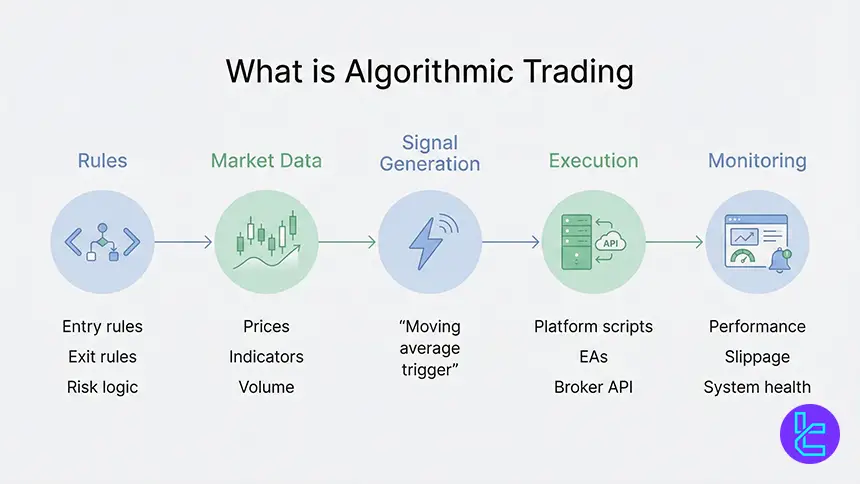
Algorithmic trading uses software and code to turn a strategy into automated decisions and execution across forex, CFDs, stocks, options, futures, and crypto. The system watches prices and data, then places, manages, and closes orders based on predefined rules, without manual clicks.
An algo can be as simple as a moving average trigger, or as complex as a Python model deployed through a broker API such as FIX. Complexity depends on the strategy logic, the coding language, and whether the platform executes natively or routes orders through external connections.
- Automates entries, exits, position sizing, and risk rules;
- Runs 24/5 or 24/7 depending on market access;
- Executes via platform scripts, EAs, or broker APIs;
- Requires testing before live deployment;
- Needs monitoring for outages and slippage.
Is Algo Trading Suitable for Beginners?
Algo trading can fit beginners when the entry point is simple, such as demo testing in MetaTrader 4 or MetaTrader 5 using sample Expert Advisors. Beginners can run forward tests with virtual funds, learn order logic, and review results without risking capital, which shortens the learning loop.
Copy and social trading can further reduce friction by letting beginners mirror experienced traders, often through fully automated allocation. This is not risk-free, but it lowers the technical barrier while a new trader learns how execution, costs, and risk controls affect outcomes in live markets.
What Are the Knowledge Requirements for Algorithmic Trading?
Algorithmic trading rewards structured thinking more than constant chart watching. You need a clear strategy definition, basic market mechanics, and an understanding of order types, spreads, commissions, and slippage. You also need to interpret backtest metrics and distinguish signal quality from luck.
Technical requirements vary by path. Platform scripting, such as MQL4, MQL5, or Pine Script reduces setup complexity, while API based execution demands stronger engineering skills like authentication, error handling, rate limits, logging, and secure key management across environments.
What is the Best Algorithmic Trading Software for Beginners?
For beginners, the MetaTrader suite is the most approachable starting point because automated trading is native through Expert Advisors, and strategy testing is built in. New users can explore sample EAs like a MACD-based bot, then adjust parameters such as take profit, trailing stop, and trade size.
Other beginner-friendly options include TradingView for idea creation via Pine Script, cTrader for cBots and automation, and Capitalize.ai for natural language strategy building. However, TradingView often needs third-party execution, and no code tools can trade simplicity for fewer advanced controls.
- Best starter: MT4 and MT5 with sample EAs
- Next step: cTrader for automation and cleaner execution tools
- Idea engine: TradingView Pine Script plus alert-based routing
- No code: Capitalize.ai for fast prototyping
High Frequency Trading in Forex
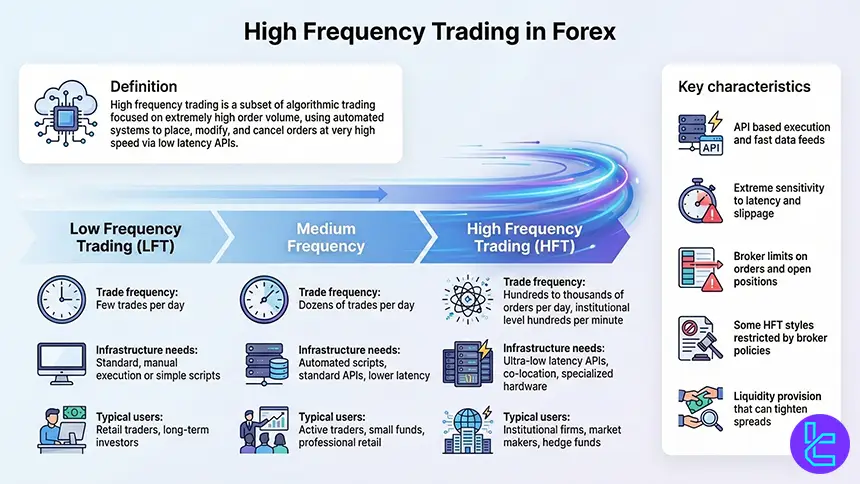
High frequency trading is a subset of algorithmic trading defined by extremely high order activity. HFT systems may create, modify, or cancel hundreds to thousands of orders per day, and in institutional settings even hundreds of trades per minute, often through low latency API connections.
HFT changes what matters. Infrastructure, execution policy, colocation, and broker limits on orders or open positions become critical. Some brokers prohibit certain latency driven practices or aggressive scalping, so strategies must fit the broker’s terms, risk controls, and execution rules to avoid violations.
- Uses API execution and fast market data feeds;
- Sensitive to latency, slippage, and venue rules;
- Broker limits may cap orders and open positions;
- Some HFT styles can be restricted by policy;
- Liquidity provision can tighten spreads and smooth prices.
Popular Algo Trading Software
Algo trading software spans retail platforms, broker-integrated suites, and developer-first clouds. Commonly cited leaders include MetaTrader 5 for retail forex automation, NinjaTrader for futures-oriented C# scripting, TradeStation for integrated execution and EasyLanguage, and QuantConnect for cloud research in Python and C#.
Institutional style platforms often emphasize OMS, compliance tooling, and execution tactics like VWAP and TWAP. The ecosystem is also shifting toward AI analytics, modular integrations, and white label deployments, reflecting the broader growth narrative for algorithmic trading tools.
- MetaTrader 5: EAs with large community ecosystem
- NinjaTrader: C# scripting and deep replay testing
- TradeStation: EasyLanguage plus broker native automation
- QuantConnect: Cloud backtesting and multi broker links
- ETNA Trading: OMS and institutional execution tactics
How Does Algorithmic Trading Software Work?
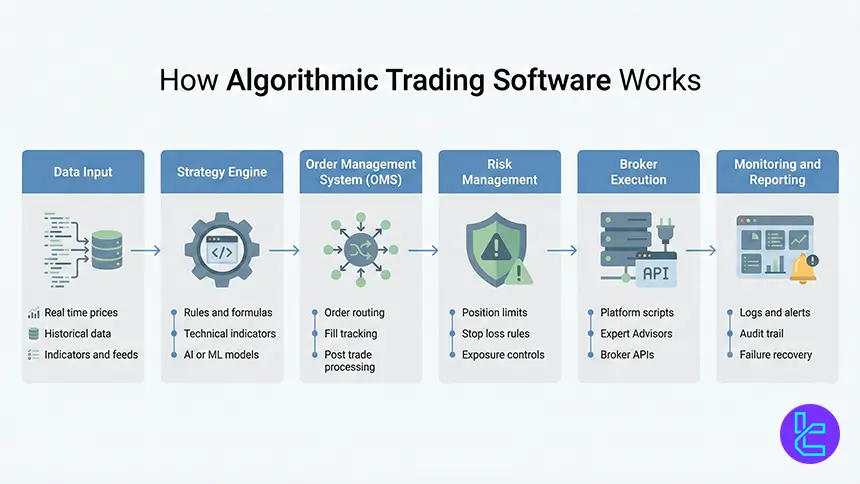
Algo software runs a loop that collects data, evaluates rules, and manages execution. It scans markets using formulas, indicators, or AI models, then routes orders through the platform or API. It also tracks fills, adjusts stops, and manages exposure, often at millisecond precision.
Modern systems add layers around execution. An Order Management System can control routing, tracking, and post trade processes, while risk modules enforce exposure caps and automated loss triggers. Good platforms also create audit trails for review, debugging, and compliance monitoring.
- Data input: real time and historical feeds
- Decision layer: rules, indicators, or AI models
- Execution: platform scripts, EAs, or broker API
- Risk controls: limits, stops, and exposure checks
- Monitoring: logs, alerts, and failure recovery
Pros and Cons of Algo Trading
The main upside is discipline and scale. Algorithms execute consistently, avoid emotional decision making, and can monitor many symbols across multiple timeframes without fatigue.
They also make testing more systematic, letting traders validate ideas before deploying live and iterating using measurable metrics.
The tradeoffs are operational and model risks. Over optimization can produce beautiful backtests that fail live, and technical failures like outages, connectivity issues, or API limits can cause unexpected behavior. Even automated systems need oversight, especially when market regimes change rapidly.
Pros | Cons |
consistency, speed, scalability, testability, discipline | outages, latency, API limits, and system failures |
multi market coverage and reduced manual workload | overfitting risk and changing market dynamics |
Trading without emotions | needs monitoring and ongoing updates |
Key Features of Algo Trading Software
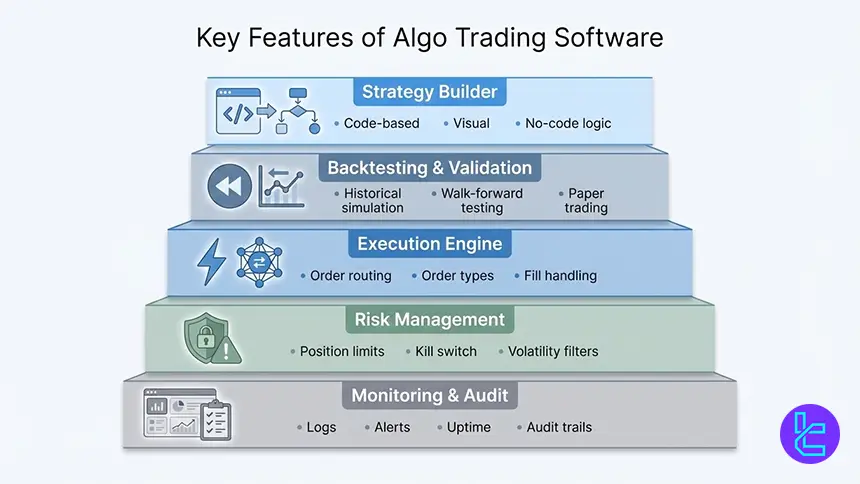
The best algo platforms combine testing, execution, and operational control. Backtesting and paper trading validate ideas before capital is at risk, while live execution needs stable routing, clear order handling, and accurate reporting. Built in analytics help identify slippage, latency effects, and hidden costs.
Advanced platforms extend features into OMS workflows, VWAP and TWAP execution tactics, and compliance tooling. For many traders, the practical edge comes from integration quality, reliable market data, and strong monitoring, rather than flashy strategy claims or black box performance marketing.
- Strategy builder: code, visual, or no code logic
- Backtesting: historical simulation and walk forward tools
- Execution: stable routing, order types, fill handling
- Risk: limits, kill switch, and volatility triggers
- Monitoring: logs, alerts, uptime, and audit trails
How to Choose the Best Algo Trading Software
Start with the target market and execution style. A forex EA strategy may fit MT5, while multi asset global trading can require a broker with broad instruments and strong APIs. The build versus buy decision depends on customization needs, speed of deployment, budget, and available engineering talent.
Then validate the platform with test workflows. Check data depth, backtesting realism, paper trading, and how execution policy handles slippage and rejections.
Review documentation quality, supported languages, community resources, and support responsiveness, because developer experience often decides whether a project ships reliably.
- Define markets, frequency, and execution sensitivity;
- Check backtesting realism and paper trading availability;
- Evaluate APIs, documentation, SDKs, and community support;
- Compare total costs: spreads, commissions, non trading fees;
- Confirm broker rules, limits, and automation permissions.
Is Algo Trading Free?
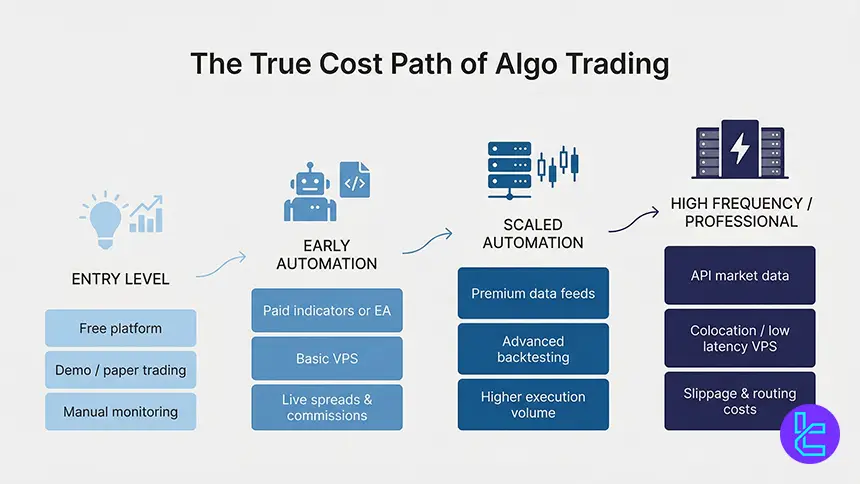
Many platforms advertise free access, but free usually means limited features or conditional eligibility. Some broker platforms provide free charting, paper trading, or basic automation, while advanced backtesting, premium data, or API usage may require minimum funding, paid subscriptions, or higher tier plans.
Costs also accumulate through trading frictions. Spreads, commissions, and non-trading fees can exceed software costs over thousands of executions. Even when software is free, real performance depends on execution quality, data fees, hosting or VPS costs, and operational monitoring to keep systems stable.
- Free tiers often limit data, backtests, or automation scope;
- Trading costs scale quickly with execution frequency;
- VPS and hosting can add recurring expenses;
- API data may require paid market data subscriptions;
- Budget should include tools, data, and operations.
Broker and API Integration for Algo Execution
Many strategies only succeed if integration is clean. When software connects to a broker API, it must handle streaming data, authentication, throttling, and error states, not just place orders. Strong documentation, SDK support, and practical examples can reduce build time from days to hours.
Developer community and customer service also matter. Active GitHub repos, forums, and support channels help troubleshoot edge cases like pagination, reconnections, and order state mismatches. A broker’s retail support score can correlate with how quickly operational issues get resolved when automation is live.
Algo Trading Software Comparison Table
The table below compares widely referenced platforms across audience fit, automation method, languages, testing depth, and typical asset coverage. It is designed for quick shortlisting before you match a platform to a broker that supports your preferred execution path and offers stable pricing.
Feature | MetaTrader 4 and 5 | TradingView | cTrader | TradeStation | NinjaTrader | QuantConnect |
Best for | Beginner to retail | Idea generation | Active forex | Active traders | Futures focused | Dev teams |
Algo support | Expert Advisors | Pine Script alerts | cBots, Automate | EasyLanguage, APIs | NinjaScript | Cloud engine |
Main languages | MQL4, MQL5 | Pine Script | C# | EasyLanguage, multi API | C# | Python, C# |
Backtesting | Strategy tester | Bar replay, limited | Advanced | Walk forward | Market Replay | Cloud backtests |
Built in execution tactics | Limited | None native | VWAP tools, DOM | VWAP, TWAP | Custom | Custom |
Typical assets | Forex, CFDs | Multi asset charts | Forex, CFDs | Stocks, options, futures | Futures, forex | Multi asset |
Conclusion and Final Words
Algorithmic trading software has moved from niche infrastructure to a core component of modern trading, spanning forex, stocks, CFD contracts, futures, and crypto. platforms like MetaTrader 5, NinjaTrader, TradeStation, and QuantConnect now support both retail and institutional workflows with backtesting, OMS layers, and automated execution.
The real edge does not come from software alone but from how well it integrates with broker infrastructure, execution policy, and costs. Tight spreads, API depth, execution speed, and risk controls ultimately define whether an automated strategy performs as designed.
Brokers and platforms are assessed using the proprietary TradingFinder Forex Methodology, which evaluates algorithmic readiness through execution quality, pricing structure, platform support, regulatory coverage, and real-world automation constraints.






